XML Formatting: How to Pretty-Print, Validate, and Work with XML in Every Language
A complete guide to XML formatting — the anatomy of an XML document, namespaces, CDATA, entity escaping, validating against XSD, pretty-printing with xmllint, Python and JavaScript tools, and common XML formats like RSS, SOAP, SVG, and Maven pom.xml.
ToolNest AI Team
Author
Published
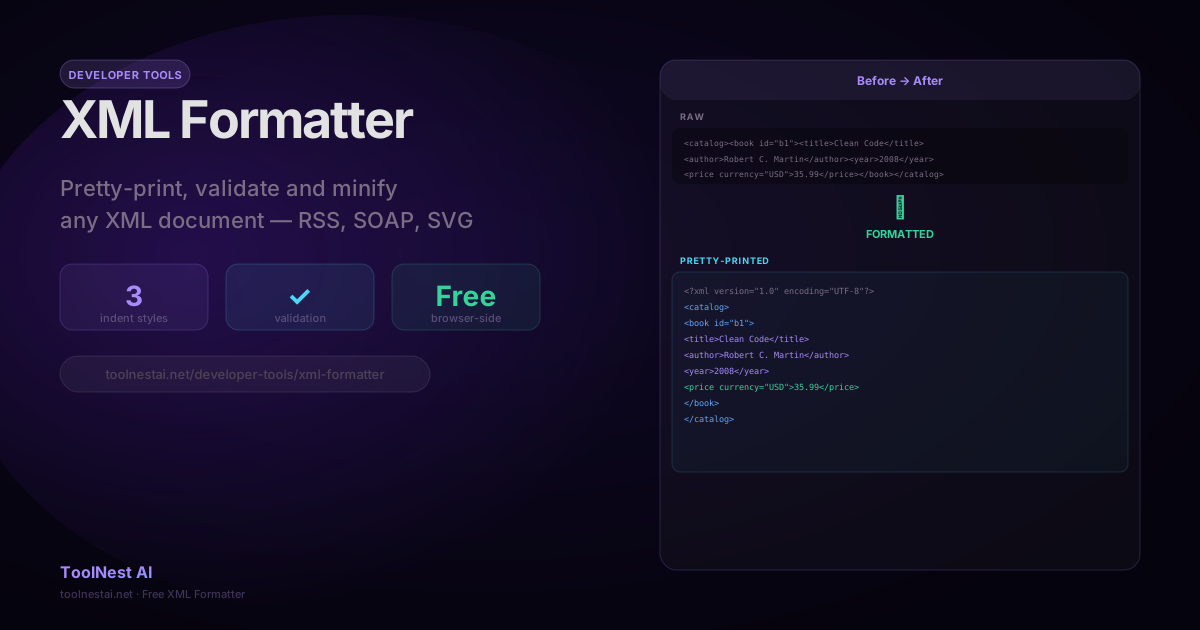
XML (Extensible Markup Language) is older than JSON, older than most modern web frameworks, and still deeply embedded in enterprise software, publishing, and configuration systems. SOAP web services, RSS feeds, SVG graphics, Maven build files, Android manifests, and Microsoft Office documents are all XML under the hood.
A compact, single-line XML response from a web service or a minified configuration file is technically valid — but unreadable to a human. XML formatting (pretty-printing) adds consistent indentation and line breaks to make the document's tree structure visible.
Format, validate, or minify any XML document with the ToolNest AI XML Formatter — 2-space, 4-space, or tab indentation, browser-side.
XML Anatomy
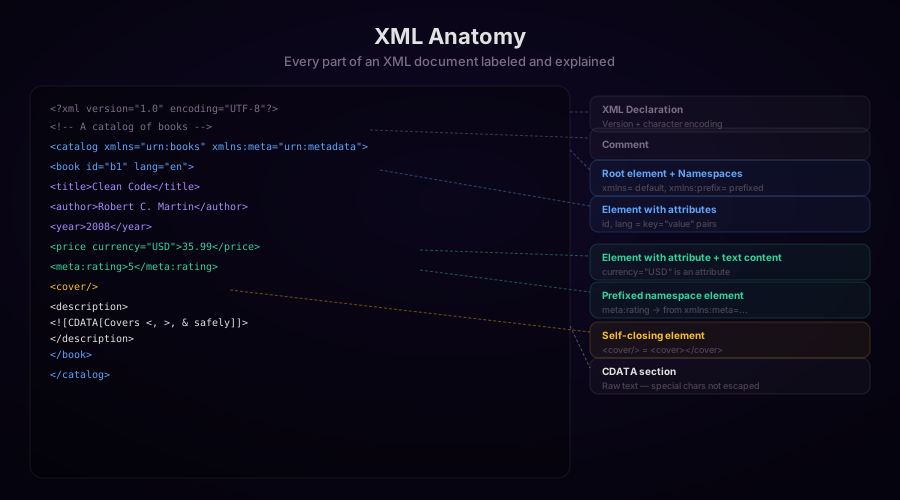
An XML document consists of:
XML Declaration
<?xml version="1.0" encoding="UTF-8"?>Optional but recommended. Specifies the XML version (always 1.0 for practical purposes) and the character encoding. UTF-8 is the standard.
Elements
The core building block. Every XML document has exactly one root element that contains all other elements.
<root>
  <child>content</child>
  <self-closing />
</root>
Elements must be properly nested (no overlapping), must have a closing tag (or use self-closing syntax), and are case-sensitive (<Title> and <title> are different elements).
Attributes
Key-value pairs inside an opening tag:
<book id="b1" lang="en" available="true">
  ...
</book>
Attribute values must be quoted (double or single quotes). Attributes cannot contain <, >, or & unescaped.
Namespaces
XML namespaces prevent element name collisions when XML from different sources is combined. A namespace is a URI that uniquely identifies the vocabulary:
<catalog xmlns="urn:books"
         xmlns:meta="urn:metadata">
  <book>
    <meta:rating>5</meta:rating>  <!-- from the metadata namespace -->
  </book>
</catalog>xmlns="..."sets the default namespace — applies to all elements without a prefixxmlns:prefix="..."defines a prefixed namespace — elements must use the prefix explicitly
Entity References
Five characters have special meaning in XML and must be escaped with entity references:
| Character | Entity | Used in |
|---|---|---|
< | < | Element content, attributes |
> | > | Element content (required in attribute values, recommended in content) |
& | & | Element content, attributes |
" | " | Attribute values (when delimited by double quotes) |
' | ' | Attribute values (when delimited by single quotes) |
CDATA Sections
When element content contains many characters that would need escaping, a CDATA section allows raw text without escaping:
<description>
  <![CDATA[
    This text can contain <angle brackets> & ampersands freely.
    The only forbidden sequence is ]]> (end of CDATA marker).
  ]]>
</description>
CDATA is commonly used for code examples, SQL queries, HTML fragments, and any content where escaping every < and & would be tedious.
Comments
<!-- This is an XML comment -->Comments cannot contain -- (double hyphen). They cannot be nested. Comments are not part of the parsed data model — they are typically discarded by parsers.
Where XML Is Used
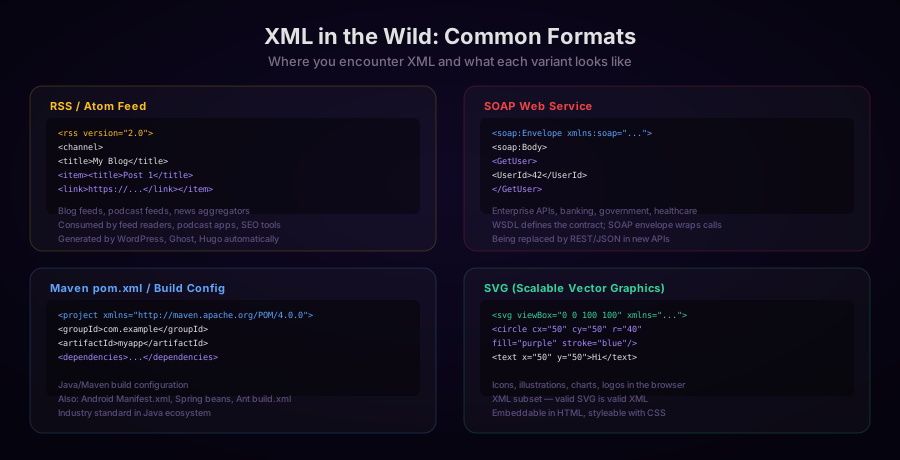
RSS and Atom Feeds
<?xml version="1.0" encoding="UTF-8"?>
<rss version="2.0">
  <channel>
    <title>My Tech Blog</title>
    <link>https://blog.example.com</link>
    <description>Latest posts on web development</description>
    <item>
      <title>XML Formatting Guide</title>
      <link>https://blog.example.com/xml-formatting</link>
      <pubDate>Sun, 17 Aug 2026 10:00:00 +0000</pubDate>
      <description>A complete guide to XML formatting...</description>
    </item>
  </channel>
</rss>
RSS is generated automatically by blogging platforms (WordPress, Ghost, Hugo). Feed readers (Feedly, Reeder) parse RSS to display new posts.
SOAP Web Services
SOAP (Simple Object Access Protocol) is a messaging protocol for exchanging structured information. It wraps the actual message in an XML envelope:
<?xml version="1.0" encoding="UTF-8"?>
<soap:Envelope
  xmlns:soap="http://schemas.xmlsoap.org/soap/envelope/"
  xmlns:xsi="http://www.w3.org/2001/XMLSchema-instance">
  <soap:Header>
    <auth:AuthToken xmlns:auth="urn:auth">
      Bearer eyJhbGciOiJIUzI1NiJ9...
    </auth:AuthToken>
  </soap:Header>
  <soap:Body>
    <GetOrderStatus xmlns="urn:orders">
      <OrderId>12345</OrderId>
    </GetOrderStatus>
  </soap:Body>
</soap:Envelope>
SOAP is still widely used in banking, healthcare (HL7/FHIR), government APIs, and enterprise ERP integrations.
Maven pom.xml
Java projects managed by Maven use a pom.xml configuration file:
<?xml version="1.0" encoding="UTF-8"?>
<project xmlns="http://maven.apache.org/POM/4.0.0"
         xmlns:xsi="http://www.w3.org/2001/XMLSchema-instance">
  <modelVersion>4.0.0</modelVersion>
  <groupId>com.example</groupId>
  <artifactId>my-app</artifactId>
  <version>1.0.0</version>
  <dependencies>
    <dependency>
      <groupId>org.springframework.boot</groupId>
      <artifactId>spring-boot-starter-web</artifactId>
      <version>3.3.0</version>
    </dependency>
  </dependencies>
</project>
Formatting XML: Tools and Code
Pretty-Printing with xmllint (Linux/macOS)
xmllint is installed by default on most Unix systems:
# Format from a file
xmllint --format document.xml

# Format from stdin
cat document.xml | xmllint --format -

# Format and write output
xmllint --format document.xml -o formatted.xml

# Validate against XSD
xmllint --schema schema.xsd document.xml --noout

# Validate well-formedness (no schema)
xmllint --noout document.xml  # Exit 0 = valid, non-zero = error
Python with minidom and lxml
# minidom (built-in, simpler)
from xml.dom.minidom import parseString

raw_xml = '<catalog><book id="b1"><title>Clean Code</title></book></catalog>'

dom = parseString(raw_xml)
formatted = dom.toprettyxml(indent='  ', encoding='UTF-8').decode('utf-8')

# Remove the extra blank line toprettyxml adds
lines = [l for l in formatted.splitlines() if l.strip()]
print('\n'.join(lines))
# lxml (better performance, handles large files)
from lxml import etree
raw_xml = b'<catalog><book id="b1"><title>Clean Code</title></book></catalog>'
root = etree.fromstring(raw_xml)
formatted = etree.tostring(root,
pretty_print=True,
xml_declaration=True,
encoding='UTF-8',
).decode('utf-8')
print(formatted)lxml also supports XPath, XSLT, and XSD validation:
from lxml import etree

# Validate against XSD schema
schema_doc = etree.parse('catalog.xsd')
schema = etree.XMLSchema(schema_doc)

doc = etree.parse('catalog.xml')
schema.validate(doc)  # True if valid

if not schema.validate(doc):
    for error in schema.error_log:
        print(f"Line {error.line}: {error.message}")
JavaScript (Node.js)
import { XMLParser, XMLBuilder } from 'fast-xml-parser';
import { formatXml } from 'xml-formatter';

// Option 1: xml-formatter package
const rawXml = '<catalog><book id="b1"><title>Clean Code</title></book></catalog>';

const formatted = formatXml(rawXml, {
  indentation: '  ',           // 2 spaces
  filter: (node) => node.type !== 'Comment',  // Optional: remove comments
  collapseContent: true,        // Don't add newlines around text content
  lineSeparator: '\n',
});

console.log(formatted);
// Option 2: Built-in DOMParser (browser)
function formatXmlBrowser(xml) {
const parser = new DOMParser();
const doc = parser.parseFromString(xml, 'application/xml');
// Check for parsing errors
const errors = doc.querySelectorAll('parsererror');
if (errors.length > 0) {
throw new Error(errors[0].textContent);
}
const serializer = new XMLSerializer();
const raw = serializer.serializeToString(doc);
// Apply indentation
return formatXml(raw, { indentation: ' ' });
}Java: DocumentBuilder
import javax.xml.parsers.*;
import javax.xml.transform.*;
import javax.xml.transform.dom.*;
import javax.xml.transform.stream.*;
import org.w3c.dom.Document;

public String formatXml(String rawXml) throws Exception {
    DocumentBuilderFactory factory = DocumentBuilderFactory.newInstance();
    DocumentBuilder builder = factory.newDocumentBuilder();
    Document doc = builder.parse(new InputSource(new StringReader(rawXml)));

    TransformerFactory tf = TransformerFactory.newInstance();
    tf.setAttribute("indent-number", 2);

    Transformer transformer = tf.newTransformer();
    transformer.setOutputProperty(OutputKeys.INDENT, "yes");
    transformer.setOutputProperty(OutputKeys.XML_DECLARATION, "yes");
    transformer.setOutputProperty(OutputKeys.ENCODING, "UTF-8");

    StringWriter writer = new StringWriter();
    transformer.transform(new DOMSource(doc), new StreamResult(writer));
    return writer.toString();
}
XML Validation: Well-Formed vs. Valid
Well-Formed XML
A document is well-formed if it follows the basic XML syntax rules:
- Exactly one root element
- All elements are properly nested (no overlapping)
- All elements are closed (or self-closed)
- All attribute values are quoted
- Characters are properly encoded or escaped
A well-formed check only verifies syntax. It says nothing about whether the right elements are in the right places.
Valid XML
A document is valid if it is well-formed AND conforms to a schema. XML supports two schema languages:
DTD (Document Type Definition) — older, limited:
<!DOCTYPE catalog [
  <!ELEMENT catalog (book+)>
  <!ELEMENT book (title, author, year, price)>
  <!ATTLIST book id ID #REQUIRED lang CDATA #IMPLIED>
]>
XSD (XML Schema Definition) — modern, more expressive:
<xs:schema xmlns:xs="http://www.w3.org/2001/XMLSchema">
  <xs:element name="catalog">
    <xs:complexType>
      <xs:sequence>
        <xs:element name="book" maxOccurs="unbounded">
          <xs:complexType>
            <xs:sequence>
              <xs:element name="title" type="xs:string"/>
              <xs:element name="author" type="xs:string"/>
              <xs:element name="year" type="xs:integer"/>
              <xs:element name="price" type="xs:decimal"/>
            </xs:sequence>
            <xs:attribute name="id" type="xs:ID" use="required"/>
          </xs:complexType>
        </xs:element>
      </xs:sequence>
    </xs:complexType>
  </xs:element>
</xs:schema>
XML Entity Escaping Reference
When generating XML programmatically, always escape content properly:
# Python: xml.sax.saxutils
from xml.sax.saxutils import escape, quoteattr
content = "5 < 10 & 'hello' > 0"
print(escape(content)) # 5 < 10 & 'hello' > 0
print(quoteattr(content)) # "5 < 10 & 'hello' > 0"// JavaScript: manual escaping
function escapeXml(text) {
return text
.replace(/&/g, '&')
.replace(/</g, '<')
.replace(/>/g, '>')
.replace(/"/g, '"')
.replace(/'/g, ''');
}Frequently Asked Questions
What is the difference between XML and HTML?
HTML is an application of SGML (a predecessor to XML) and follows specific browser parsing rules — it is designed to be fault-tolerant with malformed markup. XML is a strict format: any syntax error makes the document invalid. XHTML is HTML rewritten to follow strict XML rules. SVG and MathML are XML vocabularies that can be embedded in HTML5 documents.
Can I use XPath to query XML?
Yes. XPath (XML Path Language) is the standard language for navigating XML documents. In Python: root.xpath('//book[year > 2000]/title/text()'). In JavaScript: document.evaluate('//title', doc, null, XPathResult.ANY_TYPE, null). XPath expressions are supported by all major XML parsers.
What is XSLT?
XSLT (XSL Transformations) is a language for transforming XML documents into other XML documents, HTML, or plain text. An XSLT stylesheet is itself an XML document. XSLT is used to generate HTML from XML data, transform one XML vocabulary to another (e.g., SOAP to REST response), and generate reports from structured data.
Should new projects use XML or JSON?
For REST APIs between modern services: JSON. For human-edited configuration: YAML or TOML. For document-centric content (books, articles, publications): XML (DocBook, TEI). For interoperability with enterprise/banking/healthcare systems: XML/SOAP (no practical choice). For graphics: SVG (XML). XML remains the better choice when document structure is complex, schema validation is mandatory, or XSLT transformations are part of the workflow.
Why does XML need to escape & but HTML usually handles bare ampersands?
HTML parsers are lenient by design — browsers try to render malformed HTML gracefully. XML parsers are strict — a bare & that is not part of an entity reference is a well-formedness error and the parser stops. This is why XML requires & while an HTML page with a bare & in content may render fine in most browsers.
About the author
ToolNest AI Team
The ToolNest AI team builds free tools that help developers, marketers, and creators do more online — faster.
Related Articles
JSON vs YAML: Converting Between Formats and the Pitfalls to Avoid
A complete guide to converting between JSON and YAML — syntax differences, data type mapping, the Norway problem, YAML 1.1 vs 1.2, multiline strings, anchors, and JavaScript/Python code for both directions.
SQL Formatting: Style Guides, Dialect Differences and How to Format Queries Automatically
A complete guide to SQL formatting — the three main indentation styles, dialect differences across PostgreSQL, MySQL, SQL Server and SQLite, when to format SQL programmatically, and how to use sql-formatter and prettier-plugin-sql.
HTML Minification: How It Works, What to Watch Out For, and How Much It Saves
A complete guide to HTML minification — the six transformations that shrink HTML files, which whitespace is safe to remove, real-world savings numbers, and how to integrate html-minifier-terser into Next.js, Webpack, and build pipelines.