HTML Minification: How It Works, What to Watch Out For, and How Much It Saves
A complete guide to HTML minification — the six transformations that shrink HTML files, which whitespace is safe to remove, real-world savings numbers, and how to integrate html-minifier-terser into Next.js, Webpack, and build pipelines.
ToolNest AI Team
Author
Published
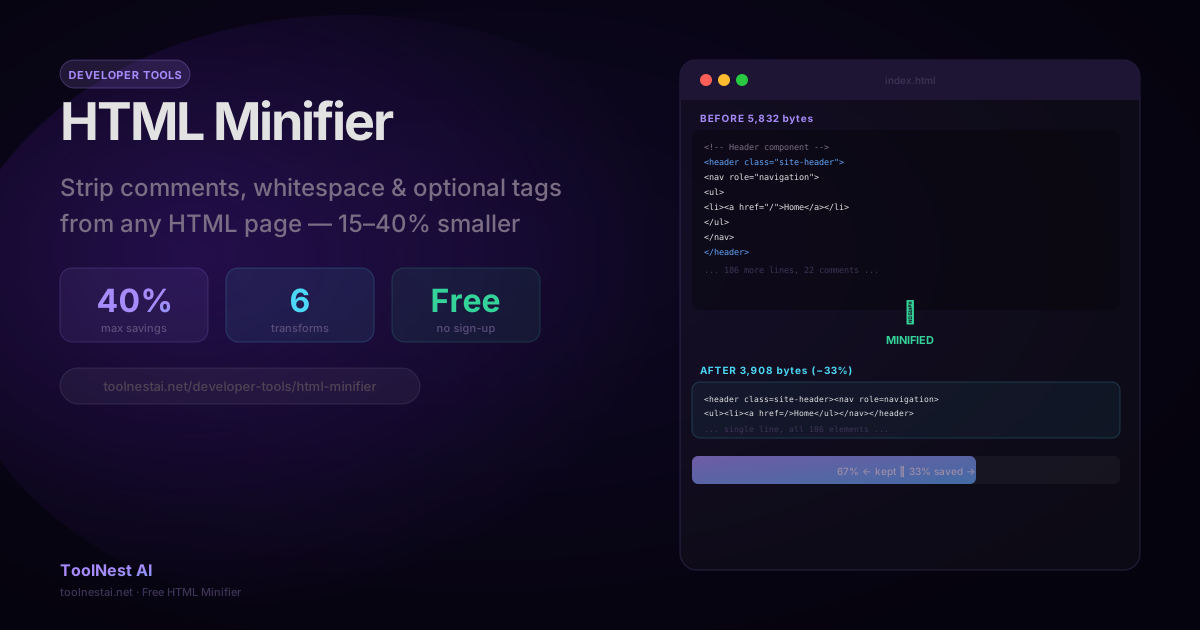
HTML minification reduces the size of HTML documents by removing characters that browsers ignore during parsing. Unlike CSS or JavaScript minification — where savings are commonly 30–70% — HTML minification typically saves 10–40%, depending heavily on how the HTML was authored.
For high-traffic pages, that difference translates directly to bandwidth costs and Time to First Byte (TTFB). An HTML page served millions of times per day benefits even from a 15% reduction.
Minify any HTML document instantly with the ToolNest AI HTML Minifier — paste, click, copy.
What HTML Minification Removes
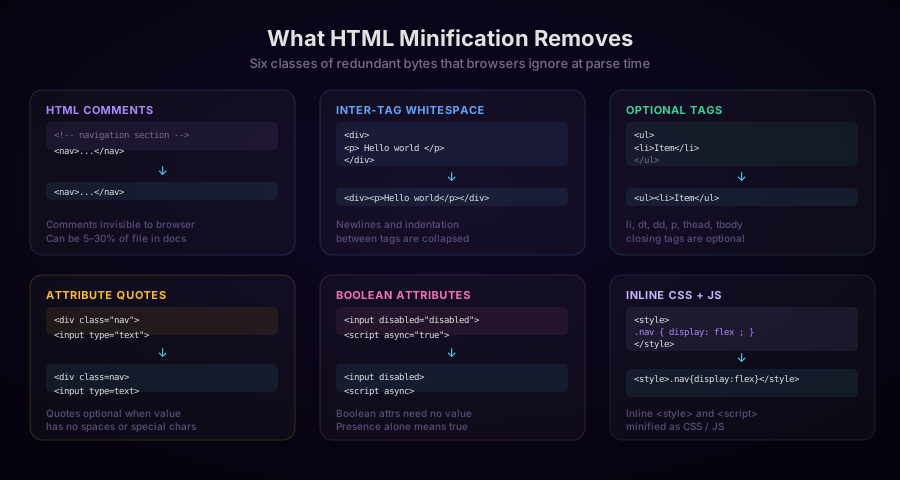
1. HTML Comments
Comments between <!-- and --> are entirely ignored by browsers. They document the source for developers but contribute zero bytes to the rendered page:
<!-- Before -->
<!-- Navigation header — updated 2026 -->
<nav class="main-nav">
  <ul><!-- items below --></ul>
</nav>

<!-- After -->
<nav class="main-nav"><ul></ul></nav>
One exception: conditional comments for Internet Explorer (<!--[if IE 9]>...<![endif]-->) are not standard HTML comments and must be preserved. Modern minifiers detect and skip them automatically, since IE is now effectively out of scope.
2. Whitespace Between Tags
HTML parsers treat sequences of whitespace characters (spaces, tabs, newlines) between block elements as ignorable. The entire indentation structure of a readable HTML document can be collapsed:
<!-- Before: 186 bytes -->
<header>
  <nav>
    <ul>
      <li><a href="/">Home</a></li>
      <li><a href="/about">About</a></li>
    </ul>
  </nav>
</header>

<!-- After: 74 bytes -->
<header><nav><ul><li><a href="/">Home</a><li><a href="/about">About</a></ul></nav></header>
3. Optional Closing Tags
The HTML5 specification defines a set of closing tags that are optional — the parser infers them from context. Removing these tags is safe in all modern browsers:
| Element | Optional closing tag |
|---|---|
<li> | When followed by another <li> or </ul> |
<dt>, <dd> | When followed by sibling or parent close |
<p> | When followed by a block element |
<thead>, <tbody>, <tfoot>, <tr>, <th>, <td> | In table context |
<option>, <optgroup> | When followed by sibling |
<!-- Before -->
<ul>
  <li>Alpha</li>
  <li>Beta</li>
  <li>Gamma</li>
</ul>

<!-- After -->
<ul><li>Alpha<li>Beta<li>Gamma</ul>
4. Attribute Quotes
The HTML5 specification allows attribute values to be unquoted when they contain only alphanumeric characters, hyphens, underscores, periods, and colons — and no spaces. Most class names, types, and href values qualify:
<!-- Before -->
<input type="text" class="form-field" autocomplete="off">
<a href="/about" target="_blank">About</a>

<!-- After -->
<input type=text class=form-field autocomplete=off>
<a href=/about target=_blank>About</a>
Attribute values containing spaces, =, >, <, ", or ' must retain quotes.
5. Boolean Attributes
HTML boolean attributes (disabled, checked, readonly, required, async, defer, autofocus, multiple, novalidate, selected) are true when the attribute is present, regardless of value. The value can be removed entirely:
<!-- Before -->
<input type="checkbox" checked="checked" disabled="disabled">
<script async="true" defer="defer" src="app.js"></script>

<!-- After -->
<input type=checkbox checked disabled>
<script async defer src=app.js></script>
6. Inline CSS and JavaScript
When <style> and <script> blocks appear inline in HTML, they can be minified using CSS and JS minification rules respectively — removing comments, collapsing whitespace, and shortening values:
<!-- Before -->
<style>
  /* header styles */
  .header {
    display: flex;
    background-color: #ffffff;
    padding: 16px 16px 16px 16px;
  }
</style>

<!-- After -->
<style>.header{display:flex;background:#fff;padding:16px}</style>
What HTML Minification Should NOT Remove
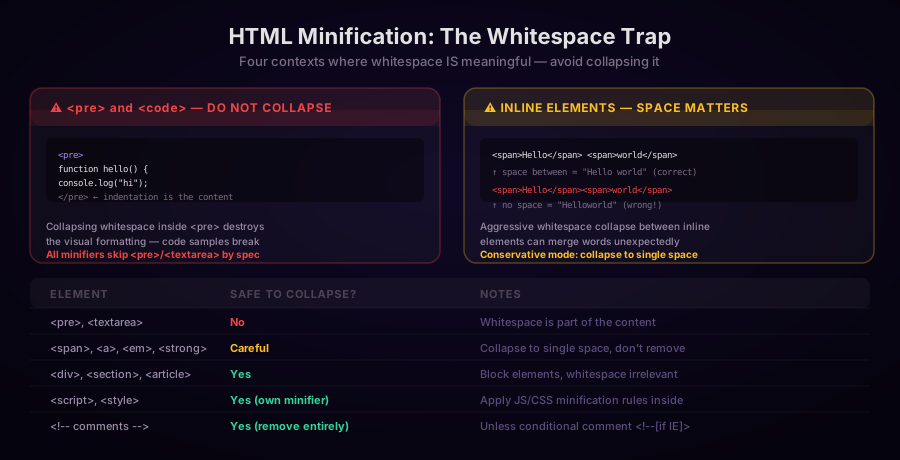
The <pre> and <textarea> Exception
The <pre> element (and <textarea>) preserves all whitespace exactly as authored. Collapsing whitespace inside <pre> destroys code examples, poetry, ASCII art, and any content where indentation is part of the meaning.
All competent HTML minifiers skip <pre> and <textarea> content entirely. If you are building your own minifier, this is the most critical exception to handle.
The Inline Element Gap
Whitespace between inline elements (spans, links, <em>) affects word separation. Consider:
<span>Hello</span> <span>world</span>The space between </span> and <span> is a text node that separates the words. Removing it entirely produces "Helloworld". The correct behavior is to collapse runs of whitespace to a single space — not to remove all whitespace.
This is why aggressive whitespace removal requires awareness of the element's display role in the context of its parent. Block elements are safe to strip entirely; inline elements require single-space preservation.
Conditional Comments
<!--[if IE 9]>
<link rel="stylesheet" href="ie9.css">
<![endif]-->
These are a legacy IE mechanism and are syntactically different from standard comments. Leave them alone.
Real-World HTML Minification Savings
How much does HTML minification actually save?
| Page type | Typical original | Typical minified | Savings |
|---|---|---|---|
| Simple landing page | 15 KB | 12 KB | 20% |
| E-commerce product page | 80 KB | 55 KB | 31% |
| Documentation page | 120 KB | 85 KB | 29% |
| Blog post | 35 KB | 25 KB | 29% |
| Admin dashboard | 200 KB | 140 KB | 30% |
| Server-rendered React (Next.js) | 45 KB | 38 KB | 16% |
Server-rendered React pages show modest savings because React's hydration HTML is already terse — prop names and component names aren't present in the output.
Pages authored by hand or generated by CMSes like WordPress show the largest savings, because CMS output includes comments, formatting whitespace, and verbose attribute values.
Minifying HTML: The Options
1. Online Tool (No Build Step)
For one-off pages, third-party HTML you've received, or audit purposes, the ToolNest AI HTML Minifier is the fastest option. All processing runs in the browser.
2. html-minifier-terser (Node.js)
The most widely used HTML minifier in the JavaScript ecosystem:
import { minify } from 'html-minifier-terser';

const input = `
<!DOCTYPE html>
<html>
  <head>
    <!-- meta tags -->
    <title>  My Page  </title>
  </head>
  <body>
    <div class="container">
      <p>Hello world</p>
    </div>
  </body>
</html>
`;

const output = await minify(input, {
  removeComments: true,
  collapseWhitespace: true,
  removeOptionalTags: true,
  removeAttributeQuotes: true,
  collapseBooleanAttributes: true,
  minifyCSS: true,
  minifyJS: true,
  removeRedundantAttributes: true,
});

console.log(output);
Options reference:
| Option | What it does | Safe? |
|---|---|---|
removeComments | Remove <!-- --> comments | Yes |
collapseWhitespace | Collapse whitespace to single space | Yes (block elements) |
removeOptionalTags | Remove optional closing tags | Yes |
removeAttributeQuotes | Remove quotes from safe attribute values | Yes |
collapseBooleanAttributes | Remove boolean attribute values | Yes |
minifyCSS | Run cssnano on inline <style> | Yes |
minifyJS | Run terser on inline <script> | Usually |
removeRedundantAttributes | Remove type="text" on <input> | Yes |
removeEmptyAttributes | Remove attributes with empty string values | Careful |
3. Next.js (Built-in)
Next.js minifies HTML automatically in production builds. It uses html-minifier-terser internally. You can configure it in next.config.js:
/** @type {import('next').NextConfig} */
const nextConfig = {
  swcMinify: true,
  experimental: {
    // Increase minification aggressiveness
    optimizeCss: true,
  },
};

export default nextConfig;
For most Next.js projects, no additional configuration is needed — next build handles it.
4. Webpack with HtmlWebpackPlugin
If you use Webpack and HtmlWebpackPlugin, minification is built in:
import HtmlWebpackPlugin from 'html-webpack-plugin';

export default {
  plugins: [
    new HtmlWebpackPlugin({
      template: 'src/index.html',
      minify: {
        removeComments: true,
        collapseWhitespace: true,
        removeOptionalTags: true,
        removeAttributeQuotes: true,
        collapseBooleanAttributes: true,
        minifyCSS: true,
        minifyJS: true,
      },
    }),
  ],
};
This only applies to the HTML template file Webpack processes — dynamically generated HTML from a server is not affected.
5. Express / Koa Middleware
For server-rendered Node.js applications, response minification middleware compresses HTML before it's sent to the client:
import express from 'express';
import shrinkRay from 'shrink-ray-current';
import { minify } from 'html-minifier-terser';

const app = express();

// Option 1: Gzip/Brotli compression (recommended first)
app.use(shrinkRay());

// Option 2: HTML minification middleware
app.use(async (req, res, next) => {
  const originalSend = res.send.bind(res);
  res.send = async (body) => {
    if (typeof body === 'string' && res.get('Content-Type')?.includes('text/html')) {
      body = await minify(body, {
        removeComments: true,
        collapseWhitespace: true,
      });
    }
    originalSend(body);
  };
  next();
});
6. Python with htmlmin
import htmlmin

with open('index.html', 'r') as f:
    html = f.read()

minified = htmlmin.minify(html,
    remove_comments=True,
    remove_empty_space=True,
    keep_pre=True  # Preserve <pre> elements
)

with open('index.min.html', 'w') as f:
    f.write(minified)

print(f'Original: {len(html):,} bytes')
print(f'Minified: {len(minified):,} bytes')
print(f'Savings: {(1 - len(minified)/len(html))*100:.1f}%')
7. PHP with tidy
$html = file_get_contents('page.html');

$tidy = new tidy();
$config = [
    'indent' => false,
    'wrap' => 0,
    'drop-empty-elements' => false,
    'show-body-only' => false,
];

$tidy->parseString($html, $config, 'utf8');
$tidy->cleanRepair();

// Basic whitespace removal
$minified = preg_replace('/\s+/', ' ', (string) $tidy);
file_put_contents('page.min.html', $minified);
HTML Minification vs. HTTP Compression
These two techniques operate at different layers and work together:
| HTML Minification | Gzip / Brotli | |
|---|---|---|
| When | Build time or server | Transfer time |
| What | Removes redundant characters | Compresses byte patterns |
| Permanent? | Yes — file is permanently smaller | No — browser decompresses on arrival |
| Works for all content? | HTML-specific | All text content |
| Typical saving | 15–40% | 60–90% of already-minified output |
Apply both. A minified, Brotli-compressed HTML document can be 80–90% smaller than the original development version.
Frequently Asked Questions
Does HTML minification change what visitors see?
No. All removed characters — comments, whitespace between block tags, optional closing tags, attribute quotes, boolean attribute values — are ignored by the browser's HTML parser. The resulting DOM is identical.
Can HTML minification break a page?
Yes, if applied incorrectly. The most common failure modes:
- Collapsing whitespace inside
<pre>elements (destroys code blocks) - Removing spaces between inline elements (merges adjacent words)
- Removing attribute quotes when the value contains characters that require quoting
Well-tested minifiers handle all of these correctly. Testing after minification is still recommended for production deployments.
Should I minify HTML in development?
No. Minified HTML is impossible to read in DevTools or page source. Minification should be a production-only build step. All major frameworks (Next.js, Vite, Webpack) apply it only during production builds.
How does HTML minification interact with server-side rendering?
With SSR, the server generates HTML dynamically for each request. Minification can be applied either at build time (for static pages) or as middleware (for dynamic pages). The middleware approach adds a small server-side processing cost — typically less than 1ms per response, which is negligible compared to the bandwidth savings.
Is removing optional closing tags safe in all browsers?
Yes, for the set of elements where the HTML5 specification defines optional end tags. The HTML5 parser specification is implemented consistently across all modern browsers (Chrome, Firefox, Safari, Edge). Optional end-tag removal is well-supported and has been for over a decade.
Does minifying HTML improve SEO?
Indirectly. HTML minification improves page load speed, which is a ranking signal. Search engine crawlers parse minified HTML correctly — Google's Googlebot handles minified HTML identically to formatted HTML.
About the author
ToolNest AI Team
The ToolNest AI team builds free tools that help developers, marketers, and creators do more online — faster.
Related Articles
CSS Minification: How It Works, What It Removes, and How Much It Saves
A complete guide to CSS minification — the six transformations that shrink stylesheets, real-world savings data, when to minify manually vs. through a build pipeline, and how to integrate cssnano, clean-css, and PostCSS.
Image Filters: How Sepia, Vintage, HDR, Noir and 13 More Effects Work
A technical and practical guide to photo filter algorithms — color matrix operations, tone curves, saturation adjustments, and artistic effects — with JavaScript and CSS code examples and guidance on when to use each filter.

EXIF Data Explained: What's Hidden in Your Photos and How to Read It
A complete guide to EXIF image metadata — what it is, what every field means, how GPS data reveals your location, how to read it with JavaScript, and when you should remove it before sharing.