CSS Minification: How It Works, What It Removes, and How Much It Saves
A complete guide to CSS minification — the six transformations that shrink stylesheets, real-world savings data, when to minify manually vs. through a build pipeline, and how to integrate cssnano, clean-css, and PostCSS.
ToolNest AI Team
Author
Published
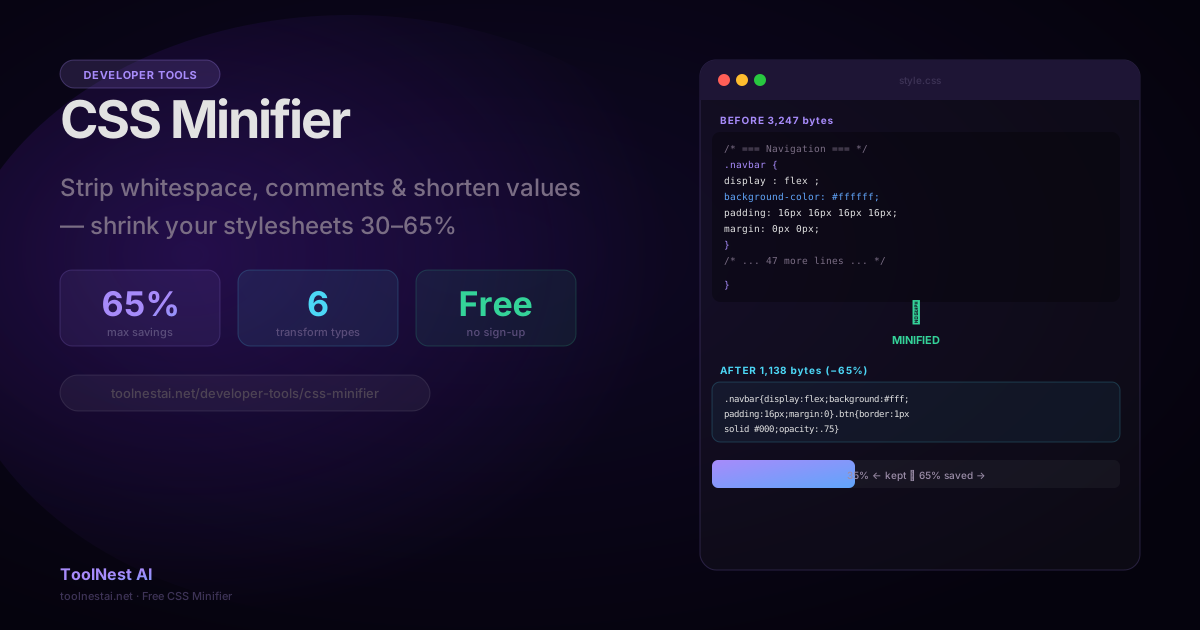
CSS minification is one of the easiest performance wins available to web developers. A stylesheet written for humans — with comments, consistent indentation, and descriptive property spacing — can be 30 to 65% larger than the same stylesheet optimised for delivery to browsers. Minification closes that gap without changing the visual output at all.
Minify your CSS instantly with the ToolNest AI CSS Minifier — paste and go, no build step required.
What CSS Minification Does
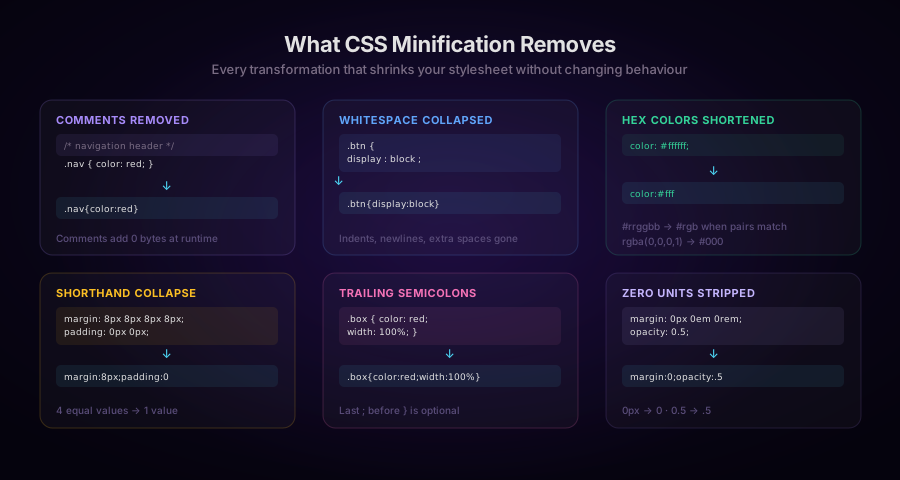
A CSS minifier applies a series of transformations to a stylesheet. Each transformation reduces byte count while preserving exact browser behaviour:
1. Remove Comments
CSS comments (/* ... */) are entirely invisible to the browser's rendering engine. They are documentation for developers, not instructions for the parser. Removing them produces zero change in visual output.
/* Before */
/* Navigation header — full-width flex container */
.nav {
  display: flex;
}

/* After */
.nav{display:flex}
In heavily documented CSS files — particularly those generated by design systems, SCSS compilers, or licensed libraries — comments can account for 15–30% of file size.
2. Collapse Whitespace
CSS parsers do not care about indentation, newlines, or extra spaces around colons and semicolons. Every space or newline between tokens that has no syntactic meaning can be removed.
/* Before */
.button  {
  display  :  block  ;
  color  :  red  ;
}

/* After */
.button{display:block;color:red}
3. Shorten Hex Color Values
Six-character hex color values can be shortened to three characters when each pair of digits is identical:
/* Before */
color: #ffffff;
background: #aabbcc;
border-color: #112233;

/* After */
color:#fff;
background:#abc;
border-color:#123;
Some minifiers also convert named colors to shorter hex equivalents (white → #fff), convert rgba(0,0,0,1) to #000, and convert rgb(255,255,255) to #fff.
4. Remove Last Semicolons
In CSS, the semicolon before a closing brace is optional. The last property in a declaration block does not require a terminating semicolon:
/* Before */
.box { color: red; font-size: 14px; }

/* After */
.box{color:red;font-size:14px}
5. Collapse Shorthand Properties
When all four values of a shorthand property are identical, they can be expressed as one:
/* Before */
margin: 8px 8px 8px 8px;
padding: 0px 0px;

/* After */
margin:8px;padding:0
When two opposing pairs are equal (top=bottom, left=right), shorthand reduces from four values to two: padding: 12px 24px 12px 24px → padding:12px 24px.
6. Strip Units from Zero Values
A zero value is zero regardless of unit. 0px, 0em, 0rem, 0% are all equivalent to 0. Removing the unit saves bytes:
/* Before */
margin: 0px 0px 16px 0px;
opacity: 0.75;

/* After */
margin:0 0 16px 0;opacity:.75
The leading zero in decimal values is also optional (0.75 → .75).
Real-World Savings
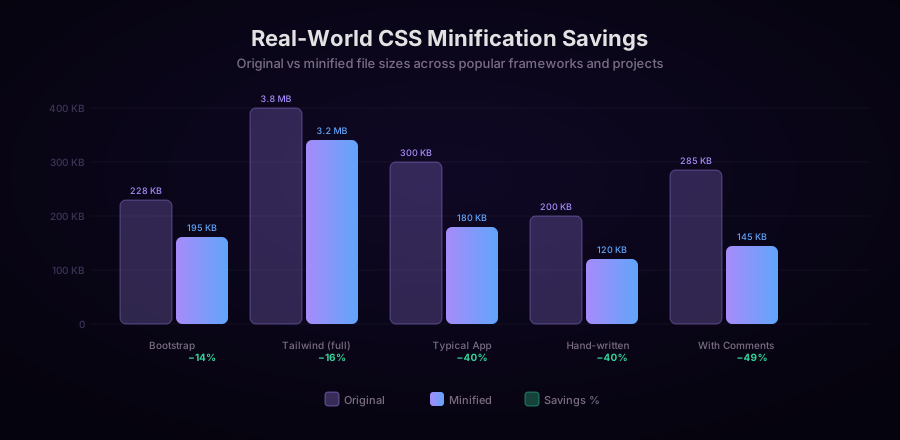
How much does minification actually save in practice? The answer depends heavily on how the CSS was written:
| Source | Original | Minified | Savings |
|---|---|---|---|
| Bootstrap 5.3 | 228 KB | 195 KB | 14% |
| Tailwind full build | 3.8 MB | 3.2 MB | 16% |
| Tailwind PurgeCSS output | 12 KB | 10 KB | 17% |
| Typical hand-written app CSS | 300 KB | 180 KB | 40% |
| Heavily commented SCSS output | 285 KB | 145 KB | 49% |
| Legacy enterprise stylesheet | 820 KB | 480 KB | 41% |
Framework CSS like Bootstrap and Tailwind shows modest savings because frameworks already use terse property values and minimal comments. Hand-written stylesheets and documented SCSS compilations show 40–65% savings because developers write for readability.
Minification is always worth doing before production deployment. Even the modest 14% savings on Bootstrap translates to 33 KB less for every visitor who doesn't have the file cached.
Minification vs. Compression (Gzip/Brotli)
Minification and HTTP compression are often confused. They are complementary, not alternatives:
- Minification removes redundant characters at the source level. It permanently reduces the file size.
- Gzip/Brotli compression compresses the file during HTTP transfer. The browser decompresses it on arrival.
Both should be applied for maximum savings. A minified, Brotli-compressed Bootstrap 5 CSS file is roughly 25 KB — compared to 228 KB unminified and uncompressed.
Minification still matters even when compression is active. Compression works by finding repeated byte sequences. Minified files compress better because:
- They are already smaller, so the compressed result is smaller.
- Removing whitespace increases the density of meaningful tokens, improving compression ratios.
A typical stylesheet will see an additional 10–20% compression improvement on the already-minified output compared to compressing the unminified original.
How to Minify CSS: All the Options
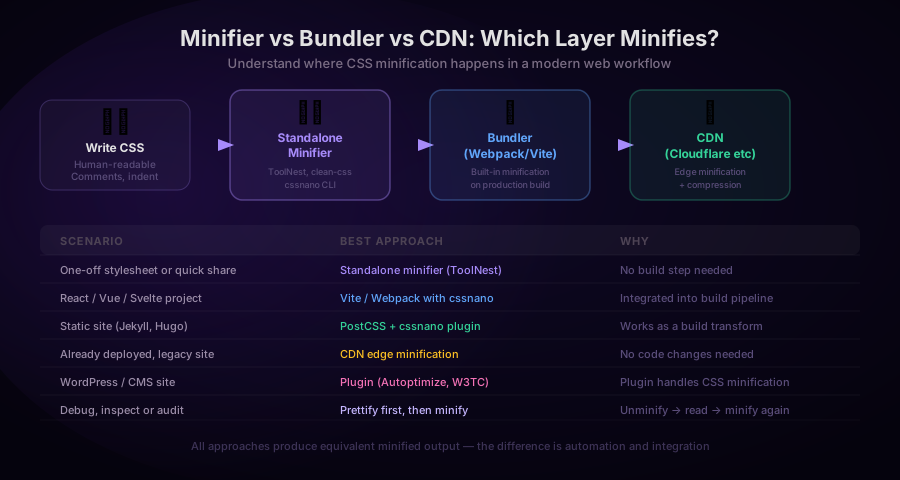
1. Standalone Minifier (No Build Step)
For one-off stylesheets, third-party CSS files, or quick audits, an online minifier is the fastest option. Paste your CSS, click Minify, copy the output.
The ToolNest AI CSS Minifier handles all six transformations and runs entirely in the browser — your CSS is never sent to a server.
2. Node.js with clean-css
import CleanCSS from 'clean-css';

const input = `
  .nav { display: flex; background-color: #ffffff; }
  /* comment */
  .btn { padding: 8px 8px 8px 8px; margin: 0px; }
`;

const output = new CleanCSS({ level: 2 }).minify(input);
console.log(output.styles);
// .nav{display:flex;background:#fff}.btn{padding:8px;margin:0}
console.log(`Savings: ${output.stats.efficiency * 100}%`);
clean-css level: 1 removes whitespace and comments. level: 2 also performs structural optimizations (shorthand collapse, property merging across adjacent selectors). Level 2 is more aggressive and carries a small risk of affecting authored cascade order — test it in production.
3. PostCSS with cssnano
cssnano is the most commonly used CSS minifier in the React/Next.js ecosystem. It integrates as a PostCSS plugin:
// postcss.config.js
export default {
  plugins: {
    cssnano: {
      preset: ['default', {
        discardComments: { removeAll: true },
        normalizeWhitespace: {},
        colormin: {},
        minifyFontValues: {},
        minifySelectors: {},
      }],
    },
  },
};
Next.js uses cssnano automatically in production builds — you don't need to configure anything. Running next build minifies all CSS.
Vite uses esbuild's CSS minifier by default (build.cssMinify: true), which covers whitespace and comments. For more aggressive minification, add the Vite cssnano plugin.
4. Build Tool Integration
// webpack.config.js
import CssMinimizerPlugin from 'css-minimizer-webpack-plugin';

export default {
  optimization: {
    minimizer: [
      '...', // Keeps JS minifier
      new CssMinimizerPlugin({
        minimizerOptions: {
          preset: ['default', { discardComments: { removeAll: true } }],
        },
      }),
    ],
  },
};
5. Command Line with cssnano
# Install
npm install --save-dev cssnano postcss postcss-cli

# Minify
npx postcss styles.css --use cssnano -o styles.min.css

# With source maps
npx postcss styles.css --use cssnano --map -o styles.min.css
6. Python with rcssmin
import rcssmin

with open('styles.css', 'r') as f:
    css = f.read()

minified = rcssmin.cssmin(css)

with open('styles.min.css', 'w') as f:
    f.write(minified)

print(f'Original: {len(css)} bytes')
print(f'Minified: {len(minified)} bytes')
print(f'Savings: {(1 - len(minified)/len(css))*100:.1f}%')
Preserving Important Comments
Some comments must survive minification: license headers, copyright notices, and @license blocks that are legally required to be distributed with the CSS. Most minifiers recognize a special comment syntax for this:
/*!
 * Bootstrap v5.3.0 (https://getbootstrap.com/)
 * Copyright 2011-2023 The Bootstrap Authors
 * Licensed under MIT (https://opensource.org/license/mit/)
 */

/* This comment will be removed */
.nav { display: flex; }
The /*! syntax (exclamation mark immediately after /*) tells the minifier to preserve this comment. The standard /* comment is removed. If you distribute third-party CSS, check whether the license requires the header to remain in the distributed file.
Source Maps for Debugging Minified CSS
When a visitor reports a visual bug on a minified site, you need to be able to trace .nav{display:flex} back to the original source line. CSS source maps solve this:
# Generate source map
npx postcss styles.css --use cssnano --map -o styles.min.css
# Creates styles.min.css and styles.min.css.map
The .map file contains a mapping from every position in the minified output back to the corresponding line in the original source. Browser DevTools use this mapping to show the original, readable CSS in the inspector even when serving the minified version.
Source maps should be deployed to your server but excluded from public browser caching — they're large and only needed by developers with DevTools open.
CSS Minification Checklist
Before deploying:
- Minify all CSS files (
*.css, compiled SCSS/Less output) - Verify that
/*!license comments are preserved where required - Enable Gzip or Brotli compression on your web server in addition to minification
- Generate source maps and deploy them alongside minified files
- Test in a staging environment — particularly complex selectors,
calc()expressions, and CSS custom properties - Check that CSS custom property names are not mangled (a sign that the minifier is being too aggressive)
Frequently Asked Questions
Does CSS minification change how a page looks?
No. All transformations preserve the CSS specification behaviour. Comments are never rendered. Whitespace in property values is normalized according to spec. Equivalent color representations produce identical colours. The rendered output is byte-for-byte identical before and after minification.
Is minification the same as tree-shaking (PurgeCSS)?
No. Minification compresses what's there. Tree-shaking (PurgeCSS, Tailwind's JIT mode) removes CSS rules that are never used by your HTML. The two work together: first tree-shake to remove unused rules, then minify the remainder. This combination can reduce Tailwind's 3.8 MB full build to 10–30 KB for a typical app.
Can minification break CSS?
With level 1 (whitespace and comments only) — extremely unlikely. With level 2 (structural optimizations like property merging) — possible if your CSS relies on unusual cascade ordering or intentional property duplication for compatibility. Always test after enabling level 2.
Should I minify CSS in development?
No. Minified CSS is difficult to read and debug. Use source CSS during development. Minification should only happen in the production build step, or as a CI pipeline task.
How does CSS minification interact with CSS custom properties?
CSS custom properties (--primary-color: #fff) pass through minification correctly — their values are preserved. The variable names themselves (--primary-color) are not shortened because shortening them would break any reference to the original name in HTML or JavaScript.
What about CSS-in-JS (styled-components, Emotion)?
CSS-in-JS generates styles at runtime in the browser and injects them via <style> tags. The minification tools covered here operate on static CSS files. For CSS-in-JS, most libraries provide their own minification options (Babel plugin macros, transpile-time extraction). If you extract CSS at build time, standard minifiers apply.
About the author
ToolNest AI Team
The ToolNest AI team builds free tools that help developers, marketers, and creators do more online — faster.
Related Articles
Image Filters: How Sepia, Vintage, HDR, Noir and 13 More Effects Work
A technical and practical guide to photo filter algorithms — color matrix operations, tone curves, saturation adjustments, and artistic effects — with JavaScript and CSS code examples and guidance on when to use each filter.
EXIF Data Explained: What's Hidden in Your Photos and How to Read It
A complete guide to EXIF image metadata — what it is, what every field means, how GPS data reveals your location, how to read it with JavaScript, and when you should remove it before sharing.
How to Remove EXIF Metadata from Photos: GPS, Camera Info and More
A complete guide to removing EXIF metadata from images — how Canvas API stripping works, what data gets removed, the orientation side-effect to handle, batch processing, and Python/JavaScript code examples.