XML Validator: Check Well-Formedness, XSD Schema, and DTD Compliance Online
A complete guide to XML validation — the difference between well-formed and valid XML, XSD schema design, DTD validation, common parser errors, and how to validate XML in JavaScript, Python, Java, and from the command line.
ToolNest AI Team
Author
Published
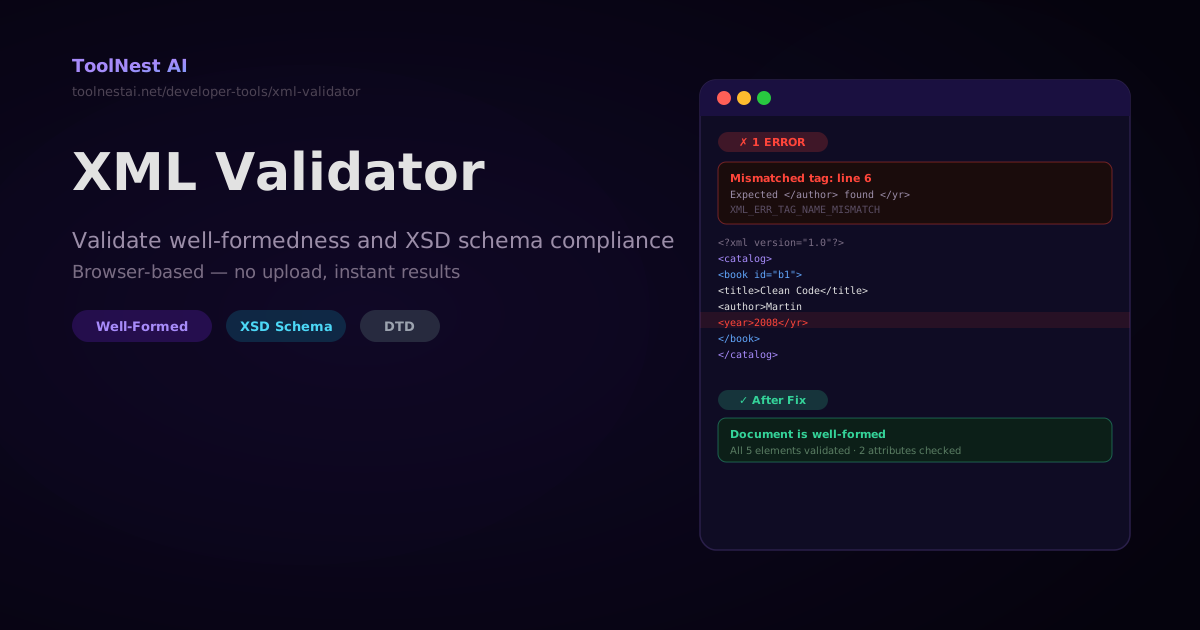
An XML document can fail in two entirely different ways. The first kind of failure — a syntax error — stops the parser cold and makes the document unreadable. The second kind of failure — a schema violation — produces a syntactically readable document that doesn't conform to the agreed structure. Both matter, and they require different checks.
Validate any XML document in your browser with the ToolNest AI XML Validator — checks well-formedness, XSD schema compliance, and DTD validation, with per-line error reporting.
Well-Formed vs. Valid: The Core Distinction
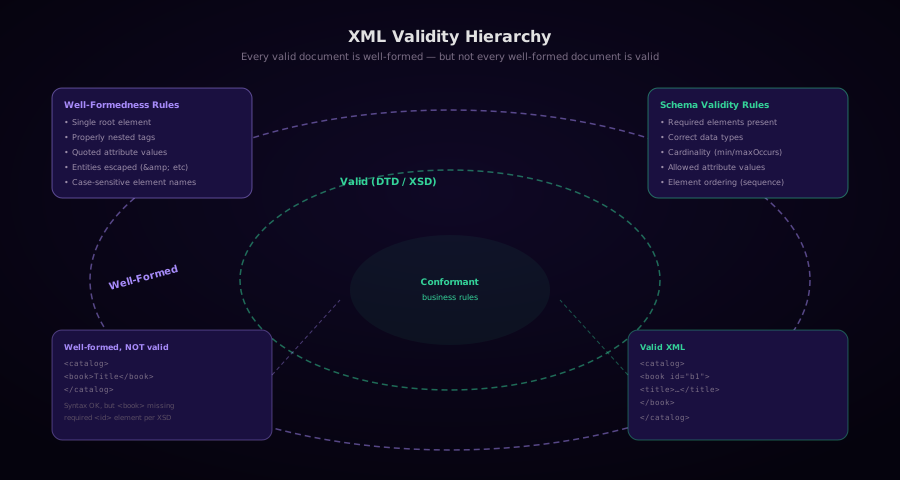
Well-Formed XML
A document is well-formed if it follows the XML 1.0 specification's syntax rules:
- Exactly one root element — all other elements are contained within it
- Properly nested elements — closing tags must be in last-in, first-out order
- All elements are closed — either with a separate closing tag or self-closing syntax (
<element/>) - Attribute values are quoted — double or single quotes, consistently
- Special characters are escaped —
<,>,&,",'inside content use entity references - Element names follow the rules — start with a letter or underscore, no spaces, case-sensitive
- No duplicate attributes — the same attribute name cannot appear twice on one element
A well-formedness check is mandatory for every XML parser. A parser that encounters a well-formedness error must stop processing and report an error — it cannot try to recover like HTML browsers do.
Valid XML
A document is valid if it is well-formed AND it conforms to a declared schema (DTD or XSD). Schema validation checks:
- Required elements are present
- Elements appear in the correct order and position
- Element content has the right data type (integer, date, string, etc.)
- Cardinality constraints are satisfied (at least one, at most one, zero or more)
- Attribute values come from a declared list of allowed values
- References point to declared IDs
The critical rule: you cannot validate against a schema until the document is well-formed. Fix syntax errors first.
Common XML Errors and How to Fix Them
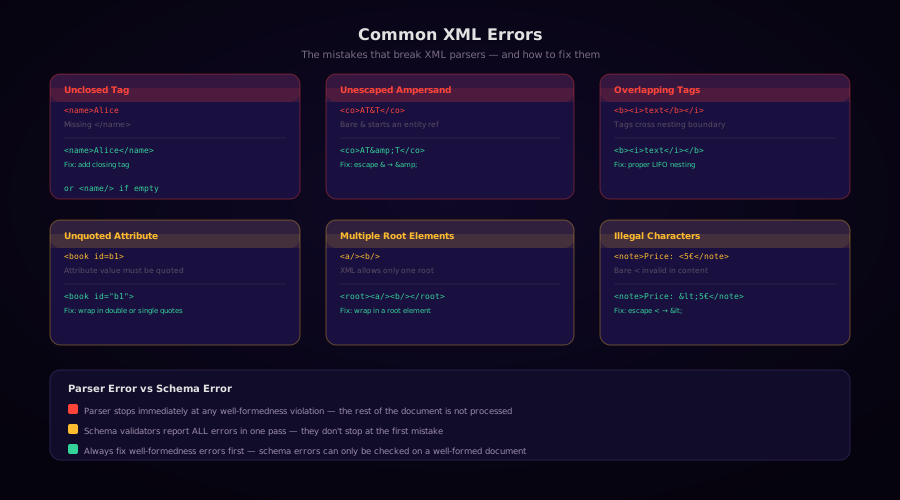
1. Unclosed Tag
<!-- Error -->
<name>Alice

<!-- Fix -->
<name>Alice</name>
<!-- Or, if empty: -->
<name/>
Parser error: XML_ERR_TAG_NOT_FINISHED
2. Unescaped Ampersand
<!-- Error -->
<company>AT&T</company>
<!-- Fix -->
<company>AT&T</company>A bare & that is not immediately followed by a valid entity name and semicolon is a well-formedness error. The five XML entities:
| Character | Entity |
|---|---|
& | & |
< | < |
> | > |
" | " |
' | ' |
3. Overlapping (Crossed) Tags
<!-- Error: HTML-style overlapping, illegal in XML -->
<bold><italic>text</bold></italic>

<!-- Fix: proper nesting -->
<bold><italic>text</italic></bold>
4. Unquoted Attribute Value
<!-- Error -->
<book id=b1>

<!-- Fix -->
<book id="b1">
5. Multiple Root Elements
<!-- Error -->
<part>engine</part>
<part>wheel</part>

<!-- Fix: wrap in a document root -->
<parts>
  <part>engine</part>
  <part>wheel</part>
</parts>
6. Bare < in Text Content
<!-- Error -->
<note>Price is < 5 euros</note>
<!-- Fix -->
<note>Price is < 5 euros</note>
<!-- Or use CDATA -->
<note><![CDATA[Price is < 5 euros]]></note>XML Schema Validation with XSD
XSD (XML Schema Definition) is the most expressive XML schema language. An XSD file is itself a valid XML document.
A Minimal XSD Schema
<?xml version="1.0" encoding="UTF-8"?>
<xs:schema xmlns:xs="http://www.w3.org/2001/XMLSchema">

  <xs:element name="catalog">
    <xs:complexType>
      <xs:sequence>
        <xs:element name="book" type="BookType"
                    minOccurs="1" maxOccurs="unbounded"/>
      </xs:sequence>
    </xs:complexType>
  </xs:element>

  <xs:complexType name="BookType">
    <xs:sequence>
      <xs:element name="title"  type="xs:string"/>
      <xs:element name="author" type="xs:string"/>
      <xs:element name="year"   type="xs:gYear"/>
      <xs:element name="price"  type="xs:decimal"/>
    </xs:sequence>
    <xs:attribute name="id"   type="xs:ID"     use="required"/>
    <xs:attribute name="lang" type="xs:language" use="optional"/>
  </xs:complexType>

</xs:schema>
Key XSD Concepts
Simple types — built-in: xs:string, xs:integer, xs:decimal, xs:boolean, xs:date, xs:dateTime, xs:anyURI, xs:ID, xs:IDREF, xs:language.
Restrictions — limit allowed values:
<xs:element name="rating">
  <xs:simpleType>
    <xs:restriction base="xs:integer">
      <xs:minInclusive value="1"/>
      <xs:maxInclusive value="5"/>
    </xs:restriction>
  </xs:simpleType>
</xs:element>
Cardinality — minOccurs and maxOccurs (use unbounded for no upper limit):
<xs:element name="tag" type="xs:string"
            minOccurs="0" maxOccurs="unbounded"/>
Choice — one of several elements:
<xs:choice>
  <xs:element name="pdf" type="xs:anyURI"/>
  <xs:element name="html" type="xs:anyURI"/>
</xs:choice>
DTD Validation
DTD (Document Type Definition) is the older schema format. It is less expressive than XSD but still used in SGML-derived formats (DocBook, TEI, RSS 2.0).
Internal DTD
<?xml version="1.0"?>
<!DOCTYPE catalog [
  <!ELEMENT catalog (book+)>
  <!ELEMENT book    (title, author, year, price)>
  <!ELEMENT title   (#PCDATA)>
  <!ELEMENT author  (#PCDATA)>
  <!ELEMENT year    (#PCDATA)>
  <!ELEMENT price   (#PCDATA)>
  <!ATTLIST book
    id   ID   #REQUIRED
    lang CDATA #IMPLIED
  >
]>
<catalog>
  <book id="b1">
    <title>Clean Code</title>
    <author>Robert C. Martin</author>
    <year>2008</year>
    <price>35.99</price>
  </book>
</catalog>
External DTD
<?xml version="1.0"?>
<!DOCTYPE catalog SYSTEM "catalog.dtd">
<catalog>…</catalog>
DTD limitations compared to XSD: no namespace support, no data types (everything is text), no minimum/maximum cardinality (only *, +, ?), no inheritance.
Validating XML with Tools
xmllint (Command Line)
xmllint is the fastest way to validate XML in a terminal:
# Check well-formedness only
xmllint --noout document.xml

# Validate against an external DTD
xmllint --valid --noout document.xml

# Validate against an XSD schema
xmllint --schema catalog.xsd --noout catalog.xml

# Validate with verbose error messages
xmllint --schema catalog.xsd catalog.xml 2>&1
Exit code 0 means valid. Any non-zero exit code indicates errors.
Python with lxml
from lxml import etree

def validate_wellformed(xml_string: str) -> list[str]:
    errors = []
    try:
        etree.fromstring(xml_string.encode('utf-8'))
    except etree.XMLSyntaxError as e:
        errors.append(f"Line {e.lineno}: {e.msg}")
    return errors

def validate_xsd(xml_file: str, xsd_file: str) -> list[str]:
    schema_doc = etree.parse(xsd_file)
    schema = etree.XMLSchema(schema_doc)
    doc = etree.parse(xml_file)
    schema.validate(doc)
    return [f"Line {e.line}: {e.message}" for e in schema.error_log]

# Example usage
errors = validate_wellformed('<root><child>text</child></root>')
print("Valid" if not errors else "\n".join(errors))

xsd_errors = validate_xsd('catalog.xml', 'catalog.xsd')
for err in xsd_errors:
    print(err)
Python Built-In (minidom)
For well-formedness only (no XSD support):
from xml.dom.minidom import parseString
from xml.parsers.expat import ExpatError

def check_wellformed(xml_string: str) -> bool:
    try:
        parseString(xml_string.encode('utf-8'))
        return True
    except ExpatError as e:
        print(f"Error at line {e.lineno}, column {e.offset}: {e.args[0]}")
        return False
JavaScript (Browser)
function validateXml(xmlString) {
  const parser = new DOMParser();
  const doc = parser.parseFromString(xmlString, 'application/xml');
  const errors = doc.querySelectorAll('parsererror');

  if (errors.length > 0) {
    return {
      valid: false,
      error: errors[0].textContent.trim(),
    };
  }

  return { valid: true, error: null };
}

// Usage
const result = validateXml('<root><child>ok</child></root>');
console.log(result.valid); // true

const bad = validateXml('<root><child>text</root>');
console.log(bad.error); // "mismatched tag" message
For XSD validation in JavaScript (Node.js), use the libxmljs2 package which wraps the same libxml2 library as xmllint:
import libxml from 'libxmljs2';
import fs from 'fs';

const xmlDoc = libxml.parseXml(fs.readFileSync('catalog.xml', 'utf8'));
const xsdDoc = libxml.parseXml(fs.readFileSync('catalog.xsd', 'utf8'));

if (xmlDoc.validate(xsdDoc)) {
  console.log('Valid');
} else {
  xmlDoc.validationErrors.forEach(err => {
    console.log(`Line ${err.line}: ${err.message}`);
  });
}
Java (JAXB + Validator)
import javax.xml.XMLConstants;
import javax.xml.transform.stream.StreamSource;
import javax.xml.validation.*;
import java.io.File;
import java.util.ArrayList;
import java.util.List;
import org.xml.sax.*;

public List<String> validateXml(String xmlPath, String xsdPath) throws Exception {
    SchemaFactory factory = SchemaFactory.newInstance(XMLConstants.W3C_XML_SCHEMA_NS_URI);
    Schema schema = factory.newSchema(new File(xsdPath));
    Validator validator = schema.newValidator();

    List<String> errors = new ArrayList<>();
    validator.setErrorHandler(new ErrorHandler() {
        public void error(SAXParseException e) {
            errors.add("ERROR line " + e.getLineNumber() + ": " + e.getMessage());
        }
        public void fatalError(SAXParseException e) {
            errors.add("FATAL line " + e.getLineNumber() + ": " + e.getMessage());
        }
        public void warning(SAXParseException e) {}
    });

    validator.validate(new StreamSource(new File(xmlPath)));
    return errors;
}
Frequently Asked Questions
What is the difference between a parser error and a schema validation error?
A parser error (well-formedness violation) means the XML cannot be parsed at all — the file is structurally broken. The parser stops immediately when it encounters the first error. A schema validation error means the XML is syntactically correct (parseable) but doesn't follow the rules in the DTD or XSD schema. Schema validators typically report all errors in a single pass.
Can I validate XML without a schema?
Yes. A well-formedness check validates the XML syntax without any schema. This verifies that the document is parseable, which is the minimum requirement for any XML processing. You only need a schema (XSD or DTD) if you want to verify that the specific elements, attributes, and data types are correct.
What is the difference between XSD and DTD?
DTD is the original XML schema format. It has limited data type support (everything is text), no namespace support, and only basic cardinality (*, +, ?). XSD (XML Schema Definition) is a more powerful W3C standard that supports rich data types, namespaces, inheritance, and precise cardinality constraints. For new projects, use XSD. DTD is encountered mainly in legacy systems and older XML formats like RSS 2.0.
Why does my XML validator say the document is well-formed but my application rejects it?
Your application is likely doing schema validation or business-rule validation beyond what a well-formedness check covers. For example, the XML might be missing a required element that the application expects, or a date field might have the wrong format. Check whether your application has an XSD schema and validate against it explicitly.
Can XML contain Unicode characters?
Yes. XML 1.0 with UTF-8 encoding supports the full Unicode character set. Declare the encoding in the XML declaration: <?xml version="1.0" encoding="UTF-8"?>. The only characters that cannot appear directly in XML (even as UTF-8) are the C0 control characters other than tab (	), newline (
), and carriage return (
). These must be escaped with numeric character references.
About the author
ToolNest AI Team
The ToolNest AI team builds free tools that help developers, marketers, and creators do more online — faster.
Related Articles
XML Formatting: How to Pretty-Print, Validate, and Work with XML in Every Language
A complete guide to XML formatting — the anatomy of an XML document, namespaces, CDATA, entity escaping, validating against XSD, pretty-printing with xmllint, Python and JavaScript tools, and common XML formats like RSS, SOAP, SVG, and Maven pom.xml.
JSON vs YAML: Converting Between Formats and the Pitfalls to Avoid
A complete guide to converting between JSON and YAML — syntax differences, data type mapping, the Norway problem, YAML 1.1 vs 1.2, multiline strings, anchors, and JavaScript/Python code for both directions.
HTML Minification: How It Works, What to Watch Out For, and How Much It Saves
A complete guide to HTML minification — the six transformations that shrink HTML files, which whitespace is safe to remove, real-world savings numbers, and how to integrate html-minifier-terser into Next.js, Webpack, and build pipelines.