Age Calculator: Calculate Exact Age & Date Differences Free Online
Learn how age is actually calculated, the leap year rule and how it affects February 29 birthdays, calendar vs full-day calculation methods, and practical uses beyond birthdays — free, instant tool.
ToolNest AI Team
Author
Published
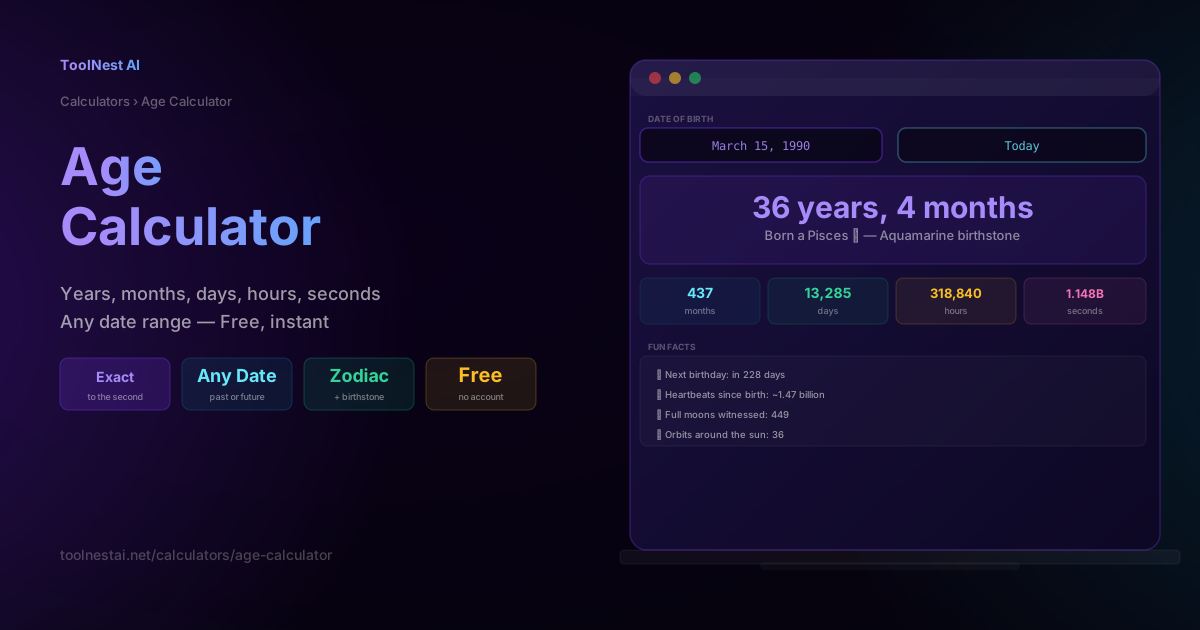
"How old am I, exactly?" sounds like a trivial question, but the honest answer depends on more than most people expect: leap years, varying month lengths, time zones, and even which of two valid calculation methods you use. This guide walks through exactly how age and date-difference calculations work under the hood, why February 29 birthdays are a genuine edge case, and the many practical uses for precise date math beyond just birthdays.
Calculate any date range instantly — down to the second — with the ToolNest AI Age Calculator.
How Age Is Actually Calculated
At first glance, calculating age seems like simple subtraction: current year minus birth year. But that's only correct if the birthday has already occurred this year. The full algorithm is:
- Subtract the birth year from the current year
- If the current month/day hasn't yet reached the birth month/day, subtract 1 from the result
- Compute the remaining months and days by "borrowing" from the calendar, accounting for the fact that months have different lengths (28-31 days)
Example: someone born March 15, 1990, calculated as of July 29, 2026:
2026 - 1990 = 36 years (March 15 has already passed this year, so no adjustment needed)
July 29 - March 15 = 4 months, 14 days
Result: 36 years, 4 months, 14 days
If the "as of" date were, say, January 10, 2026 (before March 15), the calculation would instead subtract 1 year and count backward through the calendar to determine the remaining months and days — since the birthday for that year hadn't yet occurred.
The Leap Year Rule
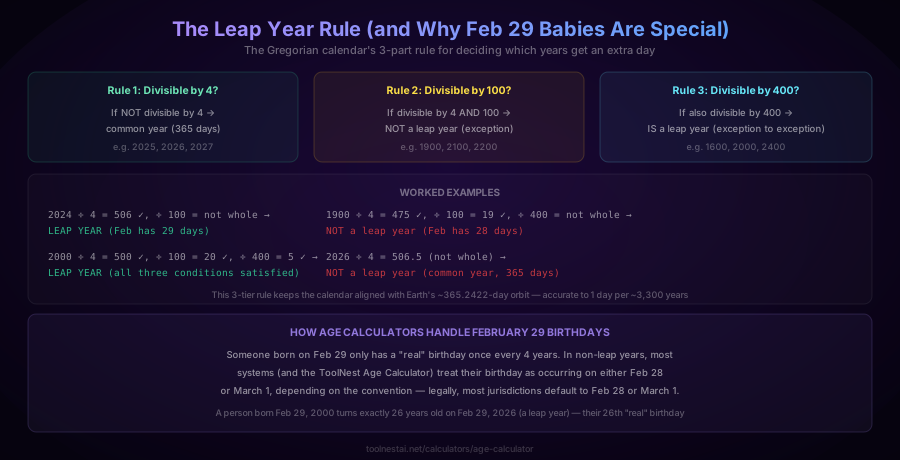
The Gregorian calendar (the calendar used by most of the world) adds a leap day roughly every 4 years to keep the calendar aligned with Earth's actual orbital period of approximately 365.2422 days. The exact rule has three tiers:
- A year divisible by 4 is a leap year — unless
- it is also divisible by 100 — in which case it is not a leap year — unless
- it is also divisible by 400 — in which case it is a leap year after all
Worked examples:
- 2024: divisible by 4, not by 100 → leap year (February has 29 days)
- 1900: divisible by 4 and by 100, but not by 400 → not a leap year
- 2000: divisible by 4, 100, and 400 → leap year
- 2026: not divisible by 4 → not a leap year (this year)
This three-tier rule keeps the calendar accurate to within about one day every 3,300 years — remarkably precise for a system designed in the 16th century (the Gregorian calendar reform of 1582).
Why This Matters for People Born on February 29
Someone born on February 29 only has a calendar-exact birthday once every four years. In the three intervening years, most systems (including the ToolNest AI Age Calculator) need a defined fallback — typically treating the birthday as occurring on either February 28 or March 1. Legal jurisdictions vary on which convention they use for age-related eligibility (like reaching the age of majority), which has occasionally been the subject of real legal disputes.
Two Calculation Methods
There are two valid ways to compute a date difference, and they can produce slightly different intermediate breakdowns even though they agree on the final answer:
Calendar method (most common): Subtract the birth year from the current year, then adjust by one if the birthday hasn't occurred yet this year. This is how humans naturally think about age, and it's what most age calculators (including birthday cards and ID checks) use.
Full-day method (precise systems): Count the exact number of elapsed days between two dates using a day-count algorithm, then convert that day count into years, months, and days. This method is required in contexts like legal contract terms, medical gestational dating, or financial day-count conventions, where "exactly how many days" matters more than the calendar-year framing.
Both methods report the same "years old" figure for any given day — they only differ in how granularly the remainder is broken down (e.g., whether "36 years and roughly 4.5 months" is expressed as "36y 4m 14d" or as a precise day count).
Age in Every Unit
For someone born March 15, 1990, calculated as of July 29, 2026:
| Unit | Value |
|---|---|
| Years, months, days | 36 years, 4 months, 14 days |
| Total months | 437 |
| Total days | 13,285 |
| Total hours | 318,840 |
| Total minutes | 19,130,400 |
| Total seconds | 1,147,824,000 |
These larger unit conversions are more than novelty — total days matter for financial day-count calculations, and total months matter for tenure and eligibility calculations that use monthly thresholds.
Beyond Birthdays — Practical Uses for Date-Range Calculations
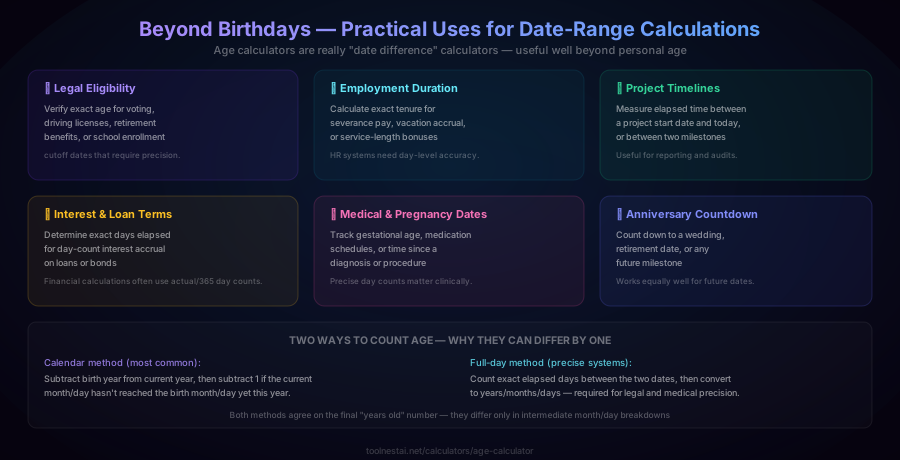
An "age calculator" is really a general-purpose date-difference calculator, and the same math applies to many situations beyond personal age:
Legal eligibility. Voting age, driver's license eligibility, retirement benefit start dates, and school enrollment cutoffs all depend on exact age as of a specific reference date — often requiring day-level precision, not just "which year were they born."
Employment duration. HR systems calculate exact tenure for severance pay formulas, vacation accrual rates, and service-length bonuses, where being off by even a few days can affect an entitlement calculation.
Project timelines. Measuring elapsed time between a project's start date and today, or between two milestones, is useful for status reporting, SLA tracking, and audits.
Interest and loan terms. Financial calculations frequently use day-count conventions (like actual/365 or 30/360) to compute interest accrual — the exact number of days elapsed genuinely changes the amount owed.
Medical and pregnancy dates. Gestational age tracking, medication schedules, and time-since-diagnosis calculations all require precise day counts, not rough calendar-year approximations.
Anniversary and event countdowns. The same math works equally well for future dates — counting down to a wedding, retirement date, or any upcoming milestone.
How to Use the Age Calculator
The ToolNest AI Age Calculator runs entirely in your browser and works for any date range — past, present, or future.
- Enter the date of birth (or the earlier date in any date range you want to measure)
- Enter the "as of" date — defaults to today, but you can set any past or future date to calculate age at a specific point in time (useful for legal or historical questions)
- View the full breakdown — years, months, and days, plus totals in months, days, hours, and seconds
- Check the extras — zodiac sign, birthstone, days until next birthday, and other calculated fun facts
Date Calculations in Different Languages
JavaScript:
function calculateAge(birthDate, asOf = new Date()) {
  let years = asOf.getFullYear() - birthDate.getFullYear();
  let months = asOf.getMonth() - birthDate.getMonth();
  let days = asOf.getDate() - birthDate.getDate();
  if (days < 0) {
    months--;
    days += new Date(asOf.getFullYear(), asOf.getMonth(), 0).getDate();
  }
  if (months < 0) {
    years--;
    months += 12;
  }
  return { years, months, days };
}
Python:
from dateutil.relativedelta import relativedelta
from datetime import date

diff = relativedelta(date(2026, 7, 29), date(1990, 3, 15))
print(f"{diff.years} years, {diff.months} months, {diff.days} days")
PHP:
$birth = new DateTime('1990-03-15');
$now = new DateTime('2026-07-29');
$diff = $birth->diff($now);
echo $diff->y . " years, " . $diff->m . " months, " . $diff->d . " days";
SQL (PostgreSQL):
SELECT age('2026-07-29'::date, '1990-03-15'::date);
-- returns an interval like "36 years 4 mons 14 days"
Common Mistakes
Mistake 1: Simple year subtraction without checking the birthday. currentYear - birthYear alone overstates age by one for anyone whose birthday hasn't occurred yet this calendar year. Always compare the month and day, not just the year.
Mistake 2: Off-by-one errors in day counting. When counting days between two dates, it's easy to accidentally include or exclude one endpoint. Be explicit about whether a date range is inclusive or exclusive of the start/end dates, especially in contract or financial calculations.
Mistake 3: Ignoring time zones for precise time-of-day calculations. If you need age down to the hour or minute (not just the day), the calculation must account for time zone differences between when the birth time was recorded and when the calculation is performed.
Mistake 4: Mishandling February 29 birthdays. Treating a Feb 29 birth date without an explicit fallback rule for non-leap years can cause date libraries to throw errors or silently produce incorrect results (like rolling over to March 1 unexpectedly). Always test this edge case explicitly.
Mistake 5: Assuming all months have 30 days. Manual day-counting that assumes uniform 30-day months will drift from the actual calendar — always use a proper date library rather than manual arithmetic across month boundaries.
Frequently Asked Questions
How is age calculated exactly?
Age is calculated by subtracting the birth year from the reference year, then subtracting one more year if the reference date's month and day haven't yet reached the birth date's month and day within the current year. The remaining months and days are found by counting forward from the birthday's most recent occurrence to the reference date, accounting for each month's actual length.
What is a leap year and how is it determined?
A leap year adds an extra day (February 29) to keep the calendar synchronized with Earth's orbit. The rule: a year is a leap year if it's divisible by 4, except years divisible by 100 are not leap years, except years divisible by 400 are leap years after all. For example, 2024 is a leap year, 1900 is not, and 2000 is.
How does an age calculator handle someone born on February 29?
Since February 29 only occurs once every four years, most age calculators define a fallback for non-leap years — treating the birthday as either February 28 or March 1. This affects when a "leap year baby" is considered to have their birthday in non-leap years, which can have legal significance in some jurisdictions for age-of-majority calculations.
What's the difference between calendar age and exact day-count age?
Calendar age (the common method) counts complete years, months, and days based on calendar dates — the way people naturally think about age. Exact day-count age measures the precise number of elapsed days between two dates and is used in contexts requiring day-level precision, such as legal contracts, medical gestational dating, or financial interest calculations. Both methods produce the same "years old" figure — they differ in intermediate precision.
Can I calculate the age difference between two arbitrary dates, not just a birth date and today?
Yes. The ToolNest AI Age Calculator works with any two dates — past, present, or future. This makes it useful for calculating employment tenure, project duration, time until a future event, or the age someone was (or will be) on any specific historical or future date.
Why do some age calculations differ by one day between tools?
Discrepancies usually come from inclusive vs. exclusive date range counting (whether the start or end date itself is counted), or from time zone handling if exact times are involved. When comparing tools, check whether they're both using the same convention for whether the starting day counts as day 0 or day 1.
How many total seconds old am I?
Multiply your total days alive by 86,400 (the number of seconds in a day), or use the direct calculation: total seconds = (reference timestamp - birth timestamp) in Unix epoch seconds. For someone born March 15, 1990, calculated as of July 29, 2026, that's approximately 1.148 billion seconds — the ToolNest AI Age Calculator computes this instantly along with total months, days, and hours.
Does this tool account for time zones?
Date-only calculations (years, months, days) are unaffected by time zones since they operate purely on calendar dates. However, if you need age precision down to the hour, minute, or second, time zone differences between the recorded birth time and the calculation's reference time zone can affect the result by up to 24 hours — worth confirming if that level of precision matters for your use case.
About the author
ToolNest AI Team
The ToolNest AI team builds free tools that help developers, marketers, and creators do more online — faster.
Related Articles

Password Generator: Create Strong, Random Passwords Free
Learn what makes a password strong, how password entropy works, which character sets to use, and how to generate uncrackable passwords instantly with a free tool — no sign-up required.

Word Counter: Count Words, Characters & Reading Time Free
Learn how to use a word counter to track words, characters, sentences, paragraphs and reading time — plus a complete reference of character limits for every major platform.