Word Counter: Count Words, Characters & Reading Time Free
Learn how to use a word counter to track words, characters, sentences, paragraphs and reading time — plus a complete reference of character limits for every major platform.
ToolNest AI Team
Author
Published
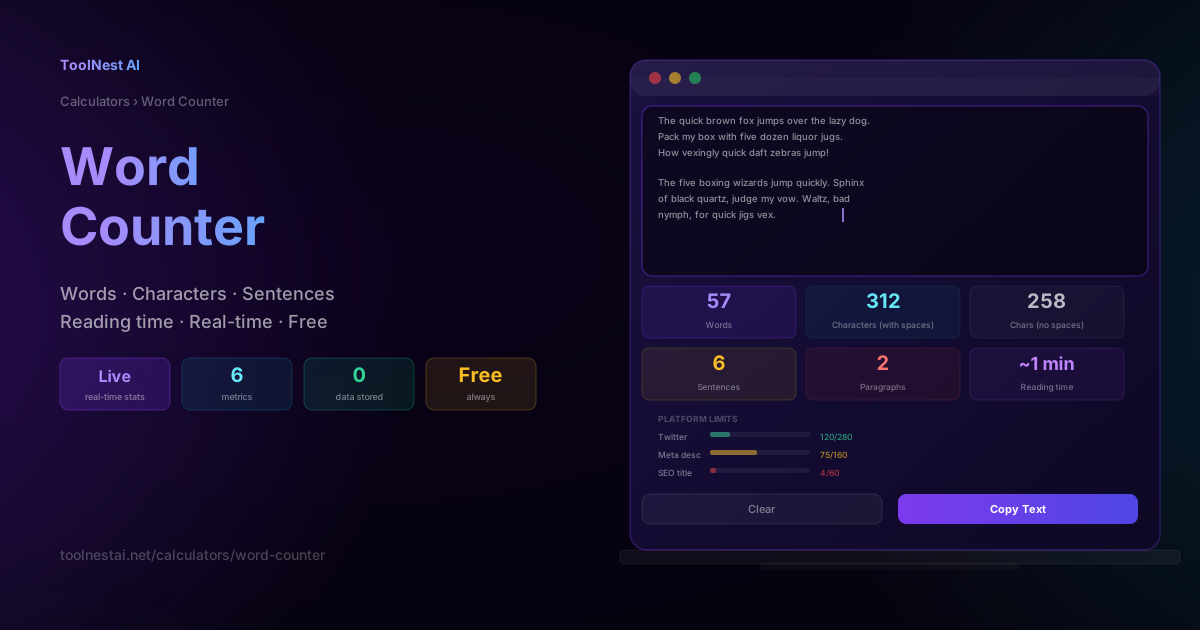
Word count is one of those numbers that looks simple — but the moment you need to hit a specific limit or stay within a platform's constraint, it becomes surprisingly important. A Twitter post cut off mid-sentence, a meta description truncated in search results, an essay that's 200 words over the limit, a blog post that's too short to rank — all of these are word count problems.
A good word counter does more than count words. It tracks characters with and without spaces, counts sentences and paragraphs, estimates reading time, and shows you in real time how close you are to platform limits. This guide explains every metric, when each one matters, and how to use the ToolNest AI Word Counter to stay in control of your text.
What the Word Counter Measures
The ToolNest AI Word Counter tracks six metrics simultaneously as you type or paste text. Every metric updates in real time — no button click, no delay.
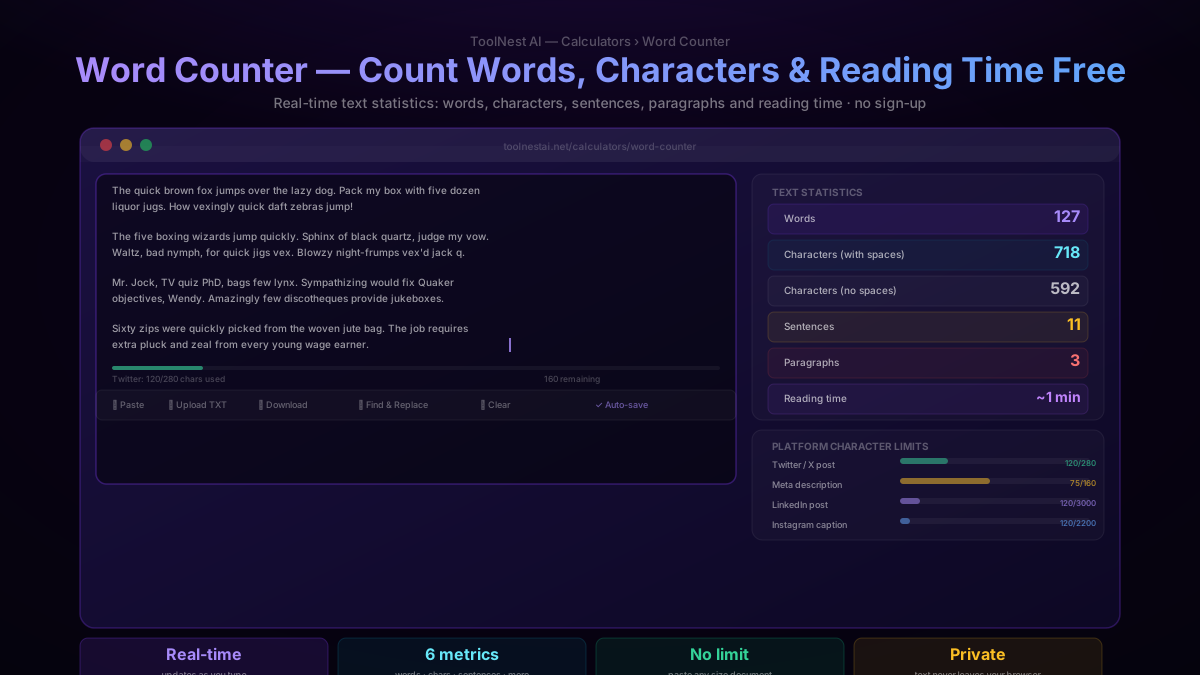
Words
A word is any sequence of non-whitespace characters separated by spaces, tabs, or line breaks. Hyphenated words (well-being, follow-up) typically count as one word. Numbers count as words. Punctuation attached to a word (don't, word,) does not affect the count.
When it matters: Academic submissions, content briefs, blog posts, grant applications, job descriptions, social media planning.
Characters with spaces
The total count of every character in the text, including spaces, tabs, and line breaks. This is the most common character count for platform limits — Twitter, Instagram, LinkedIn, and most CMS character counters all use this number.
When it matters: Social media posts, SMS messages, meta descriptions, ad copy, any platform with a character limit.
Characters without spaces
The character count excluding all whitespace. Used less frequently than the with-spaces count, but relevant for certain academic style guides and some ad platforms that count only non-space characters.
When it matters: Certain academic word processors, some ad platforms, comparing text density across documents.
Sentences
A count of sentence-ending punctuation marks: periods (.), exclamation marks (!), and question marks (?). Ellipses (...) count as one sentence ending. Abbreviations like Mr. or e.g. may inflate the count slightly — this is a known limitation of character-based sentence detection.
When it matters: Readability analysis. Short average sentence length (under 20 words) is associated with higher readability. Long average sentence length is a common cause of unclear writing.
Paragraphs
A count of blocks of text separated by blank lines. A paragraph is defined as any non-empty block of text with at least one blank line before the next block.
When it matters: Blog posts (aim for short paragraphs — 2–3 sentences for web reading), academic essays (longer paragraphs are conventional), readability checks.
Reading time
Estimated reading time in minutes, calculated as word count divided by 238 words per minute — the average silent reading speed for adults, based on a meta-analysis of reading speed research. The result is rounded to the nearest minute, with a minimum of "under 1 minute" for very short texts.
When it matters: Blog post headers ("5 min read"), content briefs, estimating how long a video script will run, deciding whether a document needs an executive summary.
Reading Speed and Content Length — What the Numbers Mean
Understanding reading time helps you calibrate content for your audience. A reader deciding whether to engage with your content makes that decision in seconds — knowing the time commitment upfront affects whether they start reading at all.
Average reading speeds by audience
General adult population: 200–250 wpm. The 238 wpm figure used by the word counter is a well-researched middle point.
Technical content readers: 100–150 wpm. Code, documentation, and technical writing are read more slowly because readers pause to process.
Skimming: 600–700 wpm. When readers skim, they pick up headlines, bold text, and the first sentence of each paragraph. This is how most web content is consumed.
Content length by type
Social media posts (100–300 words): Under a minute to read. Optimised for engagement and shareability. Brevity is the goal.
News articles and how-to guides (500–800 words): 2–4 minutes. Covers a topic with enough depth to be useful without requiring a major time commitment.
SEO blog posts (1,500–2,500 words): 6–10 minutes. The most effective length for search ranking. Long enough to cover a topic thoroughly, short enough to be read in one sitting.
Pillar content and guides (3,000–10,000 words): 12–40 minutes. Used for high-authority topic pages, comprehensive tutorials, and downloadable guides. Not typically read in one sitting.
Academic papers and white papers: Varies — often 5,000–15,000 words. Read differently from web content — often non-linearly, with readers jumping to sections of interest.
Character Limits by Platform — Complete Reference
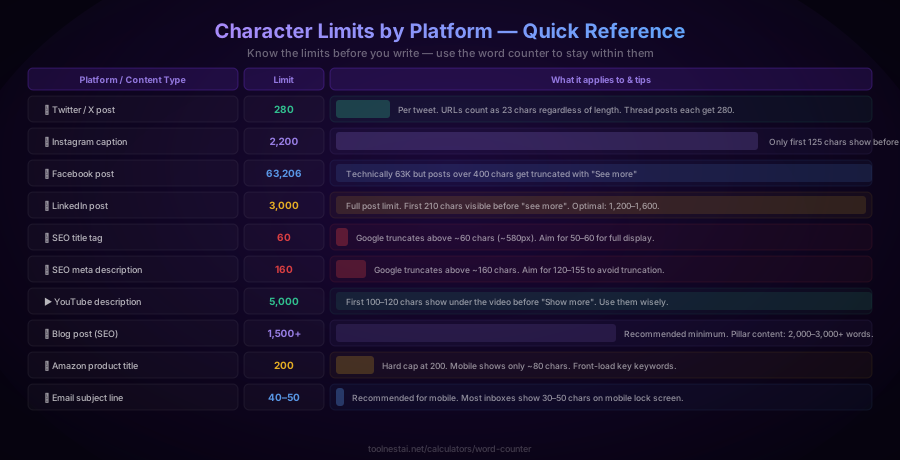
Character limits are the constraint writers hit most often. The word counter shows your character count in real time alongside the limit for common platforms.
Social media
Twitter / X: 280 characters per tweet. Note that URLs count as exactly 23 characters regardless of actual length. Thread replies each get their own 280-character limit.
Instagram: 2,200 characters per caption. Only the first 125 characters are visible before "more" is tapped. Front-load your key message and hook into the first line.
Facebook: Up to 63,206 characters technically, but posts over 400 characters show a "See more" truncation. In practice, aim for under 400 for maximum engagement.
LinkedIn: 3,000 characters per post. Only the first 210 characters show before "See more." LinkedIn's algorithm favours posts that generate comments, so engagement matters more than length.
TikTok captions: 2,200 characters. Discoverability comes primarily from hashtags — include them at the end.
Pinterest descriptions: 500 characters. The first 50–60 characters are visible in the feed before truncation.
SEO and web
Page title tag: ~60 characters (~580 pixels). Google truncates titles that are too long in search results. The truncation happens by pixel width rather than character count, so characters like W and M take more space than i or l. Safe practical limit: 50–60 characters.
Meta description: ~160 characters. Google may rewrite meta descriptions it considers low-quality, regardless of length. Aim for 120–155 characters to avoid truncation on both desktop and mobile.
H1 heading: No technical limit, but SEO best practice is under 70 characters. Headings that are too long often include unnecessary words.
URL slug: Under 60 characters for readability. Google can index long URLs but shorter slugs look cleaner in search results and social sharing.
Subject line: 40–50 characters recommended. Mobile lock screens show around 30–40 characters. Most email clients truncate above 60 characters. Short, specific subject lines consistently outperform long ones in open-rate studies.
Preview text (preheader): 85–100 characters. Shown next to the subject line in most clients. Write it as a complement to the subject, not a repeat of it.
Video and audio
YouTube title: 100 characters (hard limit). Only 60–70 characters are visible in search results and suggested video feeds. Put keywords near the front.
YouTube description: 5,000 characters. Only the first 100–120 characters show without clicking "Show more." Use the first paragraph to capture the reader who does not expand the description.
Podcast episode title: 60–80 characters recommended for full display across major directories.
E-commerce
Amazon product title: 200 characters (hard cap). Only around 80 characters display on mobile product pages. Prioritise brand, key feature, and differentiator in the first 80 characters.
eBay listing title: 80 characters. Used directly in search — include all major keywords within the limit.
How to Use the Word Counter Effectively
The ToolNest AI Word Counter is entirely client-side — your text is never sent to a server. You can paste confidential documents, client copy, or draft articles without any privacy concern.
Paste text directly. The stats update instantly — no button to click. Just paste and read the numbers.
Type in real time. The counter works as a live editor. Every keystroke updates all six metrics.
Upload a text file. Click "Upload TXT" to load a local .txt file without copy-pasting. Useful for long documents.
Check platform limits. The platform limit bars show exactly how much of each limit you have used. The bar turns yellow when you are approaching the limit and red when you exceed it.
Use it for content briefs. If you are briefing a writer, paste the reference content to get the word count target, then share the number.
Clear and start fresh. Click "Clear" to empty the textarea and reset all stats.
Word Count for Writers: Targets by Content Type
Different types of writing have different conventional lengths. These are not hard rules — quality matters more than hitting an exact number — but they serve as useful benchmarks.
| Content type | Typical word count |
|---|---|
| Tweet / social post | 50–280 characters |
| Email (marketing) | 50–125 words |
| Product description | 150–300 words |
| Blog post (basic) | 800–1,200 words |
| Blog post (SEO target) | 1,500–2,500 words |
| Pillar page / guide | 3,000–6,000 words |
| Short story | 1,500–30,000 words |
| Novella | 30,000–50,000 words |
| Novel | 50,000–100,000 words |
| Master's thesis | 15,000–50,000 words |
| PhD dissertation | 80,000–100,000 words |
For SEO content specifically, there is no single correct length. The correct length for a page is however many words are needed to answer the search query better than competing pages. Use the word counts of the top-ranking pages for your target keyword as a benchmark, not an arbitrary number.
Word Count for Students and Academics
Academic submissions are the most common context where word count is strictly enforced.
Essay and assignment limits: Most academic word count limits are "up to" limits — they specify a maximum, not a minimum. Being significantly under the limit suggests insufficient depth. Being over the limit is typically penalised, sometimes automatically by submission software.
What counts toward the word count: Varies by institution and assignment. Title, footnotes, bibliography, captions, and appendices may or may not be counted. Check the assignment guidelines explicitly.
Counting strategies: If a submission system counts differently from your word processor, use the submission system's count. The ToolNest Word Counter counts the same way most word processors do — all words in the text area, including headings if pasted.
APA, MLA, Chicago word counts: All three style guides count words in the body text only. References, bibliographies, footnotes, and appendices are excluded unless the guidelines say otherwise.
Frequently Asked Questions
How does the word counter count words?
A word is counted as any continuous sequence of non-whitespace characters separated by spaces, tabs, or line breaks. Hyphenated words (well-known) count as one word. Numbers count as words. Punctuation attached to a word (it's, word,) does not create a separate count — the counter splits on whitespace only.
Does the word counter work in real time?
Yes. Every statistic — words, characters, sentences, paragraphs, and reading time — updates instantly as you type or paste text. No button click is required and there is no delay.
Is my text stored or sent to a server?
No. All processing happens entirely in your browser using JavaScript. Your text never leaves your device. This makes the tool safe for confidential documents, client copy, or any sensitive text.
Why does my word processor show a different count?
Different tools count words slightly differently, particularly around hyphenated words, numbers, abbreviations, and special characters. For most practical purposes the difference is negligible (1–5 words in a typical document). If you need to match a specific system's count exactly, use that system's counter directly.
How is reading time calculated?
Reading time is calculated as word count divided by 238 — the average adult silent reading speed in words per minute, based on published reading speed research. The result is rounded to the nearest minute. For very short texts (under 50 words), the display shows "under 1 minute."
What is the character count with spaces vs without spaces?
"Characters with spaces" counts every character in the text including spaces, tabs, and line breaks. "Characters without spaces" counts only non-whitespace characters. Most platform limits (Twitter, meta descriptions, LinkedIn) use the with-spaces count. If a platform's limit is ambiguous, assume it includes spaces.
Can I use the word counter for documents in other languages?
Yes. The counter counts any Unicode text — it works with Latin, Cyrillic, Arabic, Chinese, Japanese, Korean, and other scripts. Word splitting (on whitespace) works correctly for space-separated scripts. For languages like Chinese and Japanese that do not use spaces between words, the "word count" will be the count of space-delimited tokens, which may not reflect true word count in those languages.
Does the word counter work on mobile?
Yes. The tool is fully responsive and works on smartphones and tablets. You can type directly into the text area or paste from your phone's clipboard. The stats display adapts to the screen size.
About the author
ToolNest AI Team
The ToolNest AI team builds free tools that help developers, marketers, and creators do more online — faster.
Related Articles
QR Code Generator: Create Free QR Codes for URLs, Wi-Fi, vCard & More
Learn how QR codes work, which content type to use for each situation, how error correction levels affect scanability, and how to generate a free QR code for any purpose — no sign-up required.
JSON Formatter: Format, Validate & Minify JSON Free
Learn what JSON is, how to read and write it correctly, the 6 data types, common syntax errors, and how to instantly format or minify any JSON online with a free formatter tool.