Password Generator: Create Strong, Random Passwords Free
Learn what makes a password strong, how password entropy works, which character sets to use, and how to generate uncrackable passwords instantly with a free tool — no sign-up required.
ToolNest AI Team
Author
Published
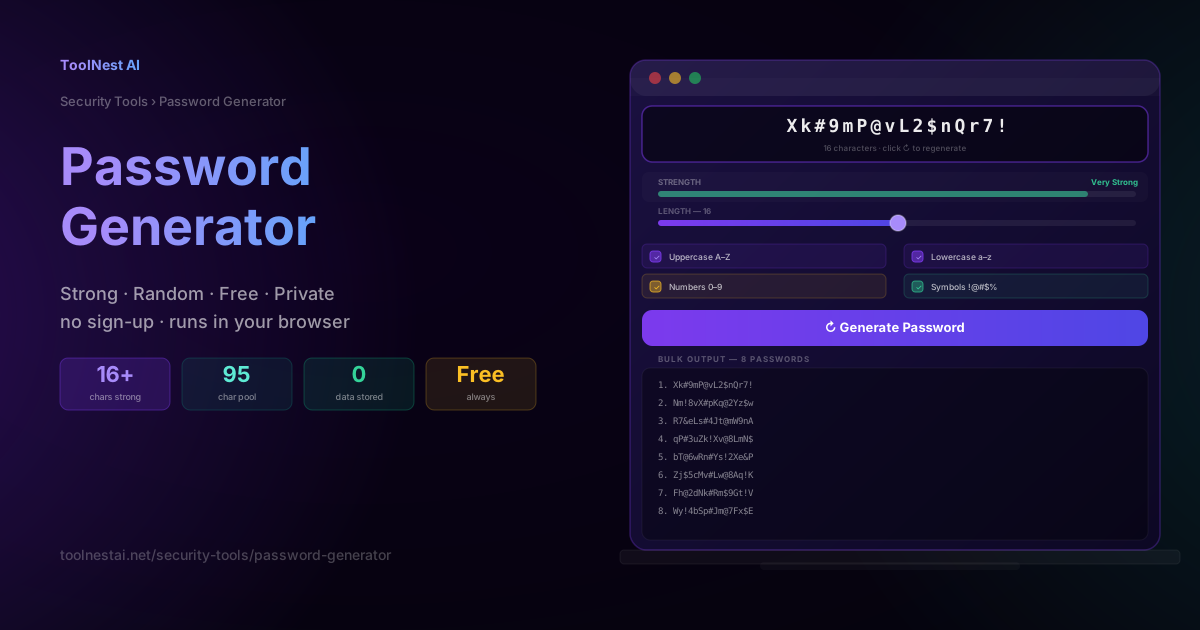
The most common password in the world is still 123456. The second is password. The third is 123456789. Together, these three passwords are used by hundreds of millions of accounts — and they are cracked in under a second by any competent attacker.
But even people who know better often make mistakes: reusing a strong password across multiple sites, adding a number and symbol to a dictionary word and calling it secure, or choosing a password based on personal information available on social media.
The solution is simple: use a random password generator. A good generator creates passwords that are genuinely unpredictable, long enough to resist brute force, and unique for every account. This guide explains exactly what makes a password strong, how to use a generator effectively, and what to do with the passwords once you have them.
What Makes a Password Strong?
Password strength comes down to two factors: length and randomness.
Length
Every additional character multiplies the number of possible passwords exponentially. A six-character lowercase password has 26⁶ = 308 million combinations. A modern GPU can test billions of combinations per second — that takes less than a second to crack.
Add uppercase letters and the pool grows to 52⁶ = 19 billion. Add numbers and symbols to reach 95⁶ = 735 billion. Still crackable in under a minute.
But extend the length to 16 characters with all four character types (95 possible characters) and you get 95¹⁶ ≈ 4.4 × 10³¹ combinations. At a billion guesses per second on the most powerful hardware available, that takes longer than the current age of the universe to crack.
Length is the single most important factor. Each character you add is worth more than switching character types.
Randomness
A long password is only strong if it is genuinely random. Human-chosen passwords are not random — they follow predictable patterns:
- Starting with a capital letter
- Ending with a number or exclamation mark
- Using common words with substitutions (Pa$$w0rd)
- Including personal information (Alice1990!, MyDog2024)
- Following keyboard patterns (qwerty, 1qaz2wsx)
Password crackers are built around these patterns. They start with common words, apply all known substitution rules, try known leaked passwords, and work through keyboard walks. A password that seems complex to a human is often trivial for a cracking tool.
A generator that uses a cryptographically secure random number generator (CSPRNG) produces passwords with no patterns — every character is chosen independently from the full character pool.
Password Entropy: The Technical Measure of Strength
Entropy is the information-theoretic measure of password strength. It is calculated as:
Entropy (bits) = log₂(pool_size^length) = length × log₂(pool_size)
For a 16-character password using all 95 printable ASCII characters:
entropy = 16 × log₂(95) = 16 × 6.57 ≈ 105 bits
Higher entropy = more guesses required to crack the password.
| Entropy | Strength | Approximate crack time (high-end hardware) |
|---|---|---|
| < 28 bits | Very weak | Instant |
| 28–35 bits | Weak | Minutes |
| 36–59 bits | Fair | Days to months |
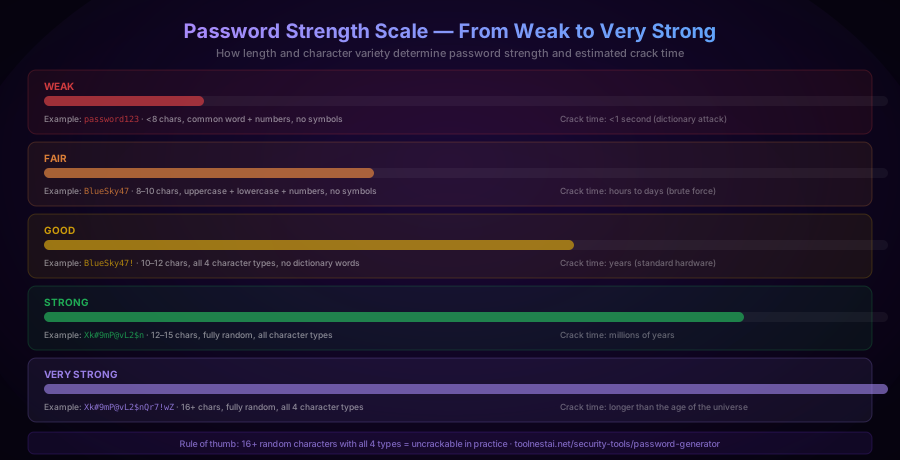
| 60–127 bits | Strong | Years to millennia |
| 128+ bits | Very strong | Longer than the universe's age |
Most security experts recommend at least 128 bits of entropy for sensitive accounts. A 20-character random password with all character types reaches that threshold comfortably.
Character Sets and What They Contribute
The ToolNest AI Password Generator lets you choose which character types to include. Here is what each adds:
Uppercase letters (A–Z): 26 characters. Required by most websites. Adds significant entropy when randomly placed throughout the password.
Lowercase letters (a–z): 26 characters. The base character set. Always include. Lowercase characters are the most readable and widely supported.
Numbers (0–9): 10 characters. Universally supported. Most sites require at least one number. Random placement is far stronger than appending numbers at the end.
Symbols (!@#$%^&*()-_=+[]|;':",<>?/`~): 33 characters. The largest boost per character. Some sites restrict which symbols are allowed — if a site rejects your password, try regenerating with common symbols only.
Combined pool: All four types = 95 characters. Using the full character pool with 16+ characters produces passwords that are uncrackable in practice with any technology available today.
Exclude ambiguous characters: The option to exclude 0, O, l, I, and 1 is useful when a password will be typed manually — these characters are easily confused in certain fonts. For passwords that are always copied and pasted, there is no reason to exclude them.
How to Use the Password Generator
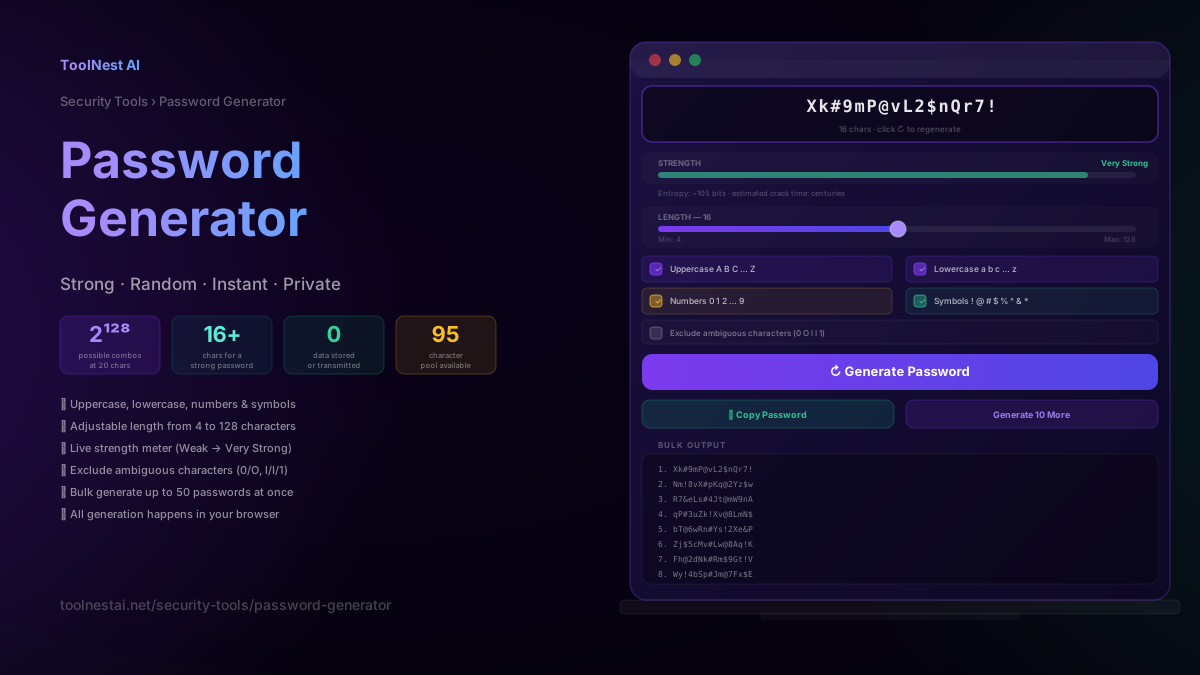
The ToolNest AI Password Generator runs entirely in your browser. No passwords are sent to any server or stored anywhere.
Step 1: Set the length
Use the length slider to choose how many characters you want. For most accounts, 16 characters is the minimum recommended. For financial accounts, email, and master passwords, use 20 or more.
Step 2: Choose character types
Enable all four character types for maximum strength. If a specific site does not allow symbols, uncheck that option and regenerate.
Step 3: Generate
Click "Generate Password." The generator uses your browser's built-in cryptographically secure random number generator — the same source of entropy used by cryptographic libraries. Each character is selected independently and uniformly from the enabled pool.
Step 4: Check the strength meter
The strength meter shows Weak, Fair, Good, Strong, or Very Strong based on the length, character diversity, and estimated entropy. For important accounts, aim for Strong or Very Strong.
Step 5: Copy and store
Click "Copy Password" to copy it to the clipboard. Immediately paste it into your password manager — do not try to memorise a 16-character random password. If you do not use a password manager, now is a good time to start.
Bulk generation
Click "Generate 10 More" to produce a batch of passwords. This is useful when setting up multiple accounts, generating API keys, or creating temporary credentials.
5 Common Password Mistakes
1. Reusing passwords across multiple sites
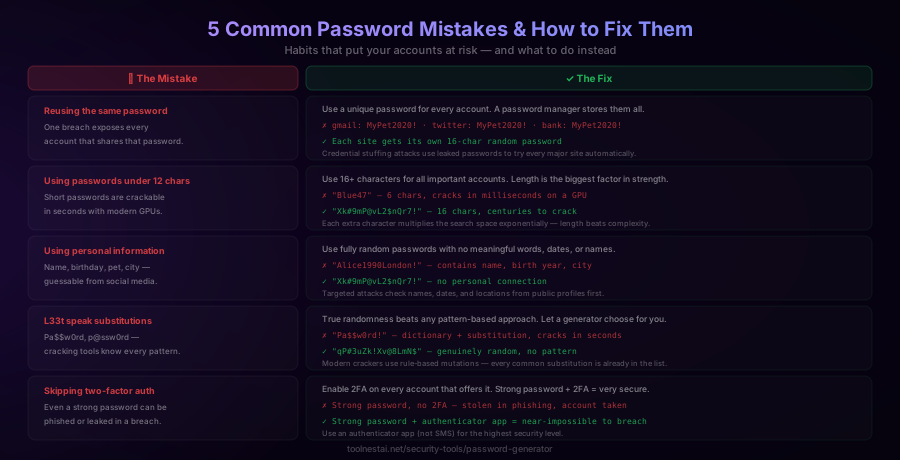
When a site is breached, the leaked passwords are immediately tried against every major service in what is called a credential stuffing attack. If you use the same password on five sites and one of them is breached, all five accounts are compromised within hours.
The fix is simple: every account gets its own unique password. A password manager makes this practical — you only need to remember one master password.
2. Using passwords shorter than 12 characters
Any password under 10 characters can be brute-forced in under a day with a dedicated GPU. Under 8 characters, it is often a matter of seconds.
Use 16+ characters for everything important. 12 characters is the absolute minimum for accounts that matter.
3. Including personal information
Attackers who target you specifically will check your name, birth year, children's names, pet names, city, and favourite sports team. All of this is often public on social media.
A generated password has no connection to you at all — it is just 16 random characters from a pool of 95.
4. Using predictable patterns
Pa$$w0rd, password1!, and Winter2026! all feel complex but are well-known patterns to cracking tools. Modern crackers apply thousands of rules: capitalise first letter, append year, substitute @ for a, replace 3 with E, and so on.
True randomness — Xk#9mP@vL2$nQr7! — has no pattern for a cracker to exploit.
5. Not enabling two-factor authentication
Even a perfect password can be phished in a convincing fake login page, or obtained in a data breach where the site stored passwords insecurely. Two-factor authentication (2FA) means that even if an attacker has your password, they cannot log in without the second factor.
Enable 2FA on every account that offers it. Use an authenticator app (like Google Authenticator or Authy) rather than SMS — SIM swapping attacks can intercept SMS codes.
Password Managers: Where to Store Generated Passwords
A password manager is not optional if you want to use unique, strong passwords for every account. No human can memorise Xk#9mP@vL2$nQr7! for each of their 50+ online accounts.
What a password manager does:
- Stores all your passwords encrypted with a master password only you know
- Autofills passwords on login pages
- Generates new passwords itself
- Syncs across all your devices
- Alerts you if a stored password appears in a known data breach
Recommended options:
Bitwarden — Open source, free for individuals, audited, cross-platform. The best free option.
1Password — Paid, polished, strong family and team features, excellent browser integration.
KeePassXC — Open source, local storage only (no cloud sync by default), maximum control.
Built-in browser managers — Chrome, Firefox, Safari, and Edge all have built-in password managers that are convenient and reasonably secure for most users. Less feature-rich than dedicated managers but better than nothing.
The master password for your password manager should be a long passphrase you can memorise — four to six random words is a good approach. The generated passwords for individual sites do not need to be memorable at all.
Passphrases vs Random Passwords
A passphrase is a password made of multiple random words: correct-horse-battery-staple. A random password is a string of random characters: Xk#9mP@vL2$nQr7!.
Both can be strong. The comparison comes down to memorability vs entropy density:
A four-word passphrase drawn from a 7,776-word list (the standard Diceware wordlist) has 7776⁴ = ~3.7 × 10¹⁵ combinations, giving about 51 bits of entropy. That is reasonable for a master password you need to memorise.
A 16-character random password from 95 characters has ~105 bits of entropy — twice as much in the same space.
For accounts stored in a password manager (which is most accounts), use random passwords — you do not need to memorise them, so there is no reason to sacrifice entropy for memorability. For the master password you need to type from memory, a six-word passphrase gives strong entropy while remaining memorable.
Password Security for Developers
Developers have additional password security considerations:
API keys and secrets: Treat like passwords. Generate with a CSPRNG. Never commit to version control. Store in environment variables or a secrets manager (AWS Secrets Manager, HashiCorp Vault, Doppler).
Database passwords: Use a generated password with maximum length allowed by your database. Rotate after any suspected compromise.
Hashing user passwords: Never store plain-text passwords. Use bcrypt, Argon2, or scrypt with appropriate work factors. Never use MD5 or SHA-1 for password storage.
Salt: Always use a unique, random salt per password before hashing. Password managers and generators do not need to worry about this — it is the responsibility of the application storing the password.
Session tokens: Generate with crypto.getRandomValues() (browser) or crypto.randomBytes() (Node.js), not Math.random(). The ToolNest AI UUID Generator generates cryptographically random UUIDs suitable for session identifiers.
Frequently Asked Questions
How long should a password be?
For most accounts, 16 characters is the recommended minimum. For financial accounts, email (which is used to reset all other passwords), and password manager master passwords, use 20 or more characters. Length is the most important factor — a 20-character random password is far stronger than a 10-character one with more symbol complexity.
Is it safe to use an online password generator?
Yes, as long as the generator runs in your browser without sending your password to a server. The ToolNest AI Password Generator uses your browser's built-in crypto.getRandomValues() API — a cryptographically secure random number generator — entirely client-side. No password is transmitted or stored. You can verify this by checking your network requests while generating a password.
What is password entropy?
Entropy measures how unpredictable a password is, in bits. It is calculated as length × log₂(character_pool_size). A 16-character password from a 95-character pool has ~105 bits of entropy. Security experts generally recommend 128+ bits for sensitive accounts. Higher entropy means more possible combinations, which means more time and computing power required to crack the password.
Should I use symbols in my password?
Yes, if the site allows them. Symbols add 33 characters to the pool (from 62 to 95), which increases entropy significantly. The practical difference between a 16-character password with symbols and without is roughly 10 bits of entropy — the version with symbols would take about 1000× longer to brute-force. If a site rejects your password due to symbols, regenerate with only the symbols that are allowed.
How often should I change my password?
The old advice of changing passwords every 90 days is outdated. Current guidance (NIST SP 800-63B) recommends only changing passwords when there is evidence of compromise — such as a notification that the site was breached, or your password appearing in a known data breach database. Frequent mandatory changes lead to weaker passwords (people add a number to the end) without improving security.
What is two-factor authentication and do I need it?
Two-factor authentication (2FA) requires a second form of verification — usually a time-based code from an authenticator app — in addition to your password. Even if an attacker obtains your password through phishing or a breach, they cannot log in without the second factor. Enable 2FA on every account that offers it, especially email, banking, and your password manager. Use an authenticator app rather than SMS when possible.
Can a generated password be guessed?
A cryptographically secure random password cannot be guessed more efficiently than trying every possible combination. There is no pattern to exploit. The only attacks are brute force (trying all combinations) and dictionary attacks (trying known passwords and variations). A 16-character random password from a 95-character pool defeats both approaches — it is not in any dictionary, and brute force would take centuries even with the most powerful hardware.
Why should I use a different password for every site?
When a site is breached, the leaked passwords are immediately used to try logging into other services — a technique called credential stuffing. If you use the same password on multiple sites, one breach compromises all of them. With unique passwords for every account, a breach at one site affects only that site. A password manager makes it practical to maintain hundreds of unique passwords.
About the author
ToolNest AI Team
The ToolNest AI team builds free tools that help developers, marketers, and creators do more online — faster.
Related Articles
JSON Formatter: Format, Validate & Minify JSON Free
Learn what JSON is, how to read and write it correctly, the 6 data types, common syntax errors, and how to instantly format or minify any JSON online with a free formatter tool.
Image Compressor: Reduce Image File Size Without Losing Quality
Learn how image compression works, which format to choose for every use case, and how to reduce image file size by up to 90% free — with a live before/after preview and batch download.