JWT Decoder: How JSON Web Tokens Work + Free Online Tool
Learn how JWTs are structured, what the header, payload, and signature actually do, why decoding is not the same as verifying, and how to safely inspect a JWT — free, instant, entirely client-side.
ToolNest AI Team
Author
Published
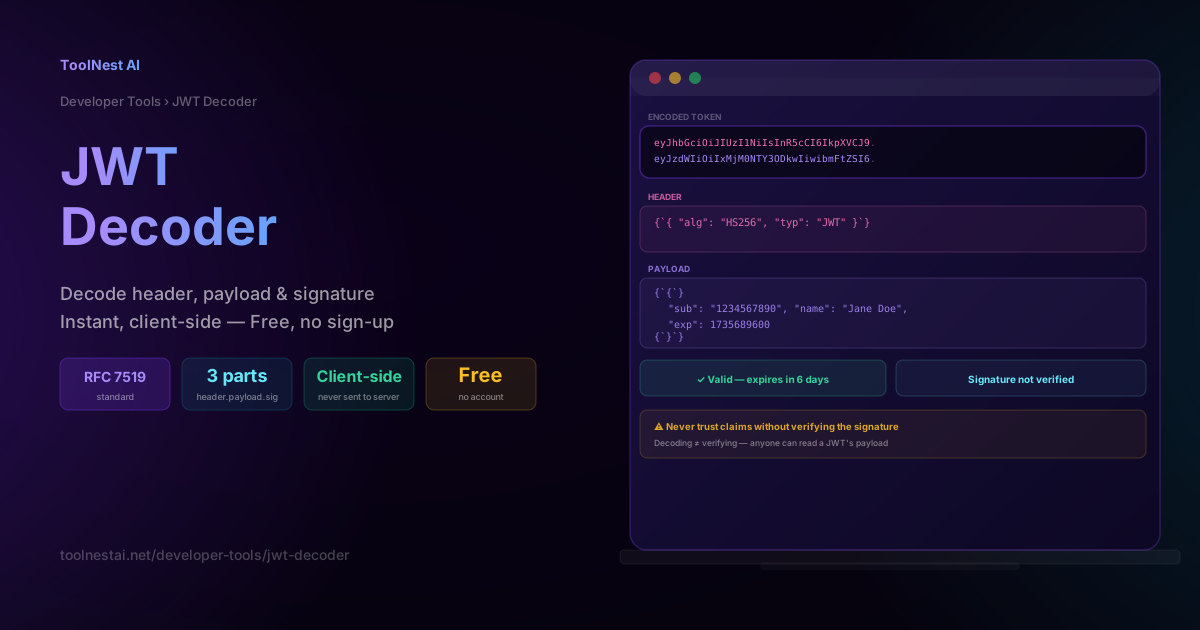
If you've worked with any modern API, you've seen a JWT — a long string starting with eyJ that gets attached to requests as Authorization: Bearer eyJhbGc.... JSON Web Tokens are the backbone of stateless authentication across web apps, mobile apps, and microservices. But there's a critical misunderstanding that trips up even experienced developers: decoding a JWT is not the same as verifying it.
This guide explains exactly what a JWT contains, how each of its three parts works, why anyone can read a JWT's payload without ever cracking anything, and the security mistakes that matter most. Decode any JWT instantly with the ToolNest AI JWT Decoder — entirely in your browser, nothing sent to a server.
What Is a JWT?
A JSON Web Token (JWT, pronounced "jot") is a compact, URL-safe way to represent a set of claims to be transferred between two parties. It's standardized in RFC 7519 and is the most common format used for authentication tokens in modern web APIs.
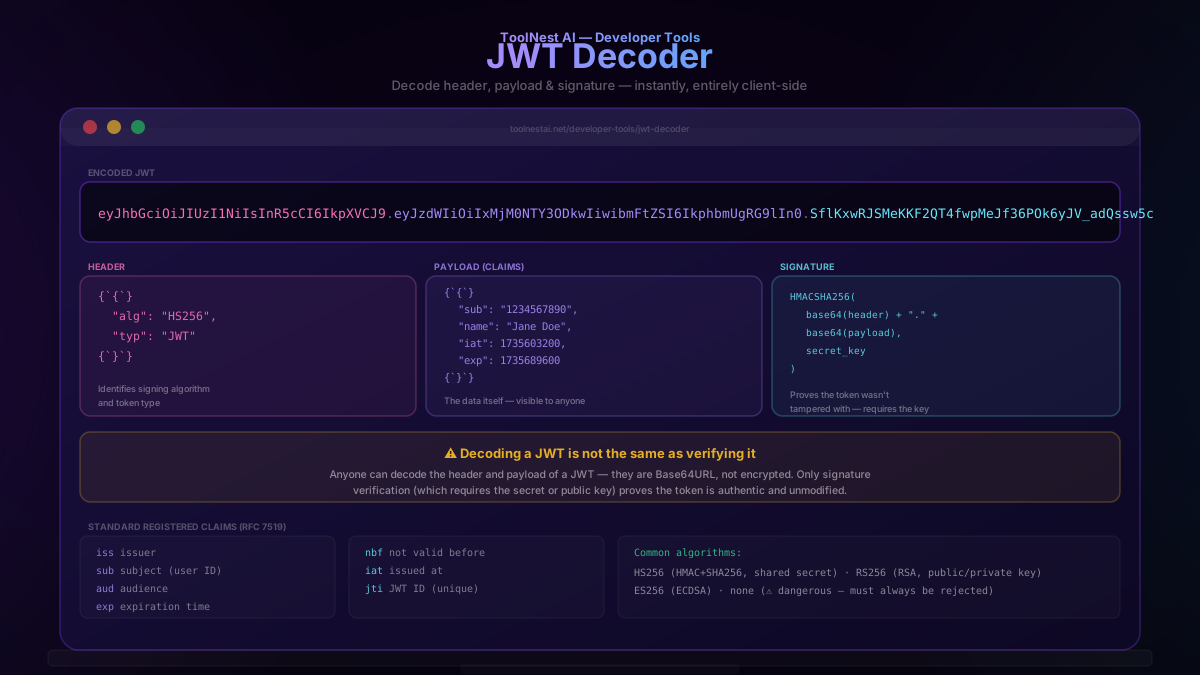
A JWT consists of exactly three Base64URL-encoded sections, separated by dots:
header.payload.signature
eyJhbGciOiJIUzI1NiIsInR5cCI6IkpXVCJ9.eyJzdWIiOiIxMjM0NTY3ODkwIiwibmFtZSI6IkphbmUgRG9lIn0.SflKxwRJSMeKKF2QT4fwpMeJf36POk6yJV_adQssw5c
The Three Parts of a JWT
1. Header
The header identifies the signing algorithm and token type:
{ "alg": "HS256", "typ": "JWT" }alg tells a verifier which algorithm was used to sign the token (commonly HS256 for HMAC-SHA256, or RS256 for RSA signatures). typ simply identifies this as a JWT.
2. Payload (Claims)
The payload holds the actual data — called "claims" — being transmitted:
{
  "sub": "1234567890",
  "name": "Jane Doe",
  "iat": 1735603200,
  "exp": 1735689600
}
This section is not encrypted — it is only Base64URL-encoded. Anyone with the token can decode and read every claim inside it. Never place secrets, passwords, or sensitive personal data directly in a JWT payload.
3. Signature
The signature proves the token was issued by a party holding the correct secret (or private) key, and that it has not been tampered with since:
HMACSHA256(
  base64UrlEncode(header) + "." + base64UrlEncode(payload),
  secret_key
)
This is the only part of a JWT that provides real security. The header and payload are just encoded data — readable and forgeable by anyone. Only a verifier holding the correct secret or public key can confirm the signature is valid.
Decoding vs Verifying — The Critical Distinction
This is the single most important thing to understand about JWTs: decoding a JWT and verifying a JWT are two completely different operations.
Decoding simply reverses the Base64URL encoding on the header and payload sections, revealing the JSON they contain. Any tool — including the ToolNest AI JWT Decoder — can do this instantly, without any key, because Base64URL is an encoding, not encryption.
Verifying recomputes the expected signature using the secret (or public) key and compares it to the signature embedded in the token. Only if they match is the token confirmed authentic and untampered.
A tool that only decodes a JWT (like most browser-based JWT inspectors, including this one) shows you exactly what the token claims — but it cannot tell you whether those claims are trustworthy. That determination requires the secret or public key, which should only exist on your server, never in a client-side tool.
Practical implication: if you paste a JWT into a decoder and it "looks valid" with sensible-looking claims, that tells you nothing about whether the token was legitimately issued. An attacker can construct a JWT with any header and payload they like — the only thing stopping them from using it is that they don't have the key needed to produce a signature your server will accept.
How JWT Authentication Works
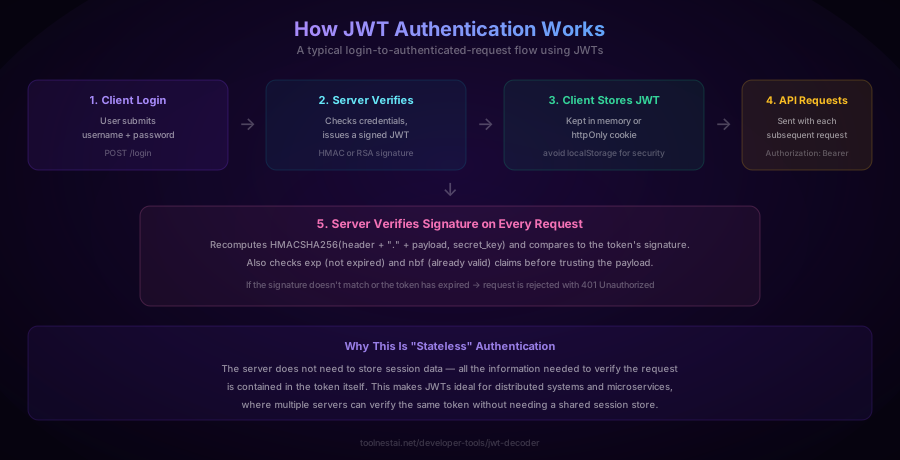
A typical JWT-based authentication flow:
- Client logs in — submits username and password to
/login - Server verifies credentials and issues a signed JWT containing the user's identity and an expiration time
- Client stores the JWT — ideally in an httpOnly, Secure, SameSite cookie (not localStorage — see security section below)
- Client sends the JWT with every subsequent API request, typically as
Authorization: Bearer <token> - Server verifies the signature on every request — recomputing the expected signature and checking the
exp(expiration) andnbf(not-before) claims before trusting anything in the payload
This is called stateless authentication because the server doesn't need to store session data anywhere — everything needed to verify the request is contained in the token itself, cryptographically sealed by the signature. This makes JWTs well-suited to distributed systems and microservices, where multiple independent servers can verify the same token without a shared session store.
Standard Registered Claims (RFC 7519)
| Claim | Meaning |
|---|---|
iss | Issuer — who created and signed the token |
sub | Subject — usually the user ID the token represents |
aud | Audience — the intended recipient(s) of the token |
exp | Expiration time (Unix timestamp) — token is invalid after this |
nbf | Not-before time — token is invalid before this |
iat | Issued-at time — when the token was created |
jti | JWT ID — a unique identifier for this specific token |
These claims are all optional per the spec, but exp in particular should almost always be present — a JWT with no expiration is valid forever unless explicitly revoked, which is a significant security liability.
Common signing algorithms:
- HS256 — HMAC with SHA-256, using a single shared secret key known to both the issuer and verifier
- RS256 — RSA signature with SHA-256, using an asymmetric key pair (private key signs, public key verifies) — better for systems where multiple services need to verify tokens but shouldn't be able to issue them
- ES256 — ECDSA with SHA-256, a smaller, faster asymmetric alternative to RS256
- none — explicitly no signature — dangerous and should always be rejected by verifiers
JWT Security — What Decoding Doesn't Protect You From
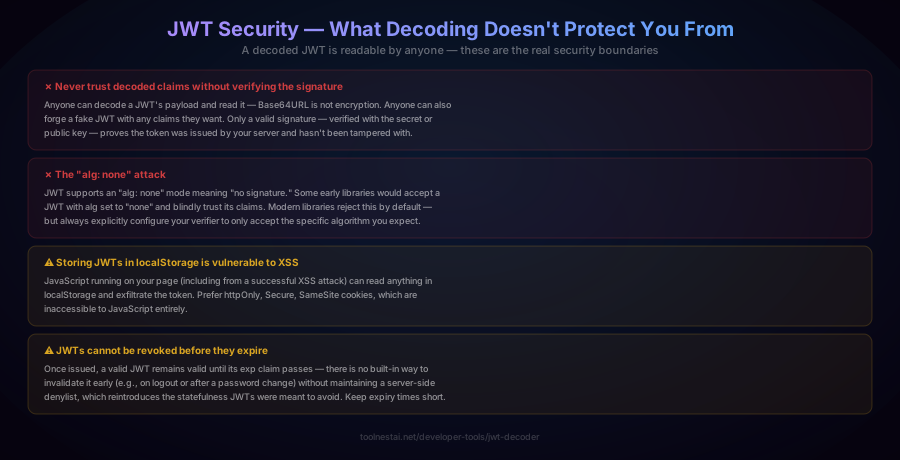
Never trust decoded claims without verifying the signature. This bears repeating: anyone can decode a JWT's payload, and anyone can construct a fake JWT with whatever claims they want. Only signature verification — done server-side, using the secret or public key — proves a token is authentic.
The "alg: none" attack. The JWT spec technically allows an alg value of "none", meaning the token is unsigned. Some early JWT libraries would accept such a token and blindly trust its claims — a critical vulnerability, since anyone could forge an unsigned token with alg: none and any payload they wanted. Modern libraries reject this by default, but you should always explicitly configure your JWT verifier to accept only the specific algorithm(s) you expect, never allowing the algorithm to be dictated by the token itself.
Storing JWTs in localStorage is vulnerable to XSS. Any JavaScript running on your page — including malicious code from a successful cross-site scripting attack — can read anything stored in localStorage and exfiltrate the token. Prefer httpOnly, Secure, SameSite cookies, which are completely inaccessible to JavaScript.
JWTs cannot be revoked before they expire. Once issued, a valid JWT remains valid until its exp claim passes. There is no built-in mechanism to invalidate a token early — for example, immediately after a user logs out or changes their password. Implementing early revocation requires a server-side denylist of invalidated token IDs (jti), which reintroduces some of the statefulness JWTs were designed to avoid. The practical mitigation is to keep expiration times short (minutes to hours, not days) and use refresh tokens for longer sessions.
How to Use the JWT Decoder
The ToolNest AI JWT Decoder runs entirely in your browser — your token is never transmitted to a server, which matters because JWTs often contain sensitive session identifiers.
- Paste your JWT into the input field
- View the decoded header and payload instantly, formatted as readable JSON
- Check the expiration status — the tool calculates whether
exphas passed and shows a human-readable countdown - Note the signature warning — the tool clearly indicates that the signature has not been cryptographically verified, since that requires the secret or public key which should never be exposed to a client-side tool
JWT Verification in Different Languages
Node.js (jsonwebtoken package):
const jwt = require('jsonwebtoken');

// Sign
const token = jwt.sign({ sub: '123', name: 'Jane Doe' }, 'your-secret', { expiresIn: '1h' });

// Verify (throws if invalid or expired)
const decoded = jwt.verify(token, 'your-secret');
Python (PyJWT):
import jwt

token = jwt.encode({"sub": "123", "exp": 1735689600}, "your-secret", algorithm="HS256")
decoded = jwt.decode(token, "your-secret", algorithms=["HS256"])
Go (golang-jwt):
token, _ := jwt.NewWithClaims(jwt.SigningMethodHS256, jwt.MapClaims{
    "sub": "123",
    "exp": time.Now().Add(time.Hour).Unix(),
}).SignedString([]byte("your-secret"))
Java (jjwt):
String token = Jwts.builder()
    .setSubject("123")
    .setExpiration(new Date(System.currentTimeMillis() + 3600000))
    .signWith(SignatureAlgorithm.HS256, "your-secret")
    .compact();
Note that in every language, verification requires explicitly specifying which algorithm(s) to accept — never rely on the algorithm advertised in the token's own header.
Common Mistakes
Mistake 1: Treating a decoded JWT as verified. As covered extensively above, this is the single most common and dangerous JWT mistake. Decoding is always safe and requires no key; trusting the claims without verification is a serious security flaw.
Mistake 2: Putting sensitive data in the payload. Because the payload is only encoded, not encrypted, anything placed there — passwords, credit card numbers, private personal data — is readable by anyone who obtains the token. Store only non-sensitive identifiers (user ID, role, permissions) in the payload.
Mistake 3: No expiration time. A JWT without an exp claim is valid indefinitely unless explicitly revoked. Always set a reasonably short expiration and use a refresh token mechanism for longer sessions.
Mistake 4: Accepting any algorithm the token specifies. Always hardcode the expected algorithm(s) in your verification code rather than trusting the alg field in the token's own header — this prevents algorithm-confusion and "none" algorithm attacks.
Mistake 5: Storing JWTs in localStorage or sessionStorage. Both are accessible to any JavaScript running on the page, making them vulnerable to token theft via XSS. Use httpOnly cookies whenever possible.
Frequently Asked Questions
What is a JWT?
A JSON Web Token (JWT) is a compact, URL-safe token format used to represent claims transferred between two parties, standardized in RFC 7519. It consists of three Base64URL-encoded parts — a header, a payload, and a signature — separated by dots. JWTs are most commonly used for stateless authentication in web APIs.
Is decoding a JWT the same as verifying it?
No, and this distinction is critical. Decoding simply reverses the Base64URL encoding to reveal the header and payload's JSON content — anyone can do this instantly without any key. Verifying recomputes the token's expected signature using the secret or public key and confirms it matches, which is the only way to prove the token is authentic and has not been tampered with. A decoder tool (like this one) only decodes; it does not and cannot verify, since that requires a key that should never be exposed client-side.
Can I read the contents of any JWT?
Yes. The header and payload of any JWT are only Base64URL-encoded, not encrypted, so anyone in possession of the token can decode and read every claim inside it. This is why sensitive data (passwords, personal information) should never be placed directly in a JWT payload.
What does the "exp" claim mean?
exp (expiration) is a standard JWT claim containing a Unix timestamp after which the token should no longer be accepted. A JWT verifier checks this value on every request and rejects the token if the current time is past exp. Tokens without an exp claim remain valid indefinitely unless separately revoked, which is generally considered poor security practice.
Why can't JWTs be revoked before they expire?
JWT-based authentication is designed to be stateless — the server verifies a token using cryptography alone, without checking a database or session store. This means there is no built-in mechanism to invalidate a specific token early (for example, immediately after logout). Implementing early revocation requires maintaining a server-side denylist of revoked token IDs, which reintroduces the statefulness JWTs were meant to avoid. The common mitigation is to use short-lived access tokens combined with a separate, revocable refresh token.
What is the difference between HS256 and RS256?
HS256 (HMAC with SHA-256) uses a single shared secret key for both signing and verifying — the same secret must be known to any party that issues or verifies tokens. RS256 (RSA with SHA-256) uses an asymmetric key pair: a private key signs tokens, and a public key (which can be shared freely) verifies them. RS256 is preferred when multiple independent services need to verify tokens but only one trusted service should be able to issue them.
Where should I store a JWT on the client?
The safest option is an httpOnly, Secure, SameSite cookie, which is inaccessible to JavaScript and therefore protected against theft via cross-site scripting (XSS). Storing a JWT in localStorage or sessionStorage is common but riskier, since any JavaScript running on the page — including code injected through an XSS vulnerability — can read and exfiltrate it.
Why does my JWT decoder show a warning about signature verification?
Because a client-side decoding tool (like the ToolNest AI JWT Decoder) has no access to the secret or public key needed to verify the signature — and it shouldn't, since exposing that key client-side would defeat its purpose. The tool decodes and displays the header and payload for inspection, and clearly flags that this does not constitute proof the token is valid. Signature verification must always happen on a trusted server that holds the appropriate key.
About the author
ToolNest AI Team
The ToolNest AI team builds free tools that help developers, marketers, and creators do more online — faster.
Related Articles
Base64 Encoder & Decoder: Complete Guide + Free Online Tool
Learn how Base64 encoding works, when to use it, the difference between Base64 and Base64URL, real-world use cases in JWTs, data URIs, and MIME email, and how to encode or decode anything free online.
Hash Generator: MD5, SHA-1, SHA-256, SHA-512 Explained + Free Tool
Learn how cryptographic hash functions work, why MD5 and SHA-1 are broken, the avalanche effect, hashing vs encryption vs encoding, and how to hash text or files free online.