Open Graph Generator: Create Perfect Social Preview Cards Free
Learn how Open Graph tags work, which tags every page needs, and how to generate them instantly with a free OG generator. Includes live previews for Facebook, LinkedIn, Twitter/X, and Discord.
ToolNest AI Team
Author
Published
You spend time writing the perfect blog post or product page. Someone shares the link on LinkedIn. Instead of a rich preview card with your headline, image, and description — the platform shows a blank card, a random image grabbed from the page, or nothing at all.
That is what happens without Open Graph tags.
Open Graph (OG) tags are HTML meta tags that tell social platforms exactly what to show when someone shares your URL. They control the title, description, and image in every link preview — on Facebook, LinkedIn, Twitter/X, Discord, WhatsApp, and Slack.
This guide explains what OG tags are, which ones every page needs, the most common mistakes, and how to generate them for any page in under a minute using a free tool.
What Are Open Graph Tags?
Open Graph is a protocol created by Facebook in 2010. It gives website owners a way to control how their pages appear when shared on social platforms.
The protocol works through <meta> tags placed in the <head> section of an HTML page. Each tag uses a property attribute prefixed with og: and a content attribute that holds the value.
<meta property="og:title" content="Your Page Title" />
<meta property="og:description" content="A compelling description of this page." />
<meta property="og:image" content="https://yoursite.com/og-image.jpg" />
<meta property="og:url" content="https://yoursite.com/your-page" />
When someone shares your URL, the social platform's crawler reads these tags and uses them to build the preview card. Without them, the crawler guesses — and it almost always guesses wrong.
Every major social platform now supports the Open Graph protocol:
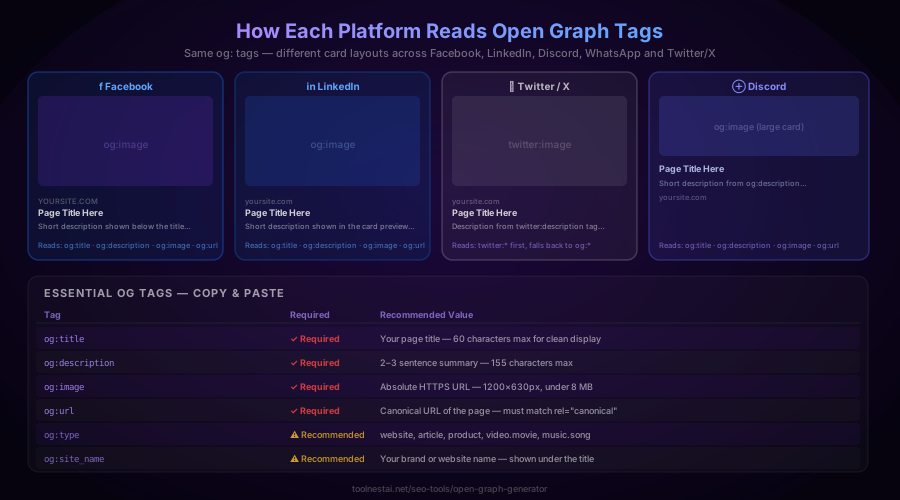
- Facebook and Instagram — read og: tags natively
- LinkedIn — reads og: tags; crawls frequently
- Discord — reads og: tags and displays large image cards
- WhatsApp and Telegram — read og: tags for link previews
- Twitter/X — has its own twitter: tags but falls back to og: when twitter: tags are absent
- Slack — reads og: tags for link unfurling
One set of OG tags covers every platform. Add Twitter Card tags on top and you have complete coverage everywhere.
Why Open Graph Tags Matter for SEO and Engagement
OG tags are not a direct Google ranking factor, but they have a measurable indirect effect on search performance.
Click-through rate from social. When your shared links show a professional-looking card with a relevant image and clear title, people click. When they show a blank or broken card, they scroll past. Higher click-through from social drives more traffic, which signals quality to Google.
Backlink generation. Shared content with rich previews gets more engagement, more re-shares, and more people linking to it naturally. Links from authoritative sites are a core ranking signal.
Brand authority. Consistent, polished social cards across every share of your content builds recognition and trust. Both matter to users and indirectly to search engines.
Google's secondary signals. Google does read og:title and og:description as secondary inputs when determining page relevance — especially if a page's HTML title or meta description is missing or weak.
The numbers support prioritising OG tags. Pages with optimised social preview cards consistently generate higher click-through rates from social shares. A missing or broken og:image alone can reduce clicks by 50–70% compared to a page with a well-designed card.
The 4 Required Open Graph Tags
Every page that can be shared needs at minimum these four tags.
og:title
<meta property="og:title" content="Open Graph Generator — Create Social Cards Free" />The title shown in the link preview card. Keep it under 60 characters so it does not get truncated on mobile. Place your primary keyword near the start. It can differ from your page's <title> tag — some marketers write a slightly different version optimised for social sharing rather than search.
og:description
<meta property="og:description" content="Generate perfect OG tags for Facebook, LinkedIn, Twitter and Discord. Free tool — live preview — no sign-up." />The description shown below the title in the card. Aim for 2–3 sentences and keep it under 155 characters. Include a soft call to action when it fits naturally. Make it specific to this page — not a generic description of your whole site.
og:image
<meta property="og:image" content="https://yoursite.com/og-image.jpg" />The image shown in the card. This is the most important tag — a strong, relevant image is what makes people stop scrolling and click.
Image requirements:
- Dimensions: 1200×630 pixels (1.91:1 ratio)
- Minimum: 600×315 pixels (shows as thumbnail on some platforms if smaller)
- Format: JPG or PNG — SVGs are not universally supported
- File size: Under 8 MB
- URL: Must be absolute HTTPS — relative paths (
/images/hero.jpg) are not read by social crawlers
Add these companion tags so platforms do not have to re-download the image to check dimensions:
<meta property="og:image:width" content="1200" />
<meta property="og:image:height" content="630" />
<meta property="og:image:alt" content="Description of the image for accessibility" />
og:url
<meta property="og:url" content="https://www.yoursite.com/your-page" />The canonical URL of the page. This must match your <link rel="canonical"> tag exactly — same domain, same www or non-www, same trailing slash behaviour. Mismatches confuse social platform crawlers and can split link equity across multiple URLs.
Recommended Open Graph Tags
Beyond the four required tags, these additions improve how your pages appear across platforms.
og:type
<meta property="og:type" content="article" />Tells platforms what kind of content this is. Valid values include website (default), article, product, video.movie, music.song, and profile. Using article for blog posts unlocks additional article-specific tags.
og:site_name
<meta property="og:site_name" content="ToolNest AI" />Your brand name. Shown below the preview card title on Facebook and LinkedIn. Helps with brand recognition when your content is shared widely.
og:locale
<meta property="og:locale" content="en_US" />The language and region of your content. Uses IETF format: en_US, en_GB, fr_FR, de_DE. Defaults to en_US if omitted.
Twitter Card Tags
Twitter/X uses its own tag system. If twitter: tags are present, Twitter uses them. If they are absent, Twitter falls back to og: tags. Adding twitter: tags lets you optimise specifically for X without affecting other platforms.
<meta name="twitter:card" content="summary_large_image" />
<meta name="twitter:title" content="Open Graph Generator — Free Social Card Builder" />
<meta name="twitter:description" content="Generate OG tags for any page. Live preview on Facebook, LinkedIn, Discord and Twitter/X." />
<meta name="twitter:image" content="https://yoursite.com/og-image.jpg" />
<meta name="twitter:site" content="@YourTwitterHandle" />
twitter:card values:
summary_large_image— full-width image card (recommended for most pages)summary— small thumbnail image beside textapp— for mobile app cardsplayer— for embedded video/audio
Use summary_large_image for blog posts, product pages, and landing pages. Use summary for profile pages and short content.
Article-Specific Open Graph Tags
When og:type is set to article, these additional tags add structured context that Facebook and some aggregators use to categorise and display your content:
<meta property="article:published_time" content="2026-07-28T09:00:00Z" />
<meta property="article:modified_time" content="2026-07-28T09:00:00Z" />
<meta property="article:author" content="https://yoursite.com/about" />
<meta property="article:section" content="SEO" />
<meta property="article:tag" content="open graph" />
<meta property="article:tag" content="meta tags" />
Use ISO 8601 format for dates. The article:author value can be a URL pointing to an author profile page, or a plain text name.
How Platforms Read Open Graph Tags
Every platform handles OG tags slightly differently. Understanding the differences helps you optimise for each one.
Facebook and Instagram
Facebook caches OG data aggressively — up to several weeks. After updating your OG tags, use the Facebook Sharing Debugger to force a cache refresh. Enter your URL and click "Scrape Again." Instagram shares the same cache, so refreshing via the Sharing Debugger clears both.
Facebook truncates og:title at around 60–65 characters and og:description at around 110 characters in mobile views. Test at both desktop and mobile sizes.
LinkedIn crawls OG tags within a few minutes of a URL being shared. It reads og:title, og:description, og:image, and og:url. The image aspect ratio LinkedIn expects is 1.91:1 — exactly the 1200×630px recommendation. LinkedIn has its own Post Inspector for cache clearing.
Twitter / X
Twitter reads twitter: tags first, then falls back to og:. The summary_large_image card type shows a 2:1 aspect ratio image with title and description below. Twitter truncates the title at around 70 characters and description at around 125 characters. Use Twitter Card Validator to preview and debug.
Discord
Discord reads og:title, og:description, and og:image and renders a large embed card in messages. It does not cache as aggressively as Facebook — updates usually propagate within minutes. Discord renders the image at the full available width, so the 1200×630px ratio looks sharp.
WhatsApp and Telegram
Both read og:title, og:description, and og:image. WhatsApp shows a square crop of the image for some link types. Telegram shows the full og:image in a link preview. Neither has a developer debugging tool — test by sharing the URL directly.
5 Common Open Graph Mistakes
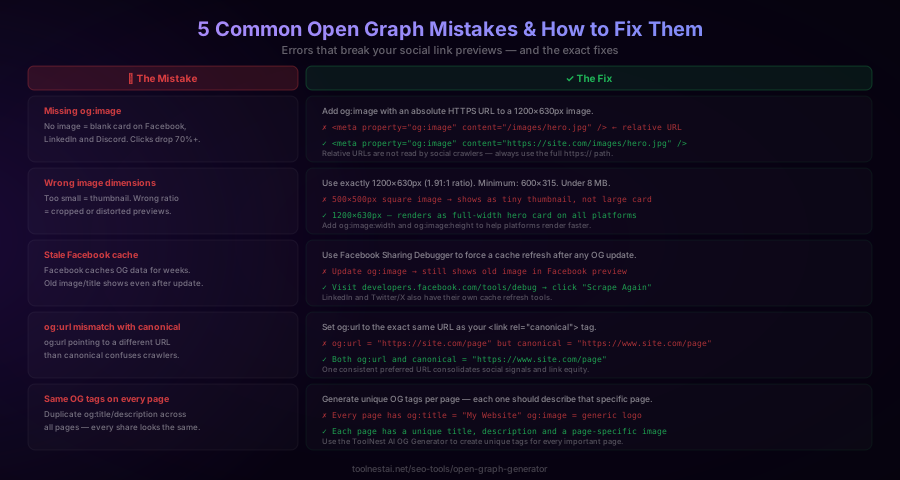
1. Missing og:image
A page with no og:image gets a blank card on Facebook, LinkedIn, and Discord. WhatsApp tries to grab any image from the page — usually picking something irrelevant. The fix is simple: add an absolute HTTPS URL to a 1200×630 image.
2. Using a relative URL for og:image
<!-- Wrong — social crawlers cannot resolve relative paths -->
<meta property="og:image" content="/images/blog-hero.jpg" />

<!-- Correct — absolute HTTPS URL -->
<meta property="og:image" content="https://yoursite.com/images/blog-hero.jpg" />
Social platform crawlers operate independently from your website's server. They cannot resolve relative paths. The image URL must always be the full https:// URL.
3. Wrong image dimensions
An image that is too small (under 600×315) will appear as a tiny thumbnail instead of a large card on Facebook and LinkedIn. An incorrect aspect ratio results in cropping. Always use 1200×630 pixels.
4. og:url mismatching canonical
If your og:url points to https://yoursite.com/page but your canonical tag says https://www.yoursite.com/page, social platforms and Google see two different URLs. Social shares split across both. Keep og:url and <link rel="canonical"> identical.
5. Identical OG tags across all pages
Using the same og:title, og:description, and og:image on every page means every link shared from your site looks identical. Each page needs unique tags that describe that specific piece of content.
The Complete OG Tag Checklist
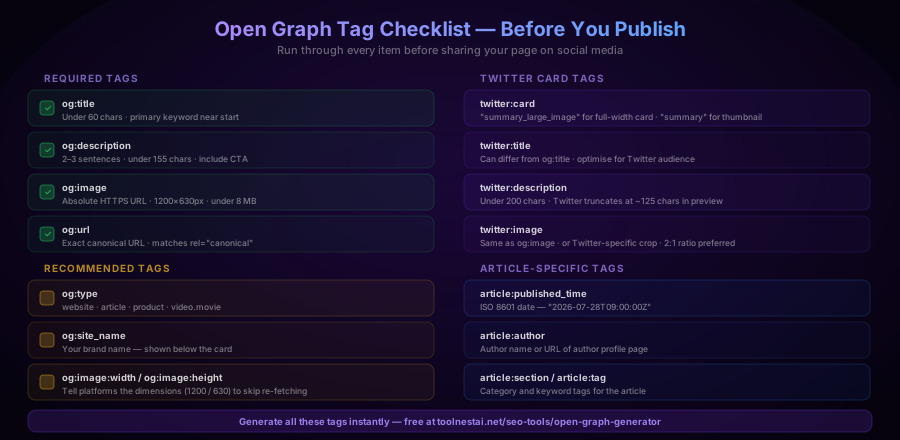
Before publishing any page that will be shared on social media, verify these items:
Required (every page)
-
og:title— under 60 characters, primary keyword near start -
og:description— 2–3 sentences, under 155 characters -
og:image— absolute HTTPS URL, 1200×630px, under 8 MB -
og:url— exact canonical URL, matches<link rel="canonical">
Recommended
-
og:type— website, article, product, etc. -
og:site_name— your brand name -
og:image:widthandog:image:height—1200and630 -
og:image:alt— accessibility description of the image
Twitter/X
-
twitter:card—summary_large_imageorsummary -
twitter:title— can differ from og:title -
twitter:description— under 125 characters -
twitter:image— same as og:image, or a Twitter-optimised crop
Articles
-
article:published_time— ISO 8601 format -
article:author— author URL or name -
article:section— category -
article:tag— one tag per meta tag, repeat for multiple
How to Generate Open Graph Tags for Any Page
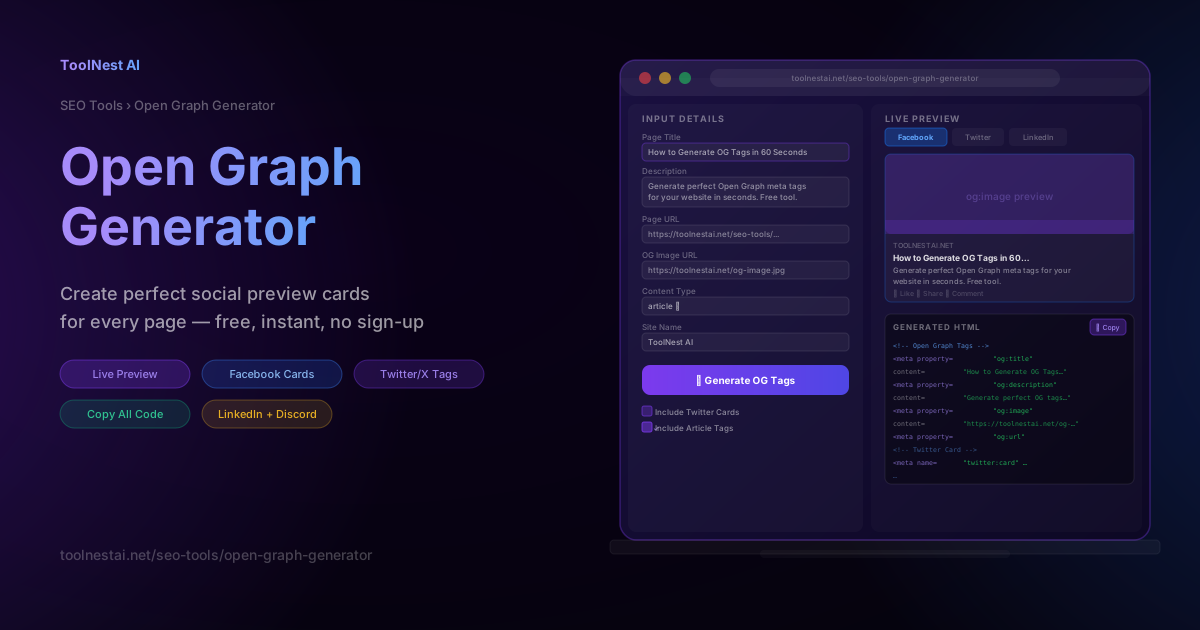
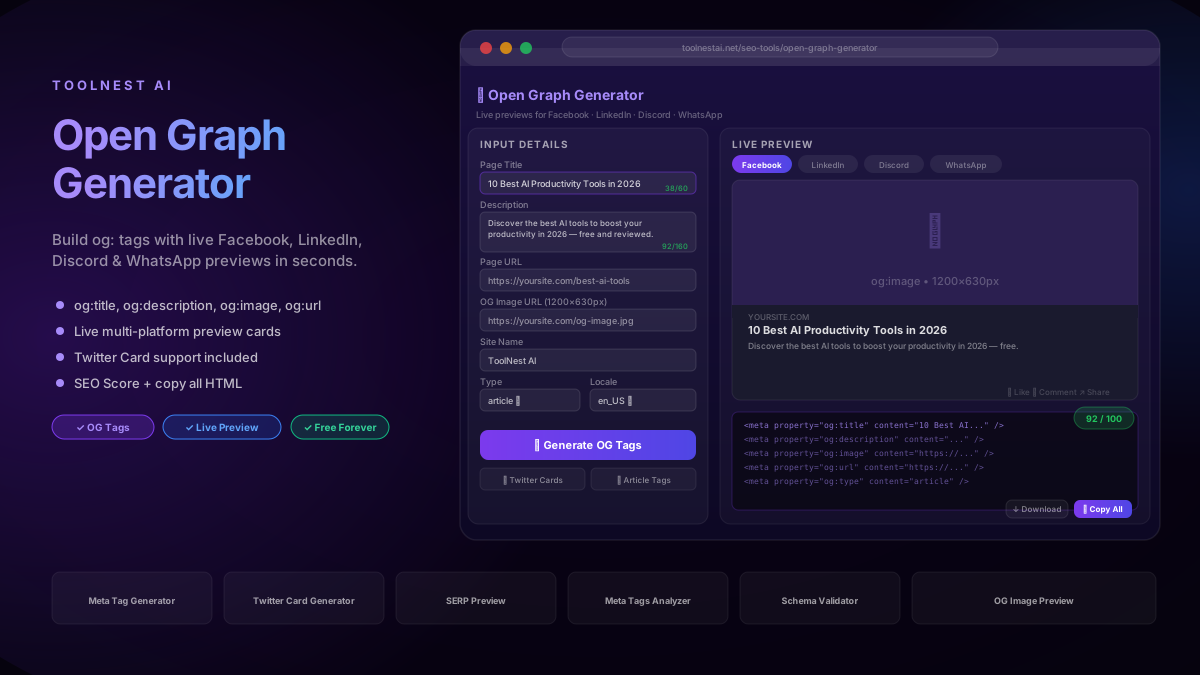
Writing OG tags from scratch is error-prone and slow, especially when you have dozens of pages. The ToolNest AI Open Graph Generator lets you create a complete set of OG and Twitter Card tags in under a minute.
Step 1: Enter your page title
Type your title in the Page Title field. The character counter turns green when you are under 60 characters. Include your primary keyword naturally near the start.
Step 2: Write your description
Add a 2–3 sentence description in the Description field. Keep it under 155 characters. The counter warns you if you exceed the recommended length.
Step 3: Add your image URL
Paste the full HTTPS URL to your 1200×630px image. The tool validates that it is an absolute URL and warns you if the format looks wrong.
Step 4: Set your page URL and content type
Enter the canonical URL exactly as it appears in your page's <link rel="canonical"> tag. Choose the appropriate content type — website for homepages and category pages, article for blog posts.
Step 5: Preview and copy
Switch between the Facebook, LinkedIn, Twitter, and Discord preview tabs to see how your card will appear on each platform. When you are happy with the result, click "Copy All" to copy the complete HTML block and paste it into your page's <head> section.
The generator creates the full set: og:title, og:description, og:image, og:url, og:type, og:site_name, og:image:width, og:image:height, twitter:card, twitter:title, twitter:description, and twitter:image — all from a single form.
OG Generator vs. Manual Coding
You can write OG tags by hand, use a CMS plugin, or use a generator tool. Here is when each approach makes sense.
Manual coding makes sense when you need precise control over every attribute, are building a custom CMS or framework integration, or are generating tags dynamically via server-side code. The downside is no live preview, and mistakes are easy to miss until after publishing.
CMS plugins (Yoast for WordPress, Rank Math, Squarespace built-in) work well for sites where most content follows the same template. They break down when you need per-page customisation, non-standard content types, or platform-specific overrides.
A free generator tool like the ToolNest AI Open Graph Generator is ideal for:
- Landing pages and campaign pages that need custom OG tags
- Checking what tags a page will produce before launch
- One-off articles and product pages
- Auditing existing pages by generating what the tags should say and comparing to the source
- Teams without developer access who need to produce correct HTML to hand off
For most content marketers, SEOs, and developers working on static or custom pages, a generator with live preview is the fastest path from zero to correct, validated OG tags.
Frequently Asked Questions
What is an Open Graph Generator?
An Open Graph Generator is a free tool that lets you fill in a form with your page title, description, image URL, and page URL, then outputs the correct HTML <meta> tags you need to paste into your page's <head> section. It removes the need to write the tags manually and typically includes a live preview of how your link will appear on platforms like Facebook and LinkedIn.
Do Open Graph tags affect SEO?
OG tags are not a direct Google ranking factor, but they have significant indirect effects. Better social previews generate higher click-through rates from shared links, which increases traffic. More shares can lead to more natural backlinks. Google also reads og:title and og:description as secondary signals when evaluating page relevance, particularly when the HTML title or meta description is weak or missing.
What is the best og:image size?
The recommended og:image size is 1200×630 pixels at a 1.91:1 aspect ratio. This is the optimal size for Facebook, LinkedIn, and Discord. Twitter/X uses a 2:1 crop of the image when twitter:card is set to summary_large_image. The minimum acceptable size is 600×315 pixels — below that, many platforms show a tiny thumbnail instead of a large card.
How do I update OG tags after they are cached?
Facebook caches OG data for several weeks. After updating your tags, use the Facebook Sharing Debugger and click "Scrape Again" to force a refresh. LinkedIn has a similar Post Inspector tool. Twitter/X typically clears its cache within a few hours. Discord and WhatsApp update faster — usually within minutes of the page being re-crawled.
Can I use the same OG image on every page?
Technically yes, but it is bad practice. When every page uses the same image, all shares from your site look identical. Users cannot tell from the preview card what the specific link is about. Best practice is to create a unique og:image for every important page — or at least for every category of content (blog posts, product pages, landing pages).
What happens if I do not add Twitter Card tags?
If twitter: tags are absent, Twitter/X falls back to your og: tags. Your links will still show a preview card, but it will use the og:title, og:description, and og:image values. The card type will default to summary (small thumbnail). If you want the large summary_large_image card on Twitter, you must explicitly add <meta name="twitter:card" content="summary_large_image" />.
Do OG tags work for videos?
Yes. Set og:type to video.movie or video.other and add og:video, og:video:url, og:video:type, og:video:width, and og:video:height tags. Facebook and Twitter support video embeds through OG tags. Most other platforms fall back to showing the og:image when they cannot embed the video directly.
How long does it take for new OG tags to appear on social platforms?
LinkedIn usually crawls within minutes of a URL being shared. Discord and Telegram update quickly as well. Facebook and Instagram cache aggressively and can take days unless you manually trigger a re-scrape through the Sharing Debugger. WhatsApp and Slack typically update within an hour of the page being shared again.
About the author
ToolNest AI Team
The ToolNest AI team builds free tools that help developers, marketers, and creators do more online — faster.
Related Articles
Meta Tag Generator: Create Perfect SEO Meta Tags (2026 Guide)
Learn how to use a meta tag generator to create perfect SEO meta tags — title, description, robots, canonical, Open Graph and Twitter Card — in under 10 seconds.