JSON vs YAML: Converting Between Formats and the Pitfalls to Avoid
A complete guide to converting between JSON and YAML — syntax differences, data type mapping, the Norway problem, YAML 1.1 vs 1.2, multiline strings, anchors, and JavaScript/Python code for both directions.
ToolNest AI Team
Author
Published
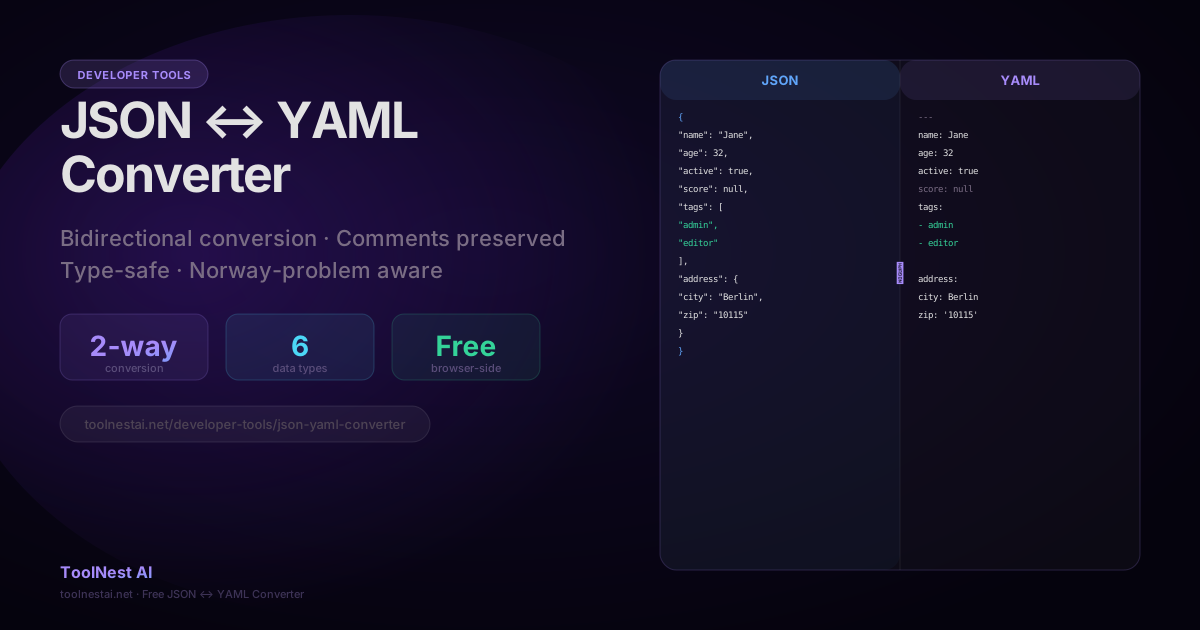
JSON and YAML are both human-readable data serialization formats, but they serve different contexts and have meaningfully different syntax. JSON is the language of APIs and JavaScript runtimes. YAML is the language of configuration files — Kubernetes, Docker Compose, GitHub Actions, Ansible, and most CI/CD systems use it exclusively.
Converting between them is a common task: pulling a Kubernetes manifest into a script that expects JSON, or turning an API response into a readable YAML config. It's straightforward in the common case — but both formats have sharp edges that can corrupt data silently.
Convert between JSON and YAML instantly with the ToolNest AI JSON ↔ YAML Converter — bidirectional, type-safe, Norway-problem aware.
JSON and YAML Side by Side
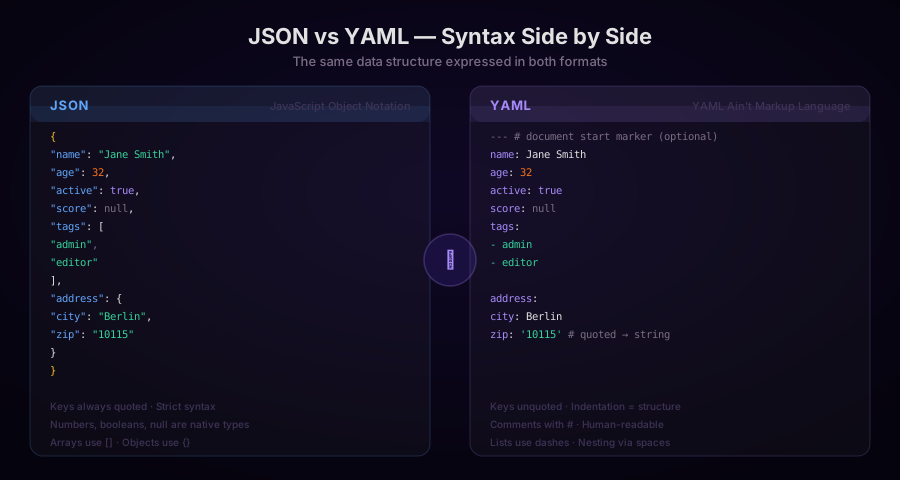
The same data structure looks very different in each format. JSON requires quotes on all keys and string values, uses {} and [] for structure, and has no comment syntax. YAML uses indentation for structure, omits quotes on most values, and supports # comments.
| Feature | JSON | YAML |
|---|---|---|
| Key syntax | "key": value | key: value |
| String values | Always quoted | Unquoted unless needed |
| Nesting | {} brackets | Indentation (2 spaces) |
| Arrays | [item, item] | - item (dash-space) |
| Comments | Not supported | # comment |
| Boolean | true / false | true / false (also yes / no in YAML 1.1) |
| Null | null | null / ~ |
| Multiline strings | \n escape sequences | ` |
| Anchors / aliases | Not supported | &anchor and *alias |
| Multiple documents | Not supported | --- separator |
Data Type Mapping
When converting between JSON and YAML, types are generally preserved — with some important caveats.
Strings
JSON strings are always double-quoted. In YAML, most strings don't need quotes. But some values that look like strings are parsed as other types in YAML 1.1 parsers:
# These are strings in JSON — but NOT in YAML 1.1:
country: NO       # parsed as false (boolean!)
flag: YES         # parsed as true
port: 0777        # parsed as 511 (octal!)
time: 1:30        # parsed as 90 (sexagesimal!)

# Fix: quote them
country: "NO"
flag: "YES"
port: "0777"
time: "1:30"
Numbers
JSON and YAML both support integers and floats. YAML 1.1 additionally supports:
- Octal (prefixed with
0):0777= 511 - Hexadecimal (prefixed with
0x):0xFF= 255 - Sexagesimal (colon-separated):
1:30:00= 5400
These are removed in YAML 1.2. Use YAML 1.2 parsers (PyYAML 6+, Go's gopkg.in/yaml.v3, js-yaml 4+) to avoid these surprises.
Booleans
JSON has exactly two boolean values: true and false. YAML 1.1 recognizes many more:
| YAML 1.1 boolean synonyms |
|---|
true, True, TRUE, yes, Yes, YES, on, On, ON → true |
false, False, FALSE, no, No, NO, off, Off, OFF → false |
YAML 1.2 reduces this to true / false only, matching JSON.
When converting YAML to JSON, a YAML 1.1 parser that reads NO as false will produce false in the JSON — which is incorrect if the intent was the string "NO" (the country code for Norway).
Null
JSON: null. YAML: null, Null, NULL, or ~. All are equivalent and convert cleanly.
YAML Pitfalls in Depth
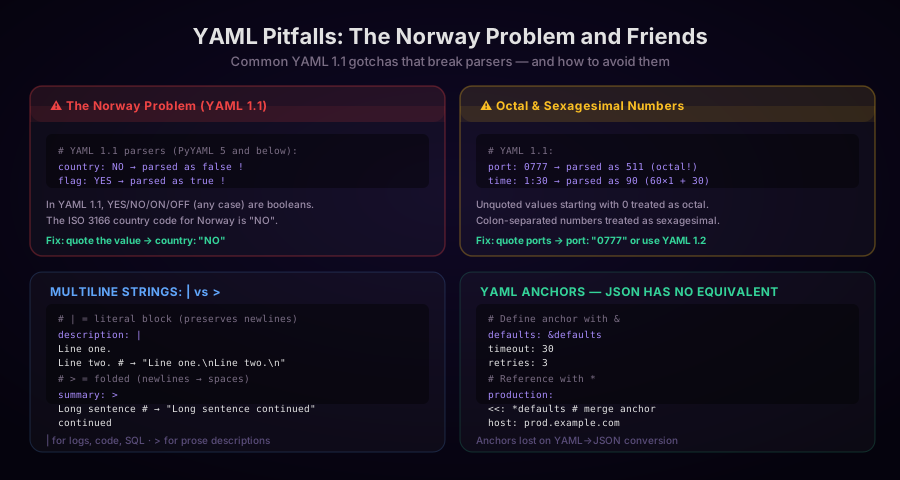
The Norway Problem
In 2022, a vulnerability report surfaced in the Kubernetes ecosystem where YAML configuration files containing country codes were misparsed. The ISO 3166 country code for Norway is NO. In YAML 1.1:
# This is a valid Kubernetes label value
region: NO
# But PyYAML 5.x reads it as: {"region": False}
The correct fix is to quote string values that could be mistaken for booleans:
region: "NO"    # Explicitly a string
region: 'NO'    # Single quotes also work
Countries affected: Norway (NO), Sweden? No — actually SE is safe. The affected codes are any that match YAML 1.1's boolean patterns: NO, YES (and their case variants).
Octal and Sexagesimal Traps
# YAML 1.1 traps:
file_permissions: 0644    # Parsed as octal 420, not integer 644
version: 1.0.0            # String (contains two dots — safe)
timestamp: 5:30           # Parsed as 330 (5×60 + 30)

# YAML 1.2 / modern parsers:
file_permissions: 0644    # Now a string starting with 0
If you're using file permission values in YAML configs, always quote them.
JSON to YAML: Code Examples
JavaScript (js-yaml)
import yaml from 'js-yaml';

const jsonData = {
  name: "Jane Smith",
  age: 32,
  active: true,
  score: null,
  roles: ["admin", "editor"],
  address: { city: "Berlin", zip: "10115" }
};

// JSON → YAML
const yamlString = yaml.dump(jsonData, {
  indent: 2,
  lineWidth: 80,
  noRefs: true,    // Don't use YAML anchors for repeated objects
});

console.log(yamlString);
/*
name: Jane Smith
age: 32
active: true
score: null
roles:
  - admin
  - editor
address:
  city: Berlin
  zip: '10115'
*/
Note that zip: '10115' is quoted because 10115 without quotes would be parsed as an integer on the round-trip back.
JavaScript: YAML → JSON
import yaml from 'js-yaml';
import { readFileSync } from 'fs';

const yamlText = readFileSync('config.yaml', 'utf8');

// YAML → JavaScript object → JSON string
const parsed = yaml.load(yamlText, {
  schema: yaml.DEFAULT_SAFE_SCHEMA,  // Rejects unsafe constructs
});

const jsonString = JSON.stringify(parsed, null, 2);
console.log(jsonString);
Schema options in js-yaml:
yaml.DEFAULT_SAFE_SCHEMA— Rejects JavaScript-specific types, safe for untrusted inputyaml.JSON_SCHEMA— Strict JSON compatibility: only JSON types, YAML 1.2 semanticsyaml.CORE_SCHEMA— YAML 1.2 core schema (default in js-yaml 4+)yaml.DEFAULT_SCHEMA— Includes JavaScript-specific types (RegExp, etc.) — only for trusted input
Python: JSON → YAML
import json
import yaml

with open('data.json', 'r') as f:
    data = json.load(f)

# Python object → YAML string
yaml_string = yaml.dump(data,
    default_flow_style=False,   # Block style (readable)
    allow_unicode=True,          # Don't escape Unicode
    sort_keys=False,             # Preserve key order
    indent=2,
)

print(yaml_string)
Python: YAML → JSON
import json
import yaml

with open('config.yaml', 'r') as f:
    # Use safe_load to avoid arbitrary code execution
    data = yaml.safe_load(f)

json_string = json.dumps(data, indent=2, ensure_ascii=False)
print(json_string)
Always use yaml.safe_load(), never yaml.load() — the unsafe variant can execute arbitrary Python code when parsing specially crafted YAML (a documented security issue).
Go: JSON to YAML
package main

import (
    "encoding/json"
    "fmt"
    "gopkg.in/yaml.v3"
)

func jsonToYAML(jsonData []byte) ([]byte, error) {
    var obj interface{}
    if err := json.Unmarshal(jsonData, &obj); err != nil {
        return nil, err
    }
    return yaml.Marshal(obj)
}

func yamlToJSON(yamlData []byte) ([]byte, error) {
    var obj interface{}
    if err := yaml.Unmarshal(yamlData, &obj); err != nil {
        return nil, err
    }
    return json.Marshal(obj)
}
YAML Features with No JSON Equivalent
When converting YAML to JSON, some YAML constructs have no direct representation and must be resolved:
Anchors and Aliases
YAML allows defining a block once and referencing it multiple times:
defaults: &defaults
  timeout: 30
  retries: 3

production:
  <<: *defaults    # Merge anchor
  host: prod.example.com

staging:
  <<: *defaults
  host: staging.example.com
When converted to JSON, anchors are resolved (expanded) — the resulting JSON contains duplicate data:
{
  "defaults": { "timeout": 30, "retries": 3 },
  "production": { "timeout": 30, "retries": 3, "host": "prod.example.com" },
  "staging": { "timeout": 30, "retries": 3, "host": "staging.example.com" }
}
Comments
YAML supports # comments. JSON does not. Comments are lost in YAML → JSON conversion.
Multiple Documents
YAML files can contain multiple documents separated by ---:
---
name: document-one
---
name: document-two
JSON has no equivalent. When converting, each document must be handled separately and typically becomes one JSON object in an array.
Ordered Maps and Tagged Types
YAML supports ordered maps (keys preserve insertion order) and tagged types (!!python/tuple, !!binary, etc.). These have no JSON equivalent and are typically discarded or converted to the nearest JSON type.
When to Use JSON vs YAML
| Use case | Recommended format | Reason |
|---|---|---|
| REST API response | JSON | Universal browser/JS support |
| Kubernetes manifest | YAML | K8s convention; YAML allows comments |
| Docker Compose | YAML | Compose spec uses YAML |
| GitHub Actions | YAML | Workflow convention |
| package.json, tsconfig | JSON | Node.js ecosystem |
| Ansible playbook | YAML | Ansible convention |
| API request body | JSON | Simpler and more widely supported |
| CI/CD config (Jenkins, CircleCI) | YAML | Pipeline convention |
| Config files humans edit | YAML | Comments, more readable nesting |
| Machine-generated data | JSON | Faster to parse, no indentation edge cases |
Frequently Asked Questions
Is YAML a superset of JSON?
YAML 1.2 is a superset of JSON — any valid JSON is also valid YAML 1.2. YAML 1.1 (older parsers) is not a strict superset due to differences in boolean handling and string quoting rules.
Why does zip: 10115 become zip: '10115' after JSON→YAML conversion?
The zip code 10115 without quotes in YAML would be parsed as the integer 10115. When converted back to JSON it would become 10115 (integer), not "10115" (string). Since the original JSON had it as a string, a well-implemented converter quotes it in YAML to preserve the type on round-trip.
Can YAML comments survive a round-trip through JSON?
No. JSON has no comment syntax. Comments in YAML are lost when converting YAML→JSON→YAML. If you need to preserve documentation, keep the YAML original and don't convert to JSON.
How do I handle YAML anchors when converting to JSON?
Anchors are resolved (expanded) during conversion. The reference is replaced with a copy of the anchored value. This means the output JSON may contain duplicated data structures.
Is it safe to use yaml.load() in Python?
No. yaml.load() with the default Loader argument executes arbitrary Python code embedded in the YAML document. Always use yaml.safe_load() for untrusted input. The PyYAML documentation marks yaml.load() as unsafe and recommends safe_load explicitly.
About the author
ToolNest AI Team
The ToolNest AI team builds free tools that help developers, marketers, and creators do more online — faster.
Related Articles
CSS Minification: How It Works, What It Removes, and How Much It Saves
A complete guide to CSS minification — the six transformations that shrink stylesheets, real-world savings data, when to minify manually vs. through a build pipeline, and how to integrate cssnano, clean-css, and PostCSS.
HTML Minification: How It Works, What to Watch Out For, and How Much It Saves
A complete guide to HTML minification — the six transformations that shrink HTML files, which whitespace is safe to remove, real-world savings numbers, and how to integrate html-minifier-terser into Next.js, Webpack, and build pipelines.
EXIF Data Explained: What's Hidden in Your Photos and How to Read It
A complete guide to EXIF image metadata — what it is, what every field means, how GPS data reveals your location, how to read it with JavaScript, and when you should remove it before sharing.