SQL Formatting: Style Guides, Dialect Differences and How to Format Queries Automatically
A complete guide to SQL formatting — the three main indentation styles, dialect differences across PostgreSQL, MySQL, SQL Server and SQLite, when to format SQL programmatically, and how to use sql-formatter and prettier-plugin-sql.
ToolNest AI Team
Author
Published
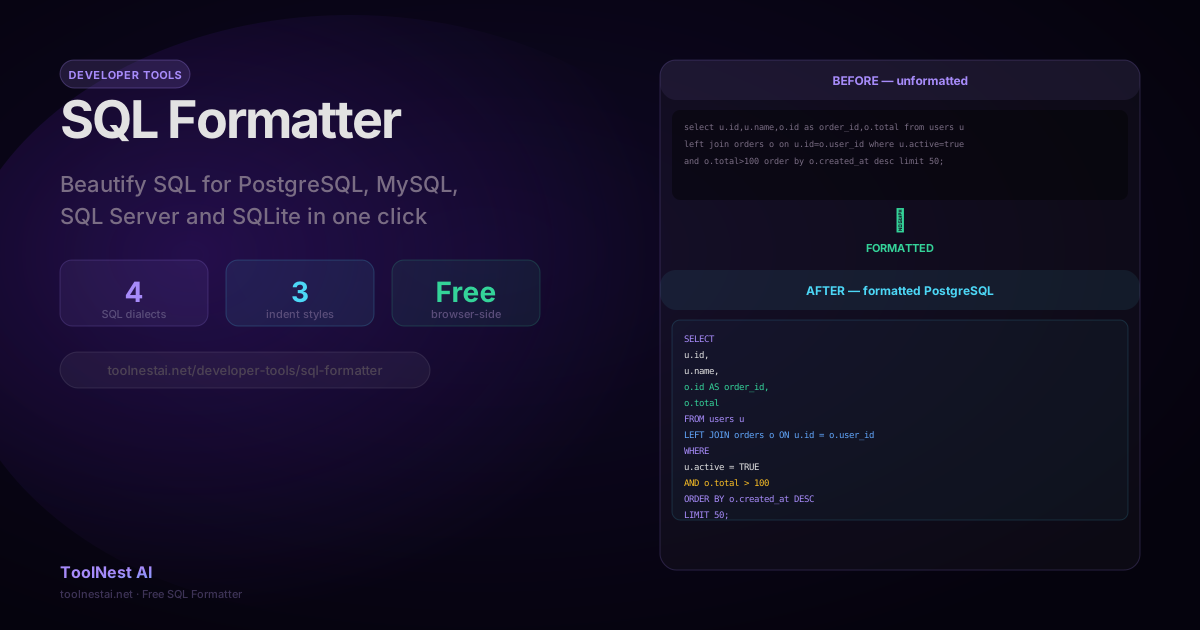
SQL is one of the oldest languages in production software, and it is also one of the most inconsistently formatted. A query written by ten different developers will often be written in ten different styles — some with uppercase keywords, some without; some using LIMIT at the end, some using TOP at the beginning; some with one column per line, some with all columns on one line.
Consistent SQL formatting makes queries easier to read, review, and debug. It also reduces the cognitive load of switching between queries in a code review.
Format any SQL query instantly with the ToolNest AI SQL Formatter — four dialects, three indent styles, no installation required.
The Three Main SQL Formatting Styles
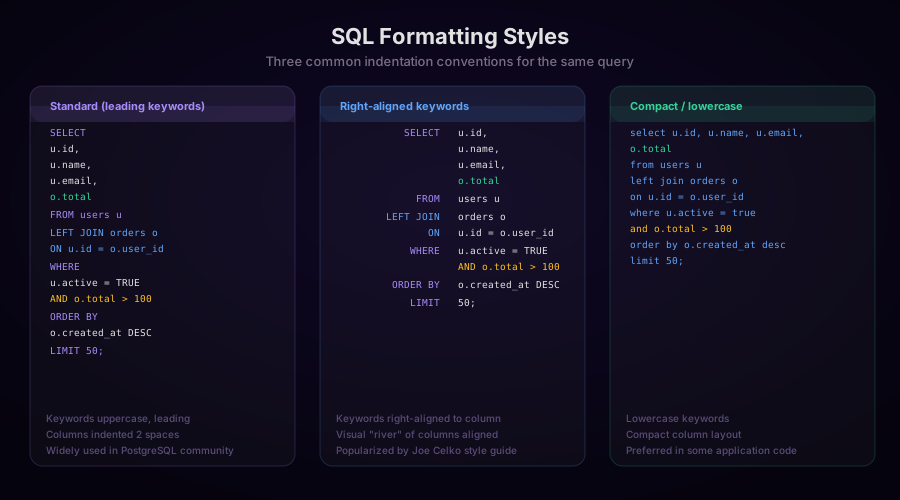
1. Standard / Leading Keywords (Most Common)
SQL keywords are uppercase, placed at the start of each clause, and column lists are indented below:
SELECT
  u.id,
  u.name,
  u.email,
  o.total
FROM users u
LEFT JOIN orders o ON u.id = o.user_id
WHERE
  u.active = TRUE
  AND o.total > 100
ORDER BY o.created_at DESC
LIMIT 50;
This style is the most widely documented and is recommended by style guides from Kickstarter, GitLab, and most open-source projects. It makes it easy to scan clause boundaries and is visually unambiguous.
2. Right-Aligned Keywords
Keywords are right-aligned to a consistent column (typically column 8 or 10), with clause values starting at the same left margin:
SELECT u.id,
       u.name,
       u.email
  FROM users u
  LEFT JOIN orders o ON u.id = o.user_id
 WHERE u.active = TRUE
   AND o.total > 100
 ORDER BY o.created_at DESC
 LIMIT 50;
This style, popularized by Joe Celko's SQL Puzzles & Answers and the SQL Style Guide by Simon Holywell, creates a visual "river" where all column data starts at the same column. It is less common in modern codebases but used in some enterprise and data warehouse environments.
3. Compact / Lowercase
Keywords are lowercase and column lists are packed more densely:
select u.id, u.name, u.email,
  o.total
from users u
left join orders o
  on u.id = o.user_id
where u.active = true
  and o.total > 100
order by o.created_at desc
limit 50;
Some application codebases prefer lowercase keywords to reduce visual noise when SQL is embedded in application code (Python, JavaScript, Ruby) where the surrounding code is also lowercase.
Which style to use? Pick one and be consistent within a project. The leading-keywords uppercase style is the most universally recognized and the default of most formatters.
SQL Dialect Differences
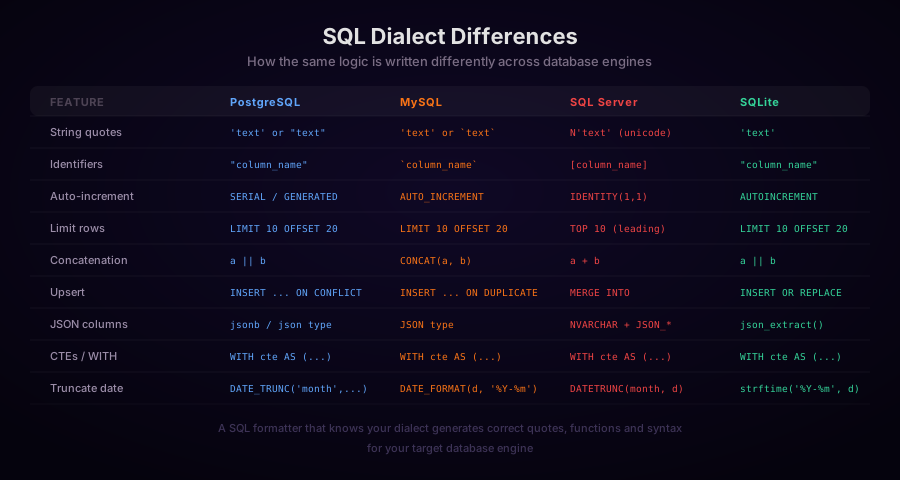
SQL is a standard (ISO/IEC 9075), but every database engine extends it with vendor-specific syntax. A formatter that knows your target dialect will generate correct quoting, functions, and clause ordering.
Identifier Quoting
Each dialect has its own way to quote identifiers that contain spaces or match reserved words:
-- PostgreSQL: double quotes
SELECT "order", "user"."first name" FROM "users";

-- MySQL: backticks
SELECT `order`, `user`.`first name` FROM `users`;

-- SQL Server: square brackets
SELECT [order], [user].[first name] FROM [users];

-- SQLite: double quotes (same as PostgreSQL)
SELECT "order", "user"."first name" FROM "users";
Limiting Row Count
-- PostgreSQL, MySQL, SQLite (SQL:2008 standard):
SELECT * FROM orders
LIMIT 10 OFFSET 20;

-- SQL Server (uses TOP, placed before column list):
SELECT TOP 10 * FROM orders;

-- SQL Server with offset (SQL Server 2012+):
SELECT * FROM orders
ORDER BY created_at
OFFSET 20 ROWS
FETCH NEXT 10 ROWS ONLY;
Auto-Increment Primary Keys
-- PostgreSQL:
CREATE TABLE users (
  id SERIAL PRIMARY KEY,
  -- or: id BIGSERIAL
  -- or (modern): id INTEGER GENERATED ALWAYS AS IDENTITY
  name TEXT NOT NULL
);

-- MySQL:
CREATE TABLE users (
  id INT AUTO_INCREMENT PRIMARY KEY,
  name VARCHAR(255) NOT NULL
);

-- SQL Server:
CREATE TABLE users (
  id INT IDENTITY(1,1) PRIMARY KEY,
  name NVARCHAR(255) NOT NULL
);

-- SQLite:
CREATE TABLE users (
  id INTEGER PRIMARY KEY AUTOINCREMENT,
  name TEXT NOT NULL
);
String Concatenation
-- PostgreSQL and SQLite: || operator
SELECT first_name || ' ' || last_name AS full_name FROM users;

-- MySQL: CONCAT function
SELECT CONCAT(first_name, ' ', last_name) AS full_name FROM users;

-- SQL Server: + operator (or CONCAT)
SELECT first_name + ' ' + last_name AS full_name FROM users;
Upsert (Insert or Update on Conflict)
-- PostgreSQL:
INSERT INTO users (id, name, email)
VALUES (1, 'Jane', 'jane@example.com')
ON CONFLICT (id)
DO UPDATE SET name = EXCLUDED.name, email = EXCLUDED.email;

-- MySQL:
INSERT INTO users (id, name, email)
VALUES (1, 'Jane', 'jane@example.com')
ON DUPLICATE KEY UPDATE name = VALUES(name), email = VALUES(email);

-- SQL Server:
MERGE INTO users AS target
USING (SELECT 1 AS id, 'Jane' AS name, 'jane@example.com' AS email) AS source
ON target.id = source.id
WHEN MATCHED THEN UPDATE SET name = source.name, email = source.email
WHEN NOT MATCHED THEN INSERT (id, name, email) VALUES (source.id, source.name, source.email);

-- SQLite:
INSERT OR REPLACE INTO users (id, name, email)
VALUES (1, 'Jane', 'jane@example.com');
Formatting SQL Programmatically
JavaScript: sql-formatter
The sql-formatter npm package is the most widely used SQL formatter in the JavaScript ecosystem:
import { format } from 'sql-formatter';

const raw = "select u.id,u.name,o.total from users u left join orders o on u.id=o.user_id where u.active=true and o.total>100 order by o.created_at desc limit 50;";

const formatted = format(raw, {
  language: 'postgresql',  // 'mysql' | 'tsql' | 'sqlite' | 'bigquery' | etc.
  tabWidth: 2,
  useTabs: false,
  keywordCase: 'upper',   // 'upper' | 'lower' | 'preserve'
  linesBetweenQueries: 2,
  indentStyle: 'standard', // 'standard' | 'tabularLeft' | 'tabularRight'
});

console.log(formatted);
Output:
SELECT
  u.id,
  u.name,
  o.total
FROM users u
LEFT JOIN orders o ON u.id = o.user_id
WHERE
  u.active = TRUE
  AND o.total > 100
ORDER BY o.created_at DESC
LIMIT
  50;
Python: sqlfluff
sqlfluff is the most popular SQL linter and formatter for Python, with built-in support for dbt, Jinja, and many dialects:
import sqlfluff

raw_sql = """
select u.id,u.name,o.total from users u
left join orders o on u.id=o.user_id
where u.active=true and o.total>100
order by o.created_at desc limit 50;
"""

# Format
result = sqlfluff.fix(raw_sql, dialect='postgres')
print(result)

# Lint (returns a list of violations)
violations = sqlfluff.lint(raw_sql, dialect='postgres')
for v in violations:
    print(f"Line {v['line_no']}: {v['description']}")
Configure sqlfluff via .sqlfluff in your project root:
[sqlfluff]
dialect = postgres
templater = dbt

[sqlfluff:rules]
max_line_length = 100

[sqlfluff:indentation]
indented_joins = True
tab_space_size = 2
Command Line with pgFormatter
pgFormatter is a command-line formatter specifically for PostgreSQL:
# Install (macOS)
brew install pgformatter

# Format a file
pg_format query.sql

# Format with options
pg_format \
  --comma-start \        # Comma at start of line
  --spaces 2 \           # 2-space indent
  --keyword-case 1 \     # 1=upper, 2=lower, 3=title
  query.sql
SQLAlchemy: Formatting for Debug Output
When using SQLAlchemy in Python, you can format the generated SQL for debugging:
from sqlalchemy import create_engine, text, select
from sqlalchemy.orm import Session
from sqlfluff import fix as sql_fix

engine = create_engine("postgresql://localhost/mydb", echo=False)

with Session(engine) as session:
    query = select(User).where(User.active == True)

    # Get the raw SQL string
    compiled = query.compile(dialect=engine.dialect, compile_kwargs={"literal_binds": True})
    raw_sql = str(compiled)

    # Format it for readable debug output
    formatted = sql_fix(raw_sql, dialect='postgres')
    print("Generated SQL:\n", formatted)
SQL Formatting in CI/CD Pipelines
Enforcing consistent SQL formatting in a team can be done via pre-commit hooks:
# .pre-commit-config.yaml
repos:
  - repo: https://github.com/sqlfluff/sqlfluff
    rev: 3.0.7
    hooks:
      - id: sqlfluff-lint
        args: [--dialect, postgres]
      - id: sqlfluff-fix
        args: [--dialect, postgres]
For dbt projects, sqlfluff integrates with dbt's Jinja templating:
# .sqlfluff
[sqlfluff]
templater = dbt
dialect = postgres

[sqlfluff:templater:dbt]
project_dir = .
profiles_dir = ~/.dbt
profile = default
target = dev
prettier-plugin-sql
For teams already using Prettier for JavaScript/TypeScript formatting, prettier-plugin-sql integrates SQL formatting into the same workflow:
npm install --save-dev prettier prettier-plugin-sql// .prettierrc
{
"plugins": ["prettier-plugin-sql"],
"language": "postgresql",
"keywordCase": "upper",
"indentStyle": "standard"
}# Format all SQL files
npx prettier --write "**/*.sql"CTE (Common Table Expression) Formatting
CTEs require consistent formatting to remain readable in complex queries:
WITH
  -- Step 1: Filter active users
  active_users AS (
    SELECT
      id,
      name,
      email
    FROM users
    WHERE
      active = TRUE
      AND created_at > '2026-01-01'
  ),
  -- Step 2: Get their recent orders
  recent_orders AS (
    SELECT
      user_id,
      COUNT(*) AS order_count,
      SUM(total) AS total_spent
    FROM orders
    WHERE created_at > CURRENT_DATE - INTERVAL '90 days'
    GROUP BY user_id
  )
-- Final: Join and rank
SELECT
  u.name,
  u.email,
  o.order_count,
  o.total_spent
FROM active_users u
INNER JOIN recent_orders o ON u.id = o.user_id
ORDER BY o.total_spent DESC
LIMIT 100;
The convention is to align CTE names consistently and treat each CTE as an independently formatted subquery.
SQL Formatting Checklist
Before committing SQL to version control or documentation:
- Keywords uppercased (
SELECT,FROM,WHERE,JOIN,AND,OR) - Each column on its own line in
SELECT - Each
JOINon its own line withONindented below - Each
WHEREcondition on its own line,AND/ORat the start - Consistent indentation (2 or 4 spaces)
- Aliases consistently declared (
AS alias_name, not justalias_name) - Trailing semicolons for all statements
- Comments for non-obvious logic, not for structural markers
Frequently Asked Questions
Should SQL keywords be uppercase or lowercase?
Uppercase keywords are the conventional standard and are recommended by most style guides (Kickstarter, GitLab, Holywell). Uppercase keywords make the structure of a query immediately visible when scanning. Lowercase keywords are acceptable in application code embedded SQL and reduce visual noise in languages that are already all-lowercase.
Does SQL formatting affect query performance?
No. SQL queries are parsed and compiled by the database engine — whitespace and case differences are stripped before execution. A formatted query and its single-line equivalent produce the identical execution plan.
What is the difference between a SQL formatter and a SQL linter?
A formatter rearranges whitespace and case to produce consistently structured SQL. A linter (sqlfluff, for example) checks for style violations, deprecated syntax, missing aliases, ambiguous column references, and other issues. Linting and formatting are complementary — use both.
How should I format SQL embedded in Python or JavaScript strings?
Use triple-quoted strings in Python or template literals in JavaScript, and indent the SQL relative to the start of the string. Keep the SQL readable at the cost of some leading whitespace — formatters can clean it up later.
Should CTEs use uppercase WITH and AS?
Yes, for consistency with keyword uppercasing. Each CTE name should be descriptive and use snake_case to match table and column naming conventions.
About the author
ToolNest AI Team
The ToolNest AI team builds free tools that help developers, marketers, and creators do more online — faster.
Related Articles
JSON vs YAML: Converting Between Formats and the Pitfalls to Avoid
A complete guide to converting between JSON and YAML — syntax differences, data type mapping, the Norway problem, YAML 1.1 vs 1.2, multiline strings, anchors, and JavaScript/Python code for both directions.
CSS Minification: How It Works, What It Removes, and How Much It Saves
A complete guide to CSS minification — the six transformations that shrink stylesheets, real-world savings data, when to minify manually vs. through a build pipeline, and how to integrate cssnano, clean-css, and PostCSS.
HTML Minification: How It Works, What to Watch Out For, and How Much It Saves
A complete guide to HTML minification — the six transformations that shrink HTML files, which whitespace is safe to remove, real-world savings numbers, and how to integrate html-minifier-terser into Next.js, Webpack, and build pipelines.