Unix Timestamps Explained: Converting Between Formats, Timezones, and DST
A complete guide to Unix timestamps — what they are, how they relate to ISO 8601, RFC 2822 and HTTP date formats, timezone-aware conversion, DST traps, Y2K38, and JavaScript/Python/Go code for converting between formats.
ToolNest AI Team
Author
Published
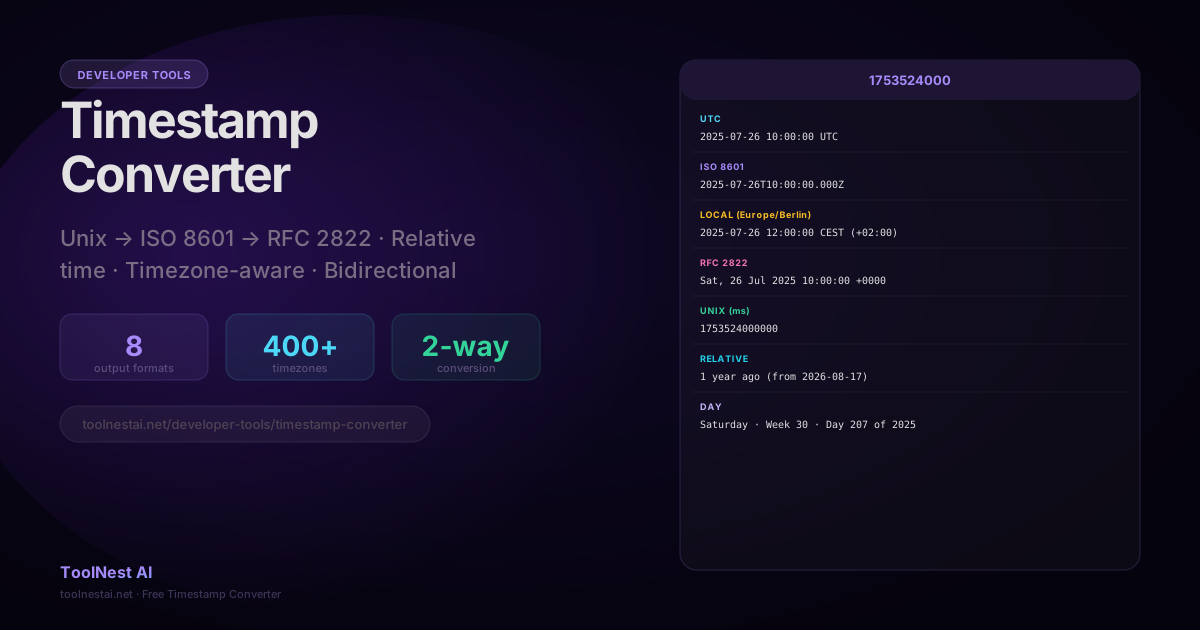
A Unix timestamp is an integer that counts the number of seconds (or milliseconds) that have elapsed since January 1, 1970, 00:00:00 UTC. That specific moment is called the Unix epoch, or epoch zero.
Unix timestamps are the standard way computers store and communicate moments in time. They are timezone-agnostic — a timestamp always refers to a single unambiguous instant, regardless of where in the world you are.
Convert any Unix timestamp to a human-readable date instantly with the ToolNest AI Timestamp Converter — ISO 8601, RFC 2822, relative time, timezone-aware.
What Is a Unix Timestamp?
The Unix operating system was developed in the late 1960s at Bell Labs. The time_t type in the C standard library was defined to represent seconds since January 1, 1970 — a date chosen because it was a recent "round" date at the time of the Unix standard's formalization.
Key facts:
- Zero = January 1, 1970, 00:00:00 UTC
- Positive values = after epoch (all dates from 1970 onward)
- Negative values = before epoch (1969 and earlier)
- Seconds is the standard unit, but many platforms use milliseconds (JavaScript's
Date.now())
Every Timestamp Format
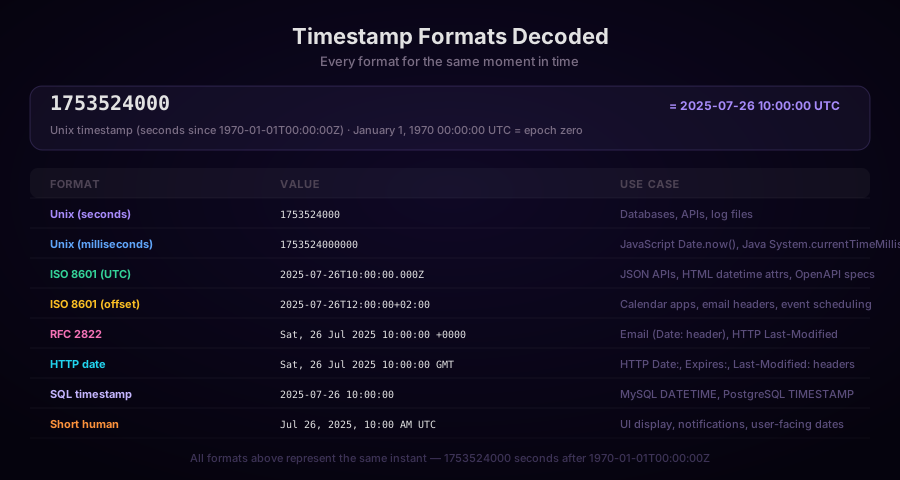
The same instant in time can be expressed in many formats:
| Format | Example | Used by |
|---|---|---|
| Unix seconds | 1753524000 | POSIX systems, databases, APIs |
| Unix milliseconds | 1753524000000 | JavaScript, Java, Kotlin |
| ISO 8601 UTC | 2025-07-26T10:00:00.000Z | JSON APIs, HTML, OpenAPI |
| ISO 8601 with offset | 2025-07-26T12:00:00+02:00 | Calendar, email, event scheduling |
| RFC 2822 | Sat, 26 Jul 2025 10:00:00 +0000 | Email headers |
| HTTP date | Sat, 26 Jul 2025 10:00:00 GMT | HTTP Date:, Last-Modified:, Expires: |
| SQL timestamp | 2025-07-26 10:00:00 | MySQL DATETIME, PostgreSQL TIMESTAMP |
| Human-readable | Jul 26, 2025, 10:00 AM UTC | UI display |
Timezones and DST
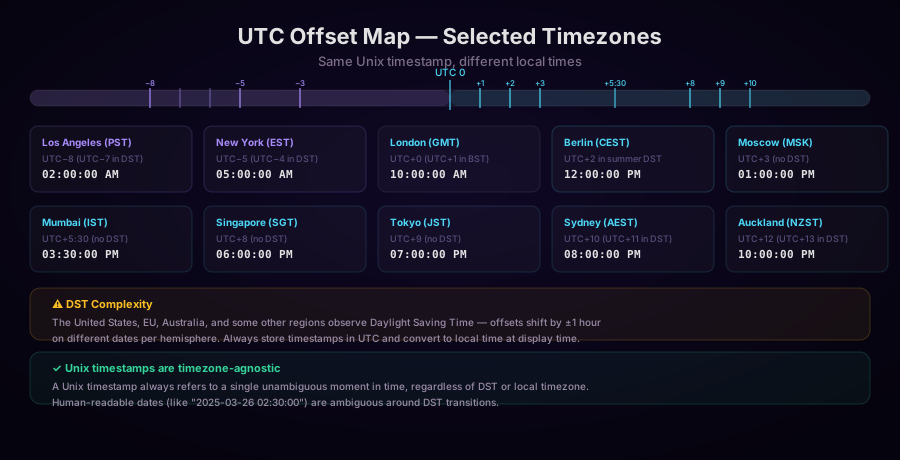
A Unix timestamp is always in UTC. When you display it to a user, you convert it to their local timezone. This is where most timestamp bugs live.
UTC Offset
A timezone's UTC offset tells you how many hours and minutes to add (positive) or subtract (negative) from UTC to get local time:
UTC-8(US Pacific in winter): subtract 8 hoursUTC+2(Central Europe in summer): add 2 hoursUTC+5:30(India): add 5 hours 30 minutes (India has a 30-minute offset)
Daylight Saving Time (DST)
Many countries shift their clocks forward by 1 hour in summer and back in autumn. This means:
- The same timezone identifier can have two different offsets depending on the date
- During the "fall back" transition, one hour of local time is repeated — the same local clock reading occurs twice
- During the "spring forward" transition, one hour of local time is skipped
// Bug: assuming New York is always UTC-5
function getNewYorkTime(unixSeconds) {
  return unixSeconds - (5 * 3600);  // WRONG for summer
}

// Correct: use IANA timezone database
const date = new Date(unixSeconds * 1000);
const nyTime = date.toLocaleString('en-US', {
  timeZone: 'America/New_York',  // IANA timezone identifier
  hour12: false,
});
The IANA Timezone Database
The authoritative database of timezone rules is the IANA tz database (also called zoneinfo or tzdata). It contains the complete history of UTC offsets and DST transitions for every named timezone in the world, updated regularly as countries change their rules.
IANA timezone identifiers follow the pattern Region/City:
America/New_York(notESTorEDT— these are ambiguous abbreviations)Europe/Berlin(notCETorCEST)Asia/Kolkata(India — notIST, which also means Israel Standard Time)
Converting Timestamps in Code
JavaScript
// Current time as Unix timestamp (seconds)
const nowSeconds = Math.floor(Date.now() / 1000);
const nowMilliseconds = Date.now();

// Unix seconds → Date object
const date = new Date(unixSeconds * 1000);

// Date → Unix seconds
const unixSeconds = Math.floor(date.getTime() / 1000);

// Format as ISO 8601 UTC
date.toISOString();  // "2025-07-26T10:00:00.000Z"

// Format in a specific timezone (using Intl.DateTimeFormat)
const formatter = new Intl.DateTimeFormat('en-US', {
  timeZone: 'America/New_York',
  year: 'numeric',
  month: '2-digit',
  day: '2-digit',
  hour: '2-digit',
  minute: '2-digit',
  second: '2-digit',
  hour12: false,
});
formatter.format(date);  // "07/26/2025, 06:00:00"

// Relative time (manual)
const seconds = Math.floor((Date.now() - unixSeconds * 1000) / 1000);
const intervals = [
  [Math.floor(seconds / 31536000), 'year'],
  [Math.floor(seconds / 2592000), 'month'],
  [Math.floor(seconds / 86400), 'day'],
  [Math.floor(seconds / 3600), 'hour'],
  [Math.floor(seconds / 60), 'minute'],
];
for (const [count, label] of intervals) {
  if (count > 0) return `${count} ${label}${count > 1 ? 's' : ''} ago`;
}
return 'just now';

// Better: use Intl.RelativeTimeFormat
const rtf = new Intl.RelativeTimeFormat('en', { numeric: 'auto' });
const diffDays = Math.round((Date.now() - unixSeconds * 1000) / 86400000);
rtf.format(-diffDays, 'day');  // "yesterday", "3 days ago"
Python
from datetime import datetime, timezone
import time

# Current time as Unix timestamp
unix_seconds = int(time.time())

# Unix seconds → UTC datetime
dt_utc = datetime.fromtimestamp(unix_seconds, tz=timezone.utc)

# UTC datetime → Unix seconds
unix_seconds = int(dt_utc.timestamp())

# Format as ISO 8601
iso_string = dt_utc.isoformat()  # "2025-07-26T10:00:00+00:00"
iso_z = dt_utc.strftime('%Y-%m-%dT%H:%M:%S.000Z')  # With Z suffix

# Convert to a specific timezone
from zoneinfo import ZoneInfo  # Python 3.9+
berlin_tz = ZoneInfo('Europe/Berlin')
dt_berlin = dt_utc.astimezone(berlin_tz)
print(dt_berlin.strftime('%Y-%m-%d %H:%M:%S %Z'))  # "2025-07-26 12:00:00 CEST"

# Parse ISO 8601 string back to timestamp
from datetime import datetime
dt = datetime.fromisoformat('2025-07-26T10:00:00+00:00')
unix = int(dt.timestamp())
Go
package main

import (
    "fmt"
    "time"
)

func main() {
    // Current Unix timestamp
    nowUnix := time.Now().Unix()
    nowUnixMs := time.Now().UnixMilli()

    // Unix seconds → time.Time (always in UTC)
    t := time.Unix(1753524000, 0).UTC()

    // Format as ISO 8601
    iso := t.Format(time.RFC3339)  // "2025-07-26T10:00:00Z"
    isoMs := t.Format("2006-01-02T15:04:05.000Z07:00")

    // Convert to local timezone
    loc, err := time.LoadLocation("America/New_York")
    if err != nil {
        panic(err)
    }
    tNY := t.In(loc)
    fmt.Println(tNY.Format("2006-01-02 15:04:05 MST"))

    // time.Time → Unix timestamp
    unixSeconds := t.Unix()
    unixMs := t.UnixMilli()
}
SQL
-- PostgreSQL

-- Current Unix timestamp
SELECT EXTRACT(EPOCH FROM NOW())::INTEGER;

-- Unix timestamp → timestamp with timezone
SELECT to_timestamp(1753524000) AT TIME ZONE 'UTC';
SELECT to_timestamp(1753524000) AT TIME ZONE 'America/New_York';

-- timestamp → Unix
SELECT EXTRACT(EPOCH FROM '2025-07-26 10:00:00'::TIMESTAMP WITH TIME ZONE)::INTEGER;

-- MySQL

-- Current Unix timestamp
SELECT UNIX_TIMESTAMP();

-- Unix timestamp → datetime
SELECT FROM_UNIXTIME(1753524000);
SELECT FROM_UNIXTIME(1753524000, '%Y-%m-%d %H:%i:%s');

-- datetime → Unix
SELECT UNIX_TIMESTAMP('2025-07-26 10:00:00');
ISO 8601 Format Reference
ISO 8601 is the international standard for representing dates and times. It uses a specific format that's unambiguous and sortable:
YYYY-MM-DDTHH:MM:SS.sssZ
│    │  │ │ │  │  │   └─ Z = UTC timezone
│    │  │ │ │  │  └───── milliseconds (optional)
│    │  │ │ │  └──────── seconds
│    │  │ │ └─────────── minutes
│    │  │ └───────────── hours (24-hour)
│    │  └─────────────── T = separator (required)
│    └────────────────── day (01-31)
│ └──────────────────── month (01-12)
└────────────────────── year (4 digits)
With timezone offset (instead of Z):
2025-07-26T12:00:00+02:00
                    └─────── offset from UTC
ISO 8601 strings are:
- Lexicographically sortable — alphabetical sort = chronological sort
- Unambiguous — no AM/PM, no month abbreviations, no locale-dependent formats
- Widely supported — JSON APIs, HTML
<time>elements, OpenAPI specs
Common Timestamp Bugs
Storing in the Wrong Unit
JavaScript's Date.now() returns milliseconds. Unix time() in C returns seconds. APIs can return either. Mixing them causes 1000× errors:
// Bug: storing JS milliseconds as if they were Unix seconds
const createdAt = Date.now();  // 1753524000000 ms
const date = new Date(createdAt);  // Correct: 2025-07-26
const buggyDate = new Date(createdAt / 1000);  // Bug: year ~55753!

// Fix: be explicit
const seconds = Math.floor(Date.now() / 1000);
const milliseconds = Date.now();
Storing Local Time Instead of UTC
# Bug: storing local time without timezone info
from datetime import datetime
created_at = datetime.now()  # Local time, timezone-naive
db.save(created_at)  # Stored as "2025-07-26 12:00:00" with no timezone context

# Fix: always store UTC
from datetime import datetime, timezone
created_at = datetime.now(timezone.utc)  # Timezone-aware UTC
db.save(created_at)  # Stored as "2025-07-26 10:00:00+00:00"
Ambiguous DST Transitions
During the "fall back" clock transition, local times between 1:00 AM and 2:00 AM occur twice. Storing 2025-11-02 01:30:00 in Eastern Time is ambiguous — it could be EDT (+4) or EST (+5). Store Unix timestamps or timezone-aware datetimes to avoid this.
The Year 2038 Problem (Y2K38)
32-bit signed integers overflow at 2147483647 — which corresponds to January 19, 2038, 03:14:07 UTC. Systems that store Unix timestamps in a 32-bit integer will roll over to January 1, 1901 (negative values) at that point.
Most modern systems already use 64-bit integers for timestamps, which will not overflow for approximately 292 billion years. However, legacy embedded systems, some databases, and some file systems that encode timestamps in 32 bits are still at risk.
If you're designing a new system today, use 64-bit integer timestamps or ISO 8601 strings. Check that your database column type can handle timestamps past 2038 — MySQL's TIMESTAMP type has this limitation (use DATETIME instead).
Frequently Asked Questions
What is the difference between Unix seconds and Unix milliseconds?
Unix seconds (time_t in C, Python's time.time()) count seconds. Unix milliseconds (JavaScript's Date.now(), Java's System.currentTimeMillis()) count thousandths of a second. A Unix second value of 1753524000 is the same moment as the Unix millisecond value 1753524000000.
Why does JavaScript use milliseconds instead of seconds?
Historical accident. When Brendan Eich designed JavaScript in 1995, he chose milliseconds for Date.now() to allow more precision. This differs from the POSIX standard (seconds), causing confusion when JavaScript developers interact with POSIX APIs and databases.
Is UTC the same as GMT?
Functionally yes, for most purposes. GMT (Greenwich Mean Time) is a timezone. UTC (Coordinated Universal Time) is the international time standard that GMT is based on. They differ by at most a few microseconds due to leap seconds. For software purposes, treat them as equivalent.
What is a leap second?
The Earth's rotation varies slightly over time. To keep UTC synchronized with astronomical time, "leap seconds" are occasionally added to UTC — the clock ticks to 23:59:60 for one second before rolling to 00:00:00. Unix timestamps do not account for leap seconds — they define a day as always 86400 seconds. This means Unix timestamps are not perfectly continuous across leap second boundaries, though the discrepancy is tiny (±37 seconds as of 2024) and irrelevant for most applications.
Should I use ISO 8601 or Unix timestamps in my API?
Both are valid. ISO 8601 (specifically 2025-07-26T10:00:00.000Z) is human-readable, debuggable, and widely supported. Unix timestamps are compact and easy to do arithmetic on. The JSON standard doesn't specify a date format — RFC 3339 (a profile of ISO 8601) is the most widely recommended choice for JSON APIs.
About the author
ToolNest AI Team
The ToolNest AI team builds free tools that help developers, marketers, and creators do more online — faster.
Related Articles
JSON vs YAML: Converting Between Formats and the Pitfalls to Avoid
A complete guide to converting between JSON and YAML — syntax differences, data type mapping, the Norway problem, YAML 1.1 vs 1.2, multiline strings, anchors, and JavaScript/Python code for both directions.
SQL Formatting: Style Guides, Dialect Differences and How to Format Queries Automatically
A complete guide to SQL formatting — the three main indentation styles, dialect differences across PostgreSQL, MySQL, SQL Server and SQLite, when to format SQL programmatically, and how to use sql-formatter and prettier-plugin-sql.
CSS Minification: How It Works, What It Removes, and How Much It Saves
A complete guide to CSS minification — the six transformations that shrink stylesheets, real-world savings data, when to minify manually vs. through a build pipeline, and how to integrate cssnano, clean-css, and PostCSS.