PDF Metadata Editor: View, Edit, and Strip PDF Properties (Free)
Learn how to view and edit PDF metadata — Title, Author, Subject, Keywords, Creator — using browser tools, pdf-lib, Python pypdf, and ExifTool. Strip hidden metadata for privacy.
ToolNest AI Team
Author
Published
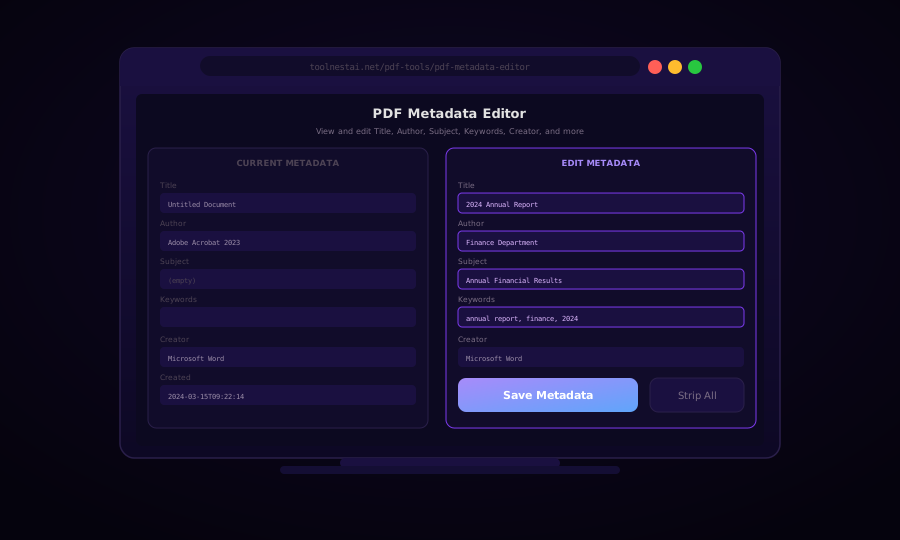
Every PDF file carries hidden information called metadata: the document title, author name, creation date, the software that created it, and sometimes revision history or embedded comments. This metadata is invisible when reading the document but travels with the file — to colleagues, clients, and anyone who downloads it.
Understanding what metadata your PDFs contain is the first step toward controlling your document's identity. Sending a confidential report with "Draft v3 - DO NOT SHARE" as the title, or with your personal name embedded as author when you intended anonymous submission, are common problems easily fixed with a metadata editor.
PDF Metadata Fields Explained
PDF metadata comes in two main forms: Document Information Dictionary (the classic metadata, part of the PDF spec since version 1.0) and XMP (Extensible Metadata Platform) (a newer XML-based format embedded as a stream).
Document Information Dictionary Fields
| Field | Description | Common Example |
|---|---|---|
Title | Document title | "Q4 2024 Financial Report" |
Author | Document author(s) | "Jane Smith" |
Subject | Topic or subject matter | "Annual financial results" |
Keywords | Searchable keywords | "finance, quarterly, 2024" |
Creator | Application that created the PDF | "Microsoft Word 2024" |
Producer | Application that converted to PDF | "Adobe PDF Library" |
CreationDate | When the PDF was first created | "D:20240315092214+01'00'" |
ModDate | Last modification date | "D:20240901120000+01'00'" |
XMP Metadata
XMP metadata duplicates most of the above fields in an XML packet and adds additional properties used by Adobe Creative Suite, asset management systems, and digital rights management tools. When you edit PDF metadata, a good tool updates both the Document Information Dictionary and the XMP data to keep them consistent.
View PDF Metadata
Before editing, it is worth reading what metadata is currently in a file.
With pdfinfo (part of poppler-utils):
pdfinfo document.pdfOutput:
Title:          Untitled Document
Subject:
Keywords:
Author:         Adobe Acrobat 2023
Creator:        Microsoft Word
Producer:       Adobe PDF Library 16.0.7
CreationDate:   Fri Mar 15 09:22:14 2024
ModDate:        Sat Sep  1 12:00:00 2024
Tagged:         yes
Pages:          24
File size:      2847120 bytes
With ExifTool:
exiftool -PDF:all document.pdfExifTool shows both Document Information Dictionary and XMP data, including any non-standard fields added by specific applications.
Edit PDF Metadata with pdf-lib (JavaScript / Browser)
import { PDFDocument } from "pdf-lib";

async function editPdfMetadata(pdfBytes, metadata) {
  const pdf = await PDFDocument.load(pdfBytes);

  if (metadata.title     !== undefined) pdf.setTitle(metadata.title);
  if (metadata.author    !== undefined) pdf.setAuthor(metadata.author);
  if (metadata.subject   !== undefined) pdf.setSubject(metadata.subject);
  if (metadata.keywords  !== undefined) pdf.setKeywords(metadata.keywords);
  if (metadata.creator   !== undefined) pdf.setCreator(metadata.creator);
  if (metadata.producer  !== undefined) pdf.setProducer(metadata.producer);
  if (metadata.creationDate !== undefined) pdf.setCreationDate(metadata.creationDate);
  if (metadata.modificationDate !== undefined) pdf.setModificationDate(metadata.modificationDate);

  return pdf.save();
}

// Example usage
const newBytes = await editPdfMetadata(existingPdfBytes, {
  title: "2024 Annual Report",
  author: "Finance Department",
  subject: "Annual Financial Results",
  keywords: ["annual report", "finance", "2024"],
  creator: "ToolNest AI",
  modificationDate: new Date(),
});

// Read existing metadata
async function readPdfMetadata(pdfBytes) {
  const pdf = await PDFDocument.load(pdfBytes);
  return {
    title:    pdf.getTitle(),
    author:   pdf.getAuthor(),
    subject:  pdf.getSubject(),
    keywords: pdf.getKeywords(),
    creator:  pdf.getCreator(),
    producer: pdf.getProducer(),
    creationDate:     pdf.getCreationDate(),
    modificationDate: pdf.getModificationDate(),
  };
}
Python: pypdf Metadata Editing
from pypdf import PdfReader, PdfWriter
from pypdf.generic import NameObject, create_string_object
from datetime import datetime

def read_metadata(pdf_path: str) -> dict:
    reader = PdfReader(pdf_path)
    meta = reader.metadata
    return {
        "title":    meta.get("/Title", ""),
        "author":   meta.get("/Author", ""),
        "subject":  meta.get("/Subject", ""),
        "keywords": meta.get("/Keywords", ""),
        "creator":  meta.get("/Creator", ""),
        "producer": meta.get("/Producer", ""),
        "creation_date": meta.get("/CreationDate", ""),
        "mod_date":      meta.get("/ModDate", ""),
    }


def edit_metadata(input_path: str, output_path: str, new_meta: dict):
    reader = PdfReader(input_path)
    writer = PdfWriter()
    writer.append(reader)

    # Format date as PDF date string: D:YYYYMMDDHHmmss+TZ
    def pdf_date(dt: datetime) -> str:
        return dt.strftime("D:%Y%m%d%H%M%S+00'00'")

    metadata_to_write = {}
    if "title"    in new_meta: metadata_to_write["/Title"]    = new_meta["title"]
    if "author"   in new_meta: metadata_to_write["/Author"]   = new_meta["author"]
    if "subject"  in new_meta: metadata_to_write["/Subject"]  = new_meta["subject"]
    if "keywords" in new_meta: metadata_to_write["/Keywords"] = new_meta["keywords"]
    if "creator"  in new_meta: metadata_to_write["/Creator"]  = new_meta["creator"]

    # Always update modification date
    metadata_to_write["/ModDate"] = pdf_date(datetime.utcnow())

    writer.add_metadata(metadata_to_write)

    with open(output_path, "wb") as f:
        writer.write(f)

    print(f"Metadata updated: {output_path}")


# Example
edit_metadata("report.pdf", "report-clean.pdf", {
    "title":   "2024 Annual Report",
    "author":  "Finance Department",
    "subject": "Annual Financial Results",
    "keywords": "annual report; finance; 2024",
})
ExifTool: CLI Metadata Editing
ExifTool is the most powerful CLI tool for reading and writing metadata across hundreds of file formats, including PDF.
# Read all PDF metadata
exiftool document.pdf

# Set title and author
exiftool -Title="2024 Annual Report" -Author="Finance Department" document.pdf

# Set multiple fields and update ModifyDate
exiftool \
  -Title="2024 Annual Report" \
  -Author="Finance Department" \
  -Subject="Annual Financial Results" \
  -Keywords="annual report; finance; 2024" \
  -ModifyDate="now" \
  document.pdf

# Strip ALL metadata (for privacy/anonymization)
exiftool -all= document.pdf

# Strip metadata and save to new file (keep original)
exiftool -all= -o document-clean.pdf document.pdf

# Copy metadata from one PDF to another
exiftool -tagsFromFile source.pdf -PDF:all target.pdf
ExifTool renames the original to document.pdf_original unless you use -o to specify an output file.
Stripping Metadata for Privacy
When sharing documents externally, metadata can reveal unwanted information:
- Author field may contain a real name when anonymous submission is required
- Creator field reveals the software you use (competitive intelligence)
- Comments and revision history embedded in XMP streams
- Custom properties added by document management systems
Strip all metadata with ExifTool:
exiftool -all= document.pdf -o document-anonymous.pdfWith pypdf:
from pypdf import PdfReader, PdfWriter

def strip_metadata(input_path: str, output_path: str):
    reader = PdfReader(input_path)
    writer = PdfWriter()
    writer.append(reader)

    # Replace all metadata with empty values
    writer.add_metadata({
        "/Title": "",
        "/Author": "",
        "/Subject": "",
        "/Keywords": "",
        "/Creator": "",
        "/Producer": "",
    })

    with open(output_path, "wb") as f:
        writer.write(f)
Note: some applications also embed metadata in XMP streams as binary data within the PDF. A thorough strip removes these streams too — ExifTool's -all= flag handles this comprehensively.
Frequently Asked Questions
What is PDF metadata used for?
PDF metadata helps document management systems index and search files by title, author, or subject. It is also used by email clients, file explorers, and library management software to display file information without opening the document.
Does editing metadata change the visible content of the PDF?
No. Metadata is stored separately from page content. Changing the title in metadata does not change any text visible on the pages.
Will editing metadata break digital signatures?
Yes. Any modification to a digitally signed PDF, including metadata changes, invalidates the signature because signatures cover the entire document byte range. If you need to edit metadata on a signed PDF, you must remove the signature first and re-sign after editing.
How do I remove the "Created with Microsoft Word" entry?
Edit the Creator and Producer fields to any value you prefer, or strip them entirely. This information is not required to be accurate and can be freely changed.
Can metadata contain personal data under GDPR?
Yes. Author names, email addresses (sometimes embedded in custom fields), and creation timestamps can constitute personal data. If you are distributing PDFs publicly or to clients, auditing and stripping metadata is good privacy hygiene.
Is there metadata I cannot remove?
Standard metadata fields can always be removed. However, some PDF generators embed additional information (revision history, hidden layers, document IDs) in places not covered by simple metadata APIs. ExifTool with -all= and then a round-trip through Ghostscript's pdfwrite device produces the most thoroughly cleaned output.
About the author
ToolNest AI Team
The ToolNest AI editorial team writes in-depth guides on PDF tools, image processing, and developer productivity.
Related Articles
How to Password Protect a PDF — Encryption, Permissions, and Ownership Explained
Add a password to any PDF with AES-256 encryption. Control open passwords, owner passwords, and permissions (print, copy, edit). With code in pdf-lib, pypdf, and Ghostscript.
How to Unlock a Password-Protected PDF — Remove Restrictions Safely
Remove the password from a PDF you own — enter the password, download an unlocked copy. Plus code examples with pdf-lib, pypdf, and qpdf for batch unlocking.
How to Sign a PDF — Draw, Type, or Upload Your Signature Online
Add your signature to any PDF for free — draw it with your mouse, type it in a script font, or upload a signature image. Place it anywhere on the page, then download. No server upload.