Remove Duplicate Lines: Clean Up Lists Instantly — Free Tool
Learn how line deduplication works, why hash-based algorithms beat naive nested loops, case-sensitive vs insensitive matching, and keep-first vs keep-last modes. Free, instant tool.
ToolNest AI Team
Author
Published
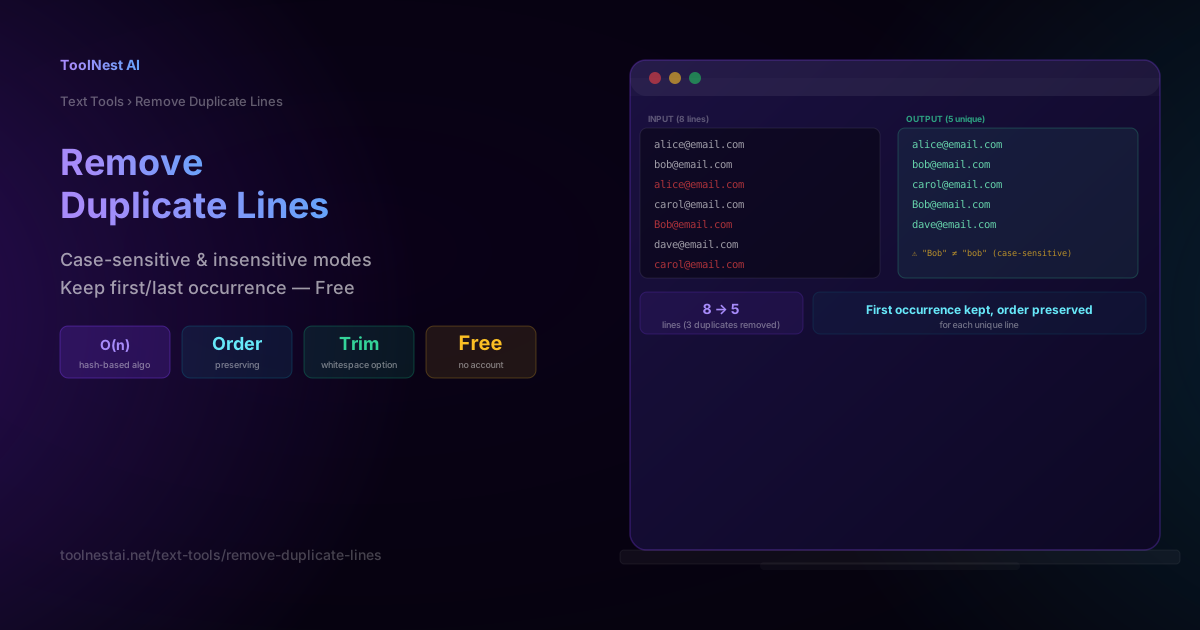
Merging two email lists, cleaning up a CSV export, or deduplicating a raw log file all come down to the same operation: removing duplicate lines while keeping the rest intact. It sounds trivial, but the details — case sensitivity, whitespace, which occurrence to keep, and how the algorithm scales — determine whether the result is actually correct.
This guide covers exactly how line deduplication works under the hood and the decisions that matter. Clean up any list instantly with the ToolNest AI Remove Duplicate Lines tool.
How Deduplication Works
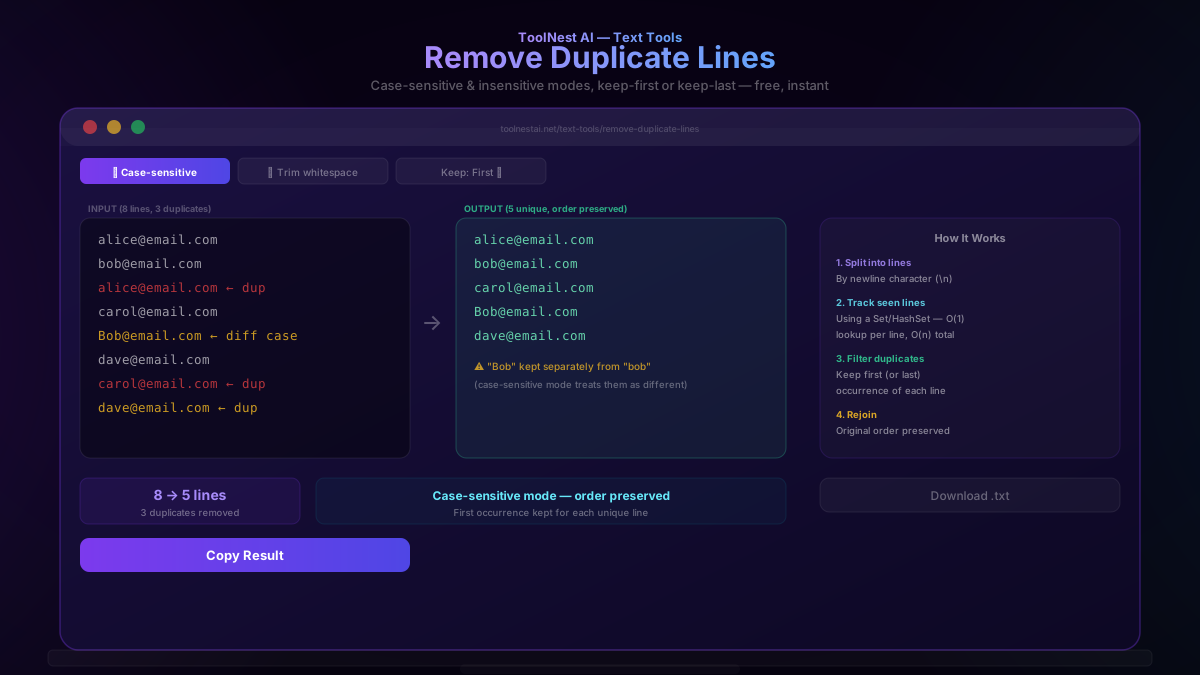
The core algorithm is straightforward: split the input text into individual lines, then process each line while tracking which values have already been "seen." If a line has already appeared, it's dropped from the output; if it's new, it's kept and recorded as seen. The relative order of the remaining unique lines is always preserved — deduplication doesn't reshuffle your list, it only removes repeats.
Input:                  Output:
alice@email.com         alice@email.com
bob@email.com           bob@email.com
alice@email.com  ← dup  carol@email.com
carol@email.com         Bob@email.com
Bob@email.com           dave@email.com
dave@email.com
carol@email.com ← dup
O(n²) vs O(n) — Why the Algorithm Matters
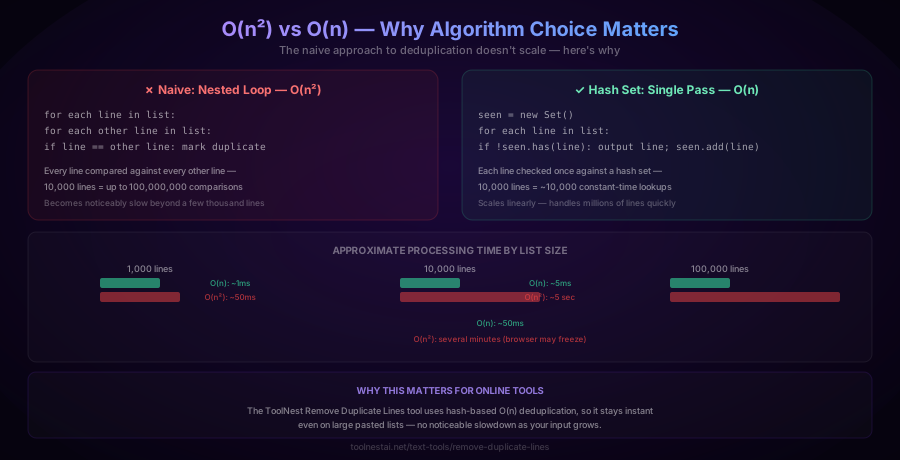
A naive implementation compares every line against every other line — a nested loop:
for each line in list:
  for each other line in list:
    if line == other line: mark as duplicate
This runs in O(n²) time — the number of comparisons grows with the square of the input size. For 10,000 lines, that's up to 100 million comparisons; for 100,000 lines, up to 10 billion. This approach becomes noticeably slow within seconds and can freeze a browser tab entirely on large inputs.
The efficient approach uses a hash set (JavaScript's Set, Python's set, or equivalent) to track seen lines with constant-time lookups:
seen = new Set()
for each line in list:
  if not seen.has(line):
    output line
    seen.add(line)
This runs in O(n) time — each line is processed exactly once, regardless of list size. 10,000 lines means roughly 10,000 constant-time set lookups, not 100 million comparisons. This is the algorithm the ToolNest AI Remove Duplicate Lines tool uses, keeping it instant even on large pasted lists.
Case-Sensitive vs Case-Insensitive Matching
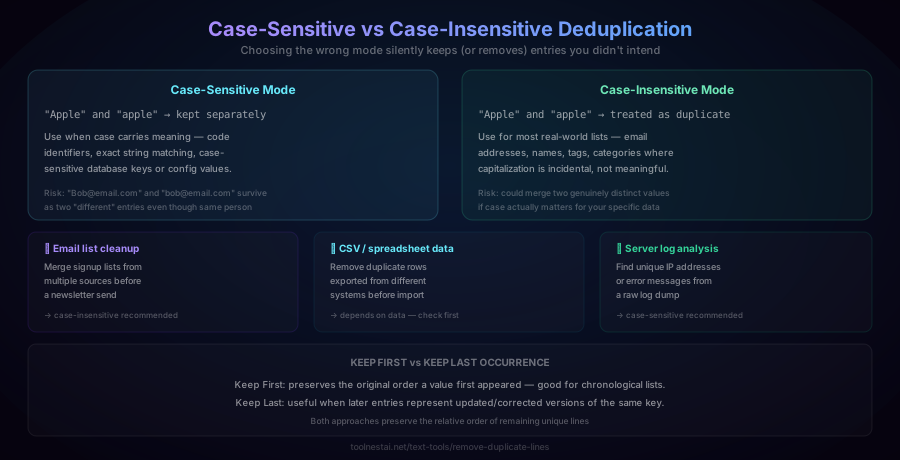
Case-sensitive mode treats "Apple" and "apple" as entirely different strings, keeping both. This is the right choice when capitalization is semantically meaningful — code identifiers, exact string matching, case-sensitive configuration keys, or database values where case genuinely distinguishes different records.
Case-insensitive mode treats "Apple" and "apple" as duplicates, keeping only one. This is usually the right default for real-world, human-entered lists — email addresses, names, tags, and categories where capitalization is typically incidental (someone typed "Bob@email.com" once and "bob@email.com" another time, but they're clearly the same address).
Choosing wrong in either direction causes a real problem: case-sensitive mode on inconsistently capitalized data leaves true duplicates in your list; case-insensitive mode on data where case genuinely matters could incorrectly merge two distinct values.
Keep First vs Keep Last Occurrence
When duplicates are found, the tool needs a rule for which copy to retain:
Keep First preserves whichever occurrence appeared earliest in the original list — useful for chronological data where you want to know when a value was first encountered.
Keep Last retains whichever occurrence appeared most recently — useful when later entries in a list represent corrected or updated versions of an earlier record with the same key (for example, a corrected email address that reused the same name).
Both modes preserve the relative order of the remaining unique lines in the final output.
How to Use the Remove Duplicate Lines Tool
The ToolNest AI Remove Duplicate Lines tool processes your text entirely in your browser.
- Paste your list, one entry per line
- Toggle case sensitivity — case-sensitive or case-insensitive matching
- Toggle whitespace trimming — treats
"apple"and"apple "(with a trailing space) as the same line if enabled - Choose keep-first or keep-last
- Copy the deduplicated result, or download it as a
.txtfile
Deduplication in Different Languages
JavaScript (case-sensitive, keep first):
function removeDuplicates(text) {
  const seen = new Set();
  return text.split('\n')
    .filter(line => {
      if (seen.has(line)) return false;
      seen.add(line);
      return true;
    })
    .join('\n');
}
JavaScript (case-insensitive):
function removeDuplicatesCI(text) {
  const seen = new Set();
  return text.split('\n')
    .filter(line => {
      const key = line.toLowerCase();
      if (seen.has(key)) return false;
      seen.add(key);
      return true;
    })
    .join('\n');
}
Python:
def remove_duplicates(lines, case_sensitive=True):
    seen = set()
    result = []
    for line in lines:
        key = line if case_sensitive else line.lower()
        if key not in seen:
            seen.add(key)
            result.append(line)
    return result
Command line (Unix awk, preserves order):
awk '!seen[$0]++' input.txt > output.txtCommand line (sort + uniq, does NOT preserve order):
sort input.txt | uniq > output.txtNote that sort | uniq is a common shortcut, but it re-sorts the file alphabetically as a side effect — if preserving original order matters, use the awk approach or the ToolNest AI tool instead.
Common Mistakes
Mistake 1: Using case-sensitive matching on inconsistently capitalized data. Human-entered lists (email signups, name fields) rarely have perfectly consistent capitalization. Case-sensitive deduplication leaves true duplicates like "Bob@email.com" and "bob@email.com" as two separate entries.
Mistake 2: Not trimming whitespace before comparing. A line with an invisible trailing space ("apple ") will not be recognized as a duplicate of "apple" unless whitespace is trimmed first. This is a common source of "duplicates I know are there but the tool isn't removing" confusion.
Mistake 3: Using sort | uniq when order matters. This common command-line combination removes duplicates, but it also re-sorts the entire file alphabetically as a side effect of how uniq works (it only detects adjacent duplicate lines, requiring a sort first). If you need to preserve original order, use an order-preserving deduplication approach instead.
Mistake 4: Assuming a naive nested-loop approach will scale. For lists under a few hundred lines, the performance difference is invisible. For lists in the tens of thousands, an O(n²) approach can become noticeably slow or even freeze a browser tab, while a hash-set-based O(n) approach remains instant.
Frequently Asked Questions
How do I remove duplicate lines from a list?
Split the text into individual lines, then check each line against a running set of previously seen values. If a line has already been seen, discard it; otherwise, keep it and add it to the seen set. This preserves the relative order of the remaining unique lines. The ToolNest AI Remove Duplicate Lines tool does this instantly in your browser.
What's the difference between case-sensitive and case-insensitive deduplication?
Case-sensitive matching treats "Apple" and "apple" as different values, keeping both in the output. Case-insensitive matching treats them as the same value, keeping only one. Case-insensitive is usually the right default for human-entered data like email lists or names, where capitalization is often accidental; case-sensitive matters for code, exact identifiers, or data where capitalization carries real meaning.
Why is a hash set faster than comparing every line to every other line?
A naive approach that compares every line against every other line runs in O(n²) time — the number of comparisons grows quadratically with input size, becoming very slow for large lists (10,000 lines can mean up to 100 million comparisons). A hash set (like JavaScript's Set or Python's set) provides constant-time lookups, so checking each line against the set of previously seen values runs in O(n) time overall — each line is processed once, regardless of total list size.
Does removing duplicate lines change the order of my list?
No, properly implemented deduplication preserves the relative order of the remaining unique lines — it only removes repeated entries, never reshuffles the surviving ones. This is different from the common Unix sort | uniq combination, which removes duplicates but also alphabetically re-sorts the entire list as a side effect.
Should I keep the first or last occurrence of a duplicate?
Keep First preserves whichever copy appeared earliest in your original list — useful for chronological data. Keep Last retains whichever copy appeared most recently — useful when later entries might represent updated or corrected versions of an earlier record with the same key. Choose based on which occurrence is more likely to be the "correct" or most relevant version for your use case.
Can I remove duplicates while ignoring extra spaces?
Yes — enable "trim whitespace" if your tool offers it. Without this option, a line with a trailing or leading space (like "apple ") is treated as a completely different string from "apple" and won't be recognized as a duplicate, even though they'd look identical to a human reader.
Will this tool work on very large lists without slowing down?
If the tool uses a proper hash-based (O(n)) algorithm, yes — processing time grows linearly with input size, so even lists with tens of thousands of lines process in milliseconds. Tools using a naive nested-loop comparison approach (O(n²)) will slow down dramatically, and potentially freeze, as list size grows into the thousands or tens of thousands of lines.
Is deduplicating a CSV file the same as deduplicating plain text lines?
The core operation is similar (removing repeated rows), but CSV deduplication often needs to consider only specific columns as the "key" for comparison (e.g., deduplicate by email column even if other columns differ), rather than requiring the entire row to match exactly. A simple line-based deduplication tool treats each full line as the comparison key, which works well for plain lists but may need adjustment for structured, multi-column CSV data where only part of each row should determine uniqueness.
About the author
ToolNest AI Team
The ToolNest AI team builds free tools that help developers, marketers, and creators do more online — faster.
Related Articles

Text Sorter: Sort Lines A-Z, by Length, or Numerically — Free Tool
Learn the difference between lexical and natural sort, why case sensitivity silently breaks alphabetical ordering, and how to sort, deduplicate, or shuffle any list of lines. Free, instant tool.

Word Counter: Count Words, Characters & Reading Time Free
Learn how to use a word counter to track words, characters, sentences, paragraphs and reading time — plus a complete reference of character limits for every major platform.