AI Email Writer: Write Professional Emails in Seconds (2026 Guide)
Learn how to use an AI email writer to write professional, polished emails in seconds — completely free. Step-by-step guide, tone tips, comparison table, common mistakes, and 8 expert FAQs.
ToolNest AI
Author
Published
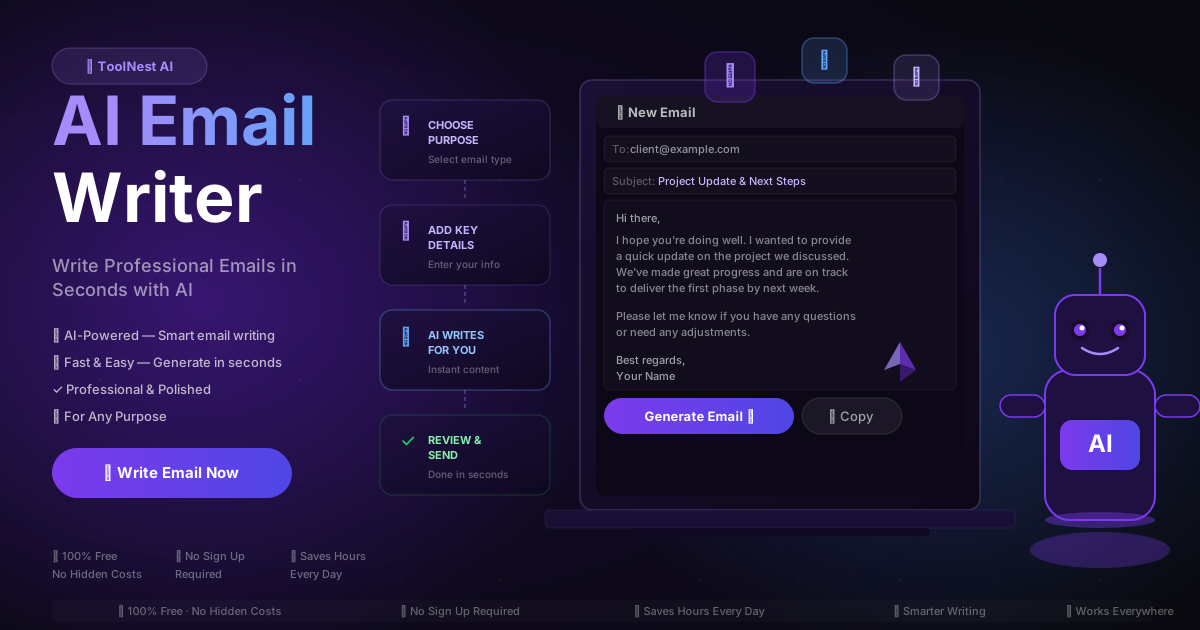
You know exactly what you need to say. Getting it into a professional email — with the right tone, the right structure, and no embarrassing phrasing — is another matter entirely.
Email still runs the professional world. McKinsey research puts the average knowledge worker spending 28% of their workweek on email. That is more than two hours a day, every day, writing messages most recipients spend twelve seconds reading. The mismatch between effort and return is one of the most persistent frustrations of modern work.
An AI email writer does not replace your judgment. It eliminates the mechanical part: staring at a blank compose window, debating whether to open with "I hope this finds you well," worrying about whether your tone is too stiff or too casual. You describe what you need. The AI writes a polished first draft in under thirty seconds. You review, adjust if necessary, and send.
This guide covers everything you need to know about using one effectively.
Table of Contents
- What Is an AI Email Writer?
- How AI Email Writers Work
- Step-by-Step: Writing an Email with AI
- Email Types You Can Generate
- Choosing the Right Tone
- AI Email Writer vs. Writing It Yourself
- Pros and Cons
- Common Email Mistakes AI Eliminates
- Frequently Asked Questions
What Is an AI Email Writer?
An AI email writer is a tool that generates professional email copy based on your inputs — the purpose, the recipient, the key points you want to cover, and the tone you want to strike. You do not need to write the email yourself. You describe what you need and the AI produces a complete, ready-to-send draft.
The best free AI email writers go well beyond generic templates. They produce contextually appropriate emails: a cold sales outreach sounds different from a client follow-up, which sounds different from an apology to a frustrated customer. The AI understands these distinctions and adjusts structure, vocabulary, length, and phrasing accordingly.
In 2026, AI email tools have become sophisticated enough to handle nuanced scenarios: negotiating a deadline extension without burning a relationship, declining a request without closing a door, expressing urgency without sounding aggressive. The quality gap between AI-generated and manually written email has narrowed considerably — and for most professional scenarios, you cannot tell the difference.
How AI Email Writers Work
When you submit your email brief, the AI processes several dimensions simultaneously.
Purpose recognition. The AI identifies what the email needs to accomplish — inform, persuade, apologise, request, follow up — and structures the output accordingly. A sales pitch needs a hook and a clear call to action. A follow-up needs brevity and a single ask. An apology needs empathy before explanation.
Tone calibration. Based on your selected tone and the email type, the AI adjusts formality, word choice, and sentence rhythm. Professional tone uses precise, active language. Friendly tone uses contractions and warmer phrasing. Formal tone avoids colloquialisms entirely.
Structure enforcement. Every AI-generated email follows proven structural patterns: a subject line that reflects the email's actual purpose, an opening that states intent within the first sentence, a body that covers each point clearly, a single actionable close, and an appropriate sign-off. No padding, no unnecessary hedging.
Length optimisation. Short emails work for quick updates and responses. Medium-length suits most professional correspondence. Long emails handle complex proposals or situations requiring significant context. The AI calibrates word count to match what you select.
Step-by-Step: Writing an Email with AI
Here is how to go from blank screen to polished email using the ToolNest AI Email Writer in under two minutes.
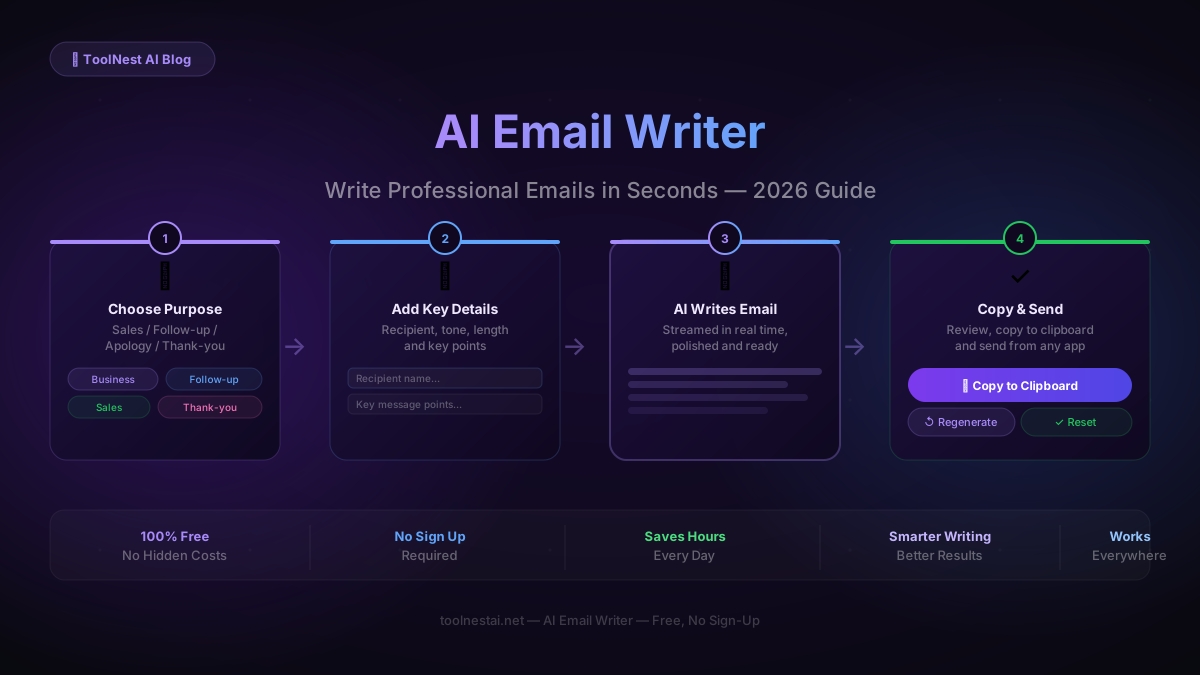
Step 1: Open the Tool
Go to the AI Email Writer on ToolNest AI. No account required, no subscription, no setup. The interface loads immediately.
Step 2: Choose Your Email Purpose
Select the type of email you need from the available categories: business update, sales outreach, follow-up, apology, thank-you, job application, newsletter, or custom. If your scenario does not fit a category neatly, use the custom option and describe it in plain language.
Step 3: Fill in the Key Details
Enter the recipient's name or role, describe your key message points in a few words or sentences, and add any specific context the AI should know — a deadline, a previous conversation, a company name, or a specific outcome you are looking for.
The more specific you are, the stronger the output. "Follow up on our product demo last Thursday and ask whether they want to proceed" produces a far better email than "follow up with a client."
Step 4: Select Tone and Length
Choose the tone that fits the relationship and context. Select a length that suits the complexity of the message — short (under 100 words), medium (100–200 words), or long (200+ words for complex or formal correspondence).
Step 5: Generate
Click Generate. The AI streams your email in real time — subject line first, then body, then sign-off. The whole process takes around twenty to thirty seconds.
Step 6: Review and Copy
Read through the output. The AI gets it right the vast majority of the time, but you know your recipient and your relationship better than any tool does. Make any small adjustments — a name, a specific date, a personal detail — then copy to clipboard and paste into Gmail, Outlook, or wherever you are sending from.
If the first draft is not quite right, click Regenerate. You can produce as many versions as you need.
Email Types You Can Generate
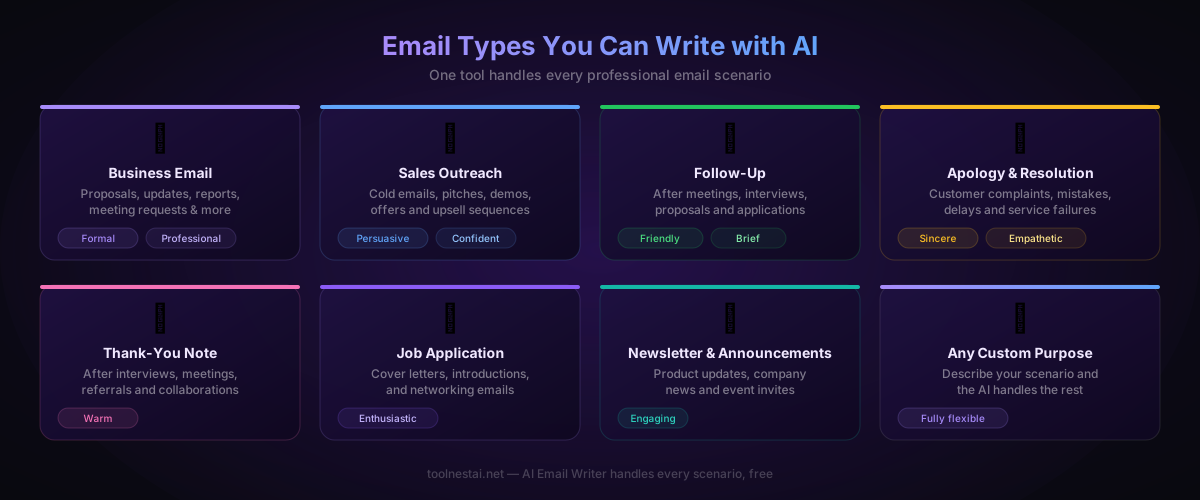
The AI Email Writer handles every common professional email scenario:
Business emails — proposals, project updates, meeting requests, status reports, and internal communications.
Sales outreach — cold emails, product pitches, demo requests, follow-up sequences, and upsell messages. The AI writes persuasive copy without sounding pushy.
Follow-up emails — after meetings, interviews, proposals, and events. These are notoriously difficult to write without either sounding needy or too casual. The AI strikes the right balance.
Apology and resolution emails — when something has gone wrong with a client or customer. The AI leads with empathy before moving to explanation and resolution, which is the correct order.
Thank-you notes — after referrals, collaborations, interviews, and professional gestures. Short, genuine, and specific.
Job application emails — covering letters and introduction emails for networking and career advancement. Works well alongside the AI Resume Builder and AI Cover Letter Generator.
Newsletters and announcements — product updates, event invitations, and company news, structured for clarity and engagement.
Custom scenarios — describe anything else and the AI will handle it.
Choosing the Right Tone
Tone is one of the most important variables in professional email — and one of the hardest to calibrate manually, especially when you are tired, stressed, or writing in a second language.
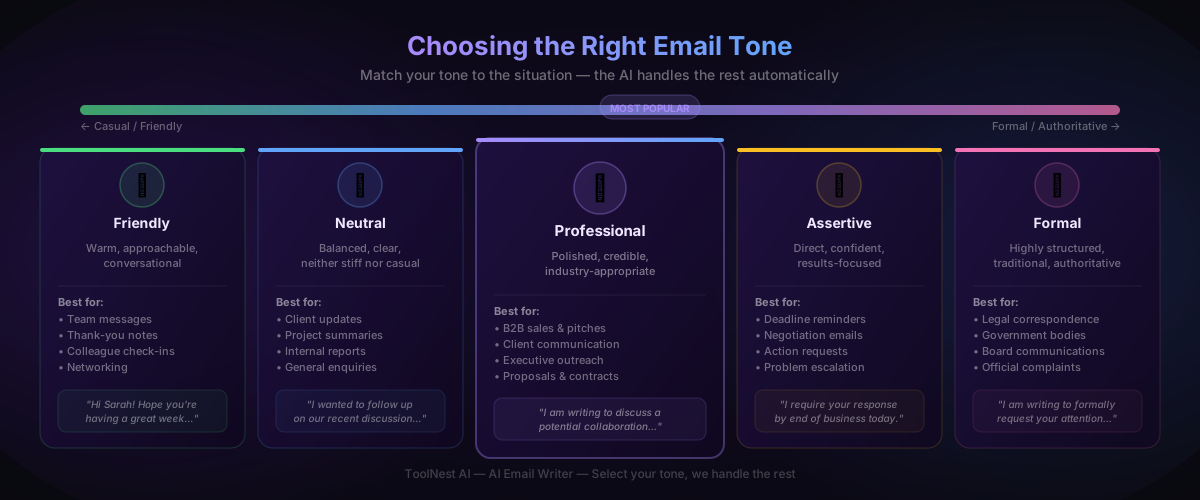
Friendly works for team communication, thank-you notes, and messages to colleagues you know well. Warm language, contractions, a conversational rhythm.
Neutral is the safe default for most client communication, project updates, and general professional correspondence. Clear and approachable without being overly familiar.
Professional is the most versatile tone for B2B communication, executive outreach, and any email where you want to project competence and authority. Precise, active, polished.
Assertive is appropriate when you need action: deadline reminders, negotiation follow-ups, requests that have already been ignored. Direct without being rude.
Formal suits legal correspondence, government communications, board-level messages, and official complaints. Traditional structure, no colloquialisms.
The AI matches your tone selection to the email type and context. If you select "Friendly" for an apology email, it will still open with empathy rather than banter — context overrides style where it should.
AI Email Writer vs. Writing It Yourself
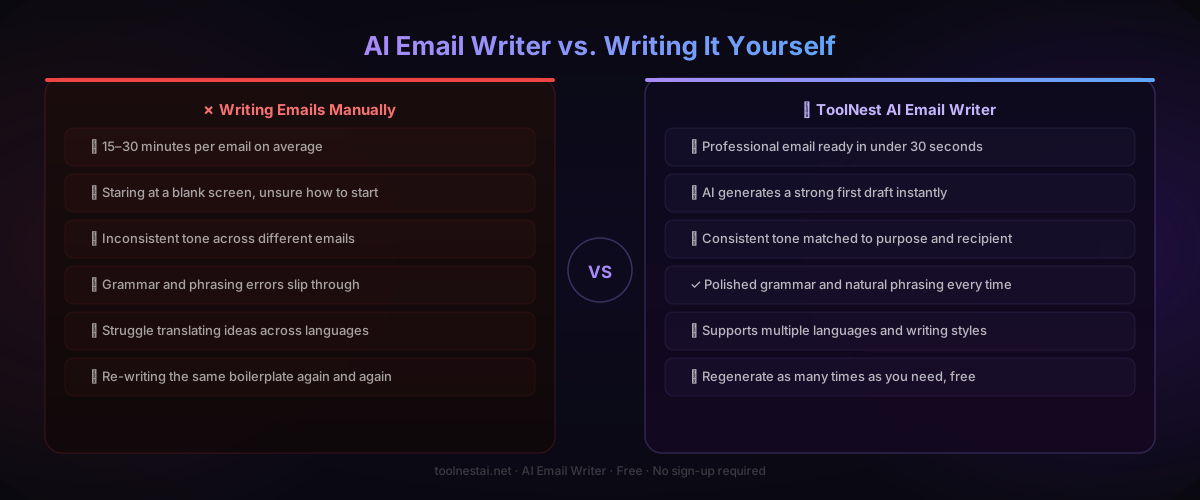
| Writing Manually | AI Email Writer | |
|---|---|---|
| Time per email | 15–30 minutes | Under 30 seconds |
| Writer's block | Common, especially under pressure | Eliminated |
| Tone consistency | Varies with mood and energy | Consistent, calibrated to selection |
| Grammar and phrasing | Errors slip through | Clean prose every time |
| Language support | Limited to your proficiency | Multiple languages |
| Cost | Time only | 100% free |
| Revision speed | Full rewrite required | Instant regeneration |
| Learning curve | Years of professional experience | None |
The comparison is not entirely one-sided. For emails where the relationship, history, and specific phrasing matter deeply — a resignation letter to a long-term employer, a message to a difficult stakeholder — your human judgment produces something more textured than the AI alone. Use AI as your first draft, apply your knowledge of the relationship as the final edit.
Pros and Cons
Pros
Speed. Thirty seconds versus twenty minutes. For professionals who send dozens of emails a day, the cumulative saving is significant.
Consistent quality. The AI does not have bad days, does not write terse emails when stressed, and does not accidentally adopt an apologetic tone in a negotiation. Every email meets the same standard.
Removes writer's block. Starting is the hardest part. Having a polished first draft in front of you makes editing easy — even if you change everything, the structure is there.
Tone accuracy. Many professionals genuinely struggle with tone calibration, particularly across cultures or when writing in a second language. The AI handles this reliably.
Free. The ToolNest AI Email Writer is completely free, requires no account, and has no usage limits.
Cons
Context requires your input. The AI cannot know that your recipient is going through a difficult period, that you have a complicated history with this client, or that a particular phrase will land badly. That context has to come from you.
Occasional generic phrasing. Some AI-generated email can read as slightly polished-but-bland. A light edit to add a specific detail — a reference to a previous conversation, a particular product name, a shared interest — makes a meaningful difference.
Not a substitute for relationship. The email itself is rarely the whole story. How quickly you respond, whether you followed through on previous commitments, whether you remember small details the other person shared — those things matter more than the perfect subject line.
Common Email Mistakes AI Eliminates
Vague subject lines. "Following up" tells the recipient nothing. The AI writes subject lines that reflect the email's actual purpose: "Q3 proposal review — response needed by Friday."
Opening with pleasantries. "I hope this email finds you well" has become meaningless filler. The AI opens by stating the purpose of the email in the first sentence.
Burying the ask. Many professionals write three paragraphs of context before finally stating what they need. The AI structures email so the key request is clear early.
Multiple competing calls to action. Asking someone to "review the proposal, schedule a call, and introduce me to your procurement lead" in a single email guarantees at least two of those things get ignored. The AI produces one clear ask per email.
Wrong formality level. Too casual with a senior executive, too stiff with a colleague you work with daily. The AI calibrates this correctly when you select the appropriate tone.
Grammar and spelling errors. These erode credibility, particularly in sales and client communication. AI-generated email is clean by default.
Emails that are too long. Most professional emails should be under 200 words. The AI respects your length selection and stays within it.
For the cover letters and follow-up applications that accompany your emails, the AI Cover Letter Generator and AI Resume Builder work seamlessly alongside this tool. Use the AI Grammar Checker for a final review of anything high-stakes, and AI Humanizer to add a more natural voice to any draft that reads too mechanically.
Frequently Asked Questions
Is the ToolNest AI Email Writer completely free?
Yes. The tool is 100% free with no subscription tiers, no usage limits, and no sign-up required. Open it, write your email, copy it, and close the tab — that is all.
Do I need an account to use it?
No account is required. The tool works directly in your browser. Nothing is saved or stored after your session.
Can I use AI-generated emails for sales and cold outreach?
Yes. The AI Email Writer is well-suited to sales outreach. Select the Sales purpose, describe your product or service and the recipient's likely pain point, and the AI produces a cold email that leads with value rather than a product pitch. Always personalise with the recipient's name and a specific detail before sending.
What email clients does the output work with?
Any. The AI produces plain text email copy that you copy and paste into Gmail, Outlook, Apple Mail, HubSpot, Mailchimp, or any other email client. There is no special formatting or export required.
Can I use it to write emails in other languages?
Yes. Specify the language in your brief — for example, "write this in French, professional tone" — and the AI will generate the email in that language. This is particularly useful for international business correspondence.
How long does generation take?
Typically between twenty and forty seconds. The email streams in real time so you can read it as it is generated.
Should I edit AI-generated emails before sending?
For most emails, the output is ready to send with minimal or no editing. For high-stakes emails — significant business relationships, difficult conversations, senior stakeholders — take sixty seconds to add specific personal details and review the framing. The AI handles the structure; your knowledge of the relationship handles the nuance.
Can I regenerate if I do not like the output?
Yes. Click Regenerate as many times as you need. Each generation produces a different version. You can also adjust your inputs — more detail in the brief, a different tone selection — and regenerate for a significantly different result.
Write Your First Email Now
The ToolNest AI Email Writer is free, requires no sign-up, and produces a polished, professional email in under thirty seconds. It eliminates writer's block, calibrates tone, and handles the mechanical work so you can focus on what the email actually needs to accomplish.
Once your email is ready, use the AI Grammar Checker for a final review, or pair it with the AI Cover Letter Generator if you are handling a job application. The AI Resume Builder covers the rest of your application materials.
Your next email is thirty seconds away.
About the author
ToolNest AI
The ToolNest AI editorial team tests and reviews the best free online tools so you don't have to.
Related Articles

Best Free AI Tools in 2026
Discover the best free AI tools available in 2026 — from AI chat assistants to text summarizers, translators, email writers and resume builders. All free, no sign-up required.
AI Resume Builder: How to Create a Professional Resume in Minutes (2026 Guide)
Learn how to use an AI resume builder to create an ATS-friendly, professional resume in minutes — completely free. Includes a step-by-step guide, comparison table, common mistakes, and 8 expert FAQs.