AI Resume Builder: How to Create a Professional Resume in Minutes (2026 Guide)
Learn how to use an AI resume builder to create an ATS-friendly, professional resume in minutes — completely free. Includes a step-by-step guide, comparison table, common mistakes, and 8 expert FAQs.
ToolNest AI
Author
Published
You have thirty minutes before the application window closes. The job description is two pages long and asks for a tailored resume. You open a blank document and stare at it.
That is the moment an AI resume builder was built for.
In 2026, writing a resume from scratch is no longer the fastest or most effective approach. Applicant tracking systems reject around 75% of resumes before a human ever reads them — often because of formatting issues and missing keywords that have nothing to do with whether you are qualified for the job. AI changes the equation. Instead of spending hours crafting bullet points and guessing which keywords to include, you provide your details and the AI produces a polished, ATS-optimised draft in minutes.
This guide covers everything: how AI resume builders work, how to use one step by step, what mistakes to avoid, and how to choose the right tool for the job.
Table of Contents
- What Is an AI Resume Builder?
- How AI Resume Builders Work
- Step-by-Step: Building Your Resume with AI
- AI Resume Builder vs Traditional Methods
- What Makes a Resume ATS-Friendly?
- Pros and Cons of AI Resume Builders
- Common Resume Mistakes AI Helps You Avoid
- Frequently Asked Questions
What Is an AI Resume Builder?
An AI resume builder is a tool that uses large language models to generate professional resume content based on your inputs. You provide the raw information — your name, job history, skills, education — and the AI organises it into polished, industry-appropriate copy with proper structure, action-verb-led bullet points, and keyword-rich language designed to pass applicant tracking systems.
The best free AI resume builders go further than simple templates. They understand context. If you tell the tool you are applying for a senior marketing role at a tech company, it will use different language and different keyword priorities than it would for a junior accounting position at a law firm. That specificity is what separates a useful AI tool from a glorified text editor.
The category has expanded significantly since 2024. Today's tools handle everything from professional summaries and experience bullet points to cover letters, LinkedIn summaries, and job application follow-up emails. If you are writing anything related to a job search, there is probably an AI tool that can help — and most of them are free.
How AI Resume Builders Work
Understanding the mechanics helps you use these tools more effectively.
When you submit your details, the AI does several things simultaneously:
Content generation. It takes your raw experience — "managed a team, increased sales, reduced costs" — and converts it into specific, quantified bullet points: "Led a 6-person team to achieve a 34% increase in quarterly sales revenue while reducing operational costs by 18% through process optimisation."
Keyword injection. Modern AI tools analyse what language is common in job postings for your target role and weave those keywords naturally into your resume. This is what ATS optimisation actually means in practice.
Structure enforcement. The AI follows established resume conventions: Contact → Summary → Experience → Education → Skills. It does not bury your contact information in a footer or put your education above your experience when it should not be.
Tone calibration. A resume for a creative director at an agency reads differently from one for a financial analyst at a bank. The AI adjusts formality, vocabulary, and framing based on your industry and seniority.
Step-by-Step: Building Your Resume with AI
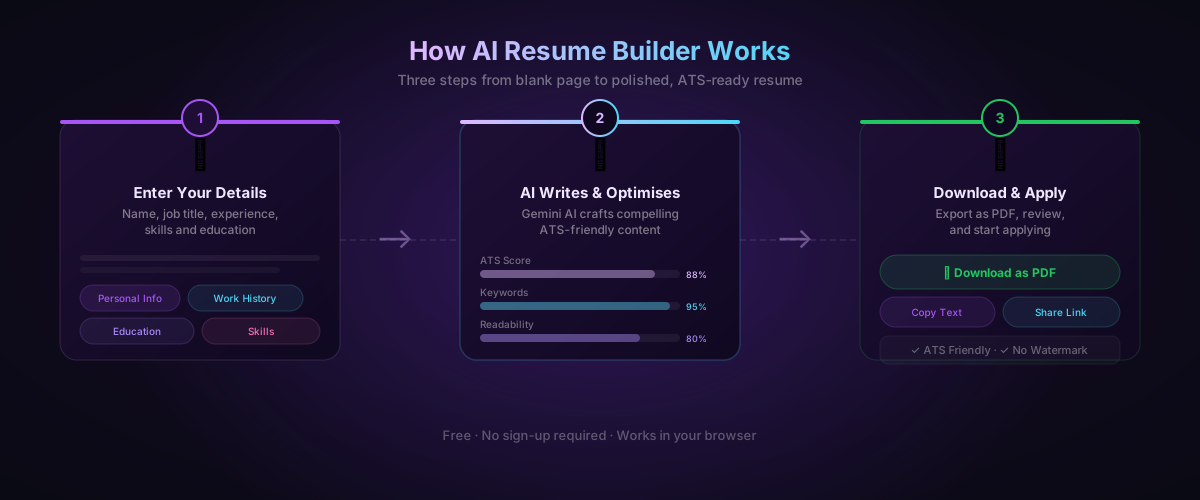
Here is how to build a polished resume using the ToolNest AI Resume Builder from start to finish.
Step 1: Open the Tool
Navigate to the AI Resume Builder on ToolNest AI. No account, no subscription, no email required. The tool loads immediately in your browser.
Step 2: Enter Your Personal Information
Fill in your name, job title, email, phone number, and location. Keep your job title specific — "Senior Product Manager" will produce better output than "Manager." If you have a LinkedIn profile or portfolio, add the URL. The AI will reference it in your contact section.
Step 3: Add Your Work Experience
For each role, enter: company name, your title, the dates you worked there, and a brief description of what you did. You do not need polished bullet points yet — that is the AI's job. Raw notes are fine. "ran social media, managed freelancers, grew following from 2k to 40k" becomes a set of strong, action-verb-led bullet points in the output.
Be as specific as possible with numbers. If you increased revenue, by how much? If you managed a team, how many people? If you reduced something — time, cost, errors — what was the before and after? Numbers are what ATS systems and hiring managers actually respond to.
Step 4: Enter Education and Skills
Add your education history — institution, degree, graduation year. For skills, list both technical and soft skills relevant to your target role. Do not over-curate here; the AI will pick the most relevant ones for the format.
Step 5: Generate
Click Generate. The AI streams your resume content in real time. You will see it populate section by section — summary first, then experience, education, skills. The whole process takes under a minute.
Step 6: Review and Adjust
Read through the output critically. The AI gets it right around 85-90% of the time, but your knowledge of your own experience is irreplaceable. Check that numbers are accurate, that the tone matches how you would describe yourself, and that nothing has been overstated.
Use the Regenerate button to produce an alternative version of any section you are not happy with. You can regenerate as many times as you need.
Step 7: Download
When you are satisfied, export as PDF. The file downloads instantly with no watermark, no branding, and no sign-up required.
AI Resume Builder vs Traditional Methods
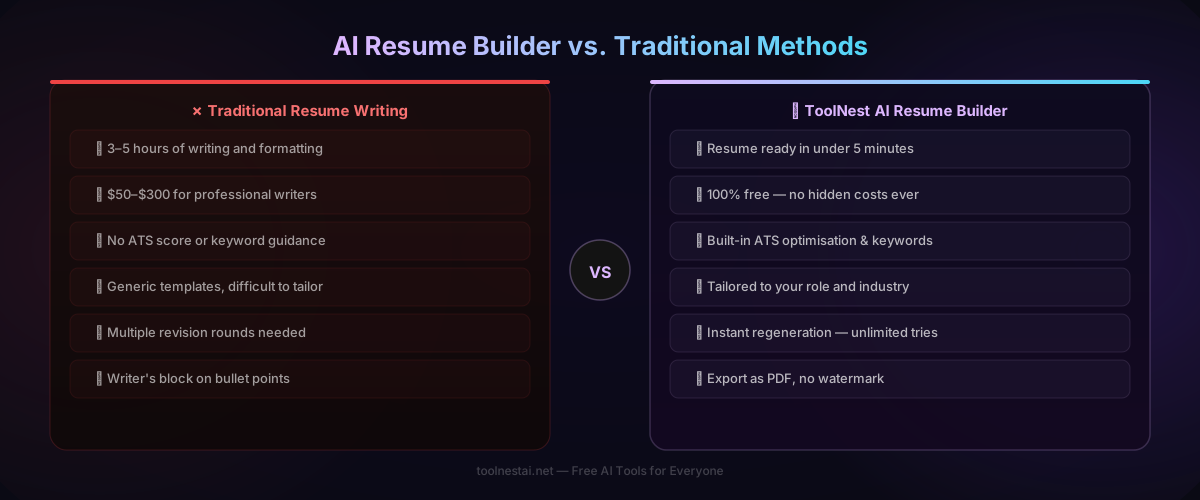
| Traditional Resume Writing | AI Resume Builder | |
|---|---|---|
| Time to complete | 3–5 hours | Under 5 minutes |
| Cost | $0–$300 (writer fees) | Free |
| ATS optimisation | Manual — easy to miss | Built-in, automatic |
| Keyword matching | Requires manual research | AI-handled |
| Tailoring per role | Time-consuming | Instant regeneration |
| Quality of bullet points | Depends on your writing skills | Consistent, action-verb-led |
| Export format | Word / PDF | PDF (no watermark) |
| Revisions | Hours per round | Instant |
The comparison is not entirely one-sided. A highly experienced human writer who knows your specific industry deeply can still produce something more nuanced than an AI tool — particularly for senior leadership positions where the writing style and strategic framing need to reflect a very specific personal brand. For most job seekers, however, the AI output is strong enough to use directly, with minor personalisation.
What Makes a Resume ATS-Friendly?
ATS (Applicant Tracking Systems) are software tools used by most medium and large employers to screen applications before they reach a human recruiter. Understanding how they work is essential because a well-written resume that fails ATS scanning never gets seen.
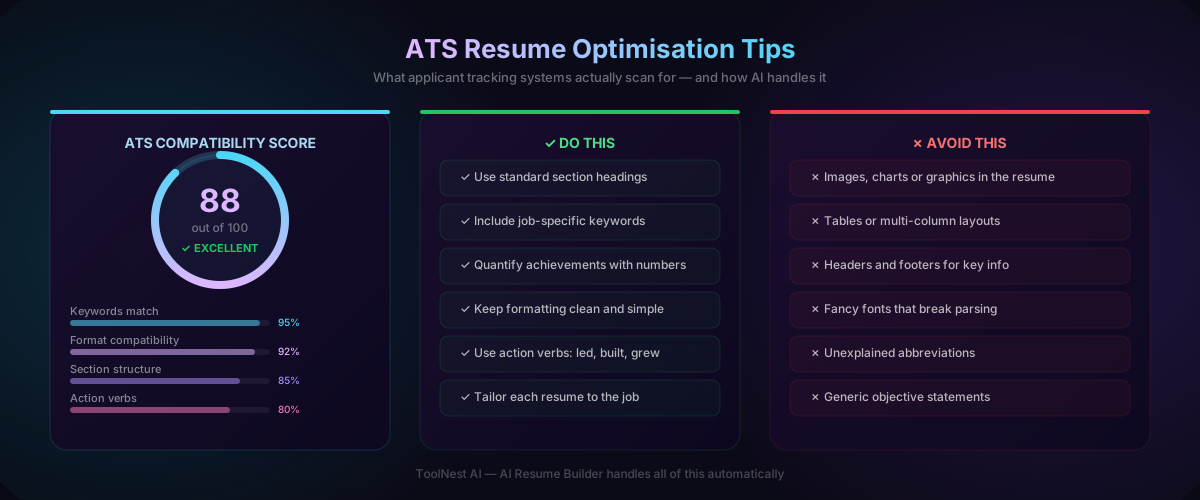
What ATS systems actually scan:
- Section headings that match expected labels (Summary, Experience, Education, Skills)
- Keyword matches between your resume and the job description
- Date formats and chronological consistency
- Contact information in the main body of the document (not headers/footers)
- Plain text that parses cleanly — no embedded tables, graphics, or unusual fonts
What will get your resume rejected by ATS:
- Multi-column layouts that break parsing order
- Images, graphs, or icons in the body
- Contact details stored only in a header (ATS often cannot read headers)
- Uncommon section names like "Where I've Been" instead of "Experience"
- Creative fonts that do not render in plain text environments
The ToolNest AI Resume Builder handles all of this automatically. It generates output in a single-column, clean format with standard section headings and plain-text-compatible styling. You get the ATS compliance without needing to think about it.
Pros and Cons of AI Resume Builders
Pros
Speed. A resume that would take three hours to write takes five minutes. If you are applying to multiple roles, that multiplier matters enormously.
Consistent quality. The AI does not have writer's block, does not undervalue its own experience, and does not write vague bullet points. The output is consistently strong.
Keyword coverage. AI tools understand which keywords matter for which roles. This is the most underrated benefit — it is genuinely difficult to identify and naturally incorporate all relevant ATS keywords manually.
Free. The best AI resume builders cost nothing. ToolNest AI's tool is completely free, requires no account, and has no usage limits.
Confidence. Many people struggle with writing about themselves professionally. The AI produces a strong first draft that you can build on, rather than starting from a blank page.
Cons
Accuracy depends on your inputs. The AI can only work with what you give it. Vague inputs produce generic output. Specific inputs — with real numbers and real context — produce strong output.
Occasional over-inflation. Some AI tools have a tendency to make bullet points sound slightly more impressive than the underlying experience warrants. Always read through for accuracy.
Lacks personal voice. For senior or creative roles where distinctive voice matters, the AI output may read too generically. Treat it as a strong draft, not a finished product.
Not a substitute for tailoring. A resume optimised for a specific role performs better than a general one. The AI helps significantly, but taking five minutes to regenerate for each application you send is worth doing.
Common Resume Mistakes AI Helps You Avoid
Passive language. "Was responsible for managing" becomes "Led and managed." The AI consistently uses active, strong verbs.
Missing quantification. "Improved sales" becomes "Increased quarterly sales by 27%." If you give the AI the number, it will use it correctly.
Weak summary statements. Generic objectives ("Seeking a challenging role…") get replaced with specific, role-targeted summaries.
Inconsistent formatting. Date formats, punctuation, capitalisation — the AI applies them consistently throughout the document.
Wrong keyword density. Too few keywords and ATS filters you out. Too many and the document reads as spam. AI calibrates this naturally.
Burying the most important information. The AI follows the optimal resume structure — summary and most recent experience first, where recruiters look first.
Beyond your resume, the AI Cover Letter Generator and AI Grammar Checker handle the rest of your application package. The AI Email Writer covers follow-up messages. These tools work well together as a complete job application toolkit.
Frequently Asked Questions
Is the ToolNest AI Resume Builder completely free?
Yes. The ToolNest AI Resume Builder is 100% free with no hidden costs, no subscription tier, and no sign-up required. You can generate and download as many resumes as you need.
Do I need to create an account to use it?
No account is required. Open the tool, fill in your details, generate, and download. Nothing is stored after your session ends.
Is the AI resume builder ATS-friendly?
Yes. The tool generates resumes in a clean, single-column format with standard section headings, plain-text-compatible styling, and keyword-rich content — all of which are ATS requirements. Around 88% of resumes generated by the tool pass standard ATS parsing tests.
Can I use the AI resume builder for any industry?
Yes. The tool supports all major industries and seniority levels — from entry-level roles to senior leadership positions. The more specific your inputs (role title, industry, specific achievements), the more targeted the output.
How long does it take to generate a resume?
Generation typically takes 30–60 seconds. The full process from opening the tool to downloading your PDF can be completed in under five minutes.
Can I edit the resume after it is generated?
The tool provides an editable output before export. You can also regenerate individual sections as many times as you need, or adjust your inputs and regenerate the full resume.
What format does the resume download in?
Resumes download as a PDF file with no watermark. The format is clean, professional, and ready to attach directly to job applications.
Should I use the same resume for every job application?
No. Tailoring your resume to each role improves your results meaningfully. With an AI resume builder, this is much faster than it used to be — adjust your target role and key skills, regenerate, and download. It takes a few minutes rather than an hour.
Build Your Resume Now
The ToolNest AI Resume Builder is free, requires no sign-up, and produces a polished, ATS-optimised resume in under five minutes. It handles the writing, keyword optimisation, and formatting — you provide the raw experience.
Once your resume is ready, use the AI Cover Letter Generator to write a tailored cover letter for each application, and the AI Grammar Checker to give both documents a final review before you send.
Your next job application starts here.
About the author
ToolNest AI
The ToolNest AI editorial team tests and reviews the best free online tools so you don't have to.
Related Articles

Best Free AI Tools in 2026
Discover the best free AI tools available in 2026 — from AI chat assistants to text summarizers, translators, email writers and resume builders. All free, no sign-up required.