AI Paraphrasing Tool: Rewrite Text Naturally Without Losing Meaning (2026 Guide)
Learn how to use a free AI paraphrasing tool to rewrite text naturally in seconds. Step-by-step guide, 5 paraphrase modes, best practices, common mistakes, and 8 expert FAQs.
ToolNest AI
Author
Published
You have text that says the right thing but not quite in the right way. Maybe it is too formal for the audience, too stiff for the platform, or lifted from a source you need to restate in your own words. Whatever the reason, rewriting takes time — time you could spend on something else.
An AI paraphrasing tool eliminates that bottleneck. Paste your text, choose a mode, and get a natural, restructured version in under thirty seconds. No synonym-swapping, no clunky rewrites, no loss of meaning.
This guide explains how these tools work, how to get the best results from them, and what separates a good paraphrase from a bad one.
Table of Contents
- What Is an AI Paraphrasing Tool?
- How AI Paraphrasing Works
- Step-by-Step: How to Paraphrase Text with AI
- The Five Paraphrase Modes Explained
- Who Uses an AI Paraphrasing Tool?
- AI Paraphrasing vs. Manual Rewriting
- Best Practices for Better Results
- Common Paraphrasing Mistakes to Avoid
- Frequently Asked Questions
What Is an AI Paraphrasing Tool?
An AI paraphrasing tool is software that rewrites text while preserving the original meaning. You supply the input — a sentence, a paragraph, or a full article — and the AI returns a restructured version that says the same thing in different words.
What separates modern AI paraphrasers from older tools is depth. Earlier tools did simple synonym substitution: "fast" became "quick," "important" became "significant." The result often read like a word-processed thesaurus — technically different but obviously mechanical.
Current AI paraphrasing tools understand sentence structure, context, and intent. They restructure at the sentence and paragraph level, not just at the word level. The output reads naturally because the AI generates new phrasing rather than decorating the original.
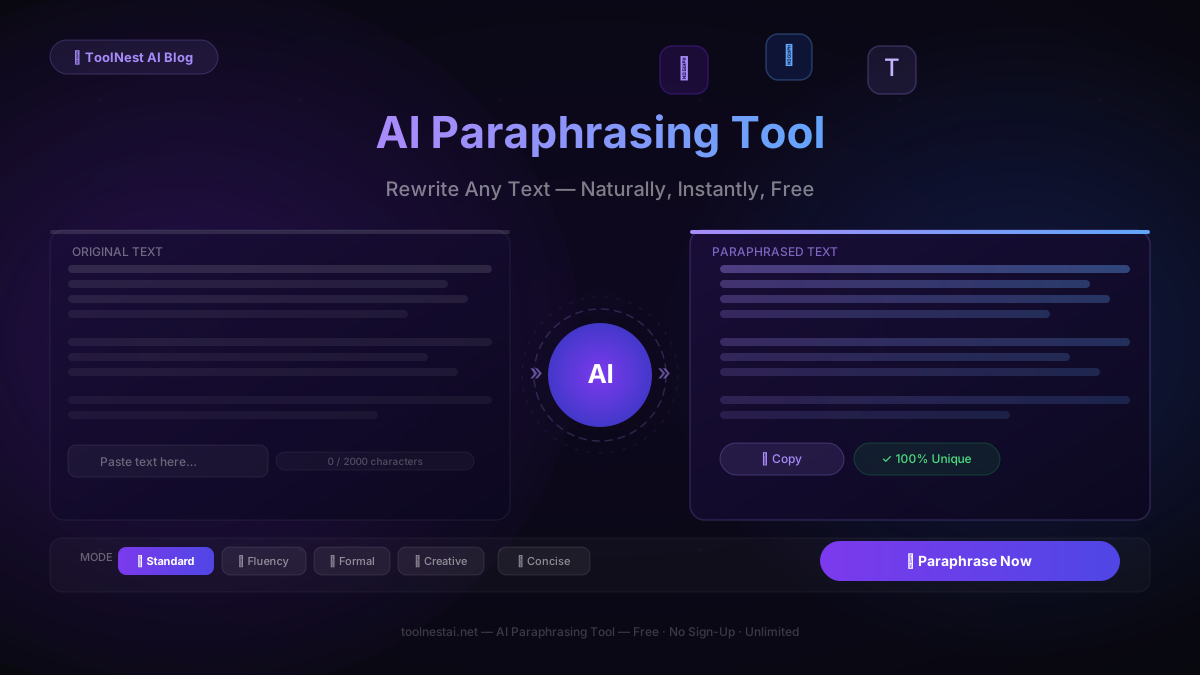
The ToolNest AI Paraphrasing Tool processes up to 2,000 characters per request, produces 100% unique output verified for originality, and offers five distinct modes to match different writing goals. It is completely free, requires no account, and works directly in your browser.
How AI Paraphrasing Works
When you submit text to an AI paraphraser, the model does not simply look up synonyms. It runs the entire passage through a large language model that has learned from a vast corpus of written text — enough to understand how ideas are typically phrased across different registers, industries, and styles.
The process involves three layers:
Semantic understanding. The AI first identifies the meaning of the text — what is being communicated, not just what words are present. This step ensures the rewrite preserves the intent even when the surface structure changes significantly.
Mode-aware generation. Depending on which mode you select, the AI applies different constraints to its output. Formal mode prioritises professional vocabulary and longer, more precise constructions. Creative mode allows more structural experimentation and bolder word choices. Concise mode compresses without losing substance.
Originality enforcement. Good AI paraphrasers generate output that is linguistically distinct from the input — not just a lightly modified copy. The rewrite should pass an originality check not because it tricks a detector, but because it is genuinely new phrasing of the same idea.
The combination of these three layers is what makes the difference between a paraphrasing tool that is useful and one that produces output you have to rewrite anyway.
Step-by-Step: How to Paraphrase Text with AI
Using the ToolNest AI Paraphrasing Tool takes about thirty seconds from paste to copy. Here is the full process.
Step 1: Open the Tool
Go to the AI Paraphrasing Tool on ToolNest AI. No sign-up, no subscription. The tool loads immediately in your browser.
Step 2: Paste Your Text
Copy the text you want to paraphrase and paste it into the input field. The tool accepts up to 2,000 characters per request — enough for a dense paragraph or several short ones. For longer documents, process them in sections for better control over the output.
Step 3: Select a Mode
Choose the paraphrase mode that matches your goal. Standard works for most situations. If you need formal language for a report, select Formal. If you want tighter, shorter output, select Concise. Each mode produces meaningfully different results, so picking the right one matters.
Step 4: Click Paraphrase Now
Hit the button. The AI streams the rewritten text in real time — you can read it as it generates. The full result typically appears in fifteen to thirty seconds.
Step 5: Review the Output
Read through the paraphrased text. The AI preserves meaning accurately in the vast majority of cases, but it cannot know proprietary context, internal jargon, or specific audience nuances that you hold. A thirty-second review catches anything that needs a personal touch.
Step 6: Copy and Use
Click Copy to grab the output. Paste it into your document, email, article, or wherever you need it. If the first version is not quite right, click Regenerate — the AI produces a fresh rewrite with each attempt.
The Five Paraphrase Modes Explained
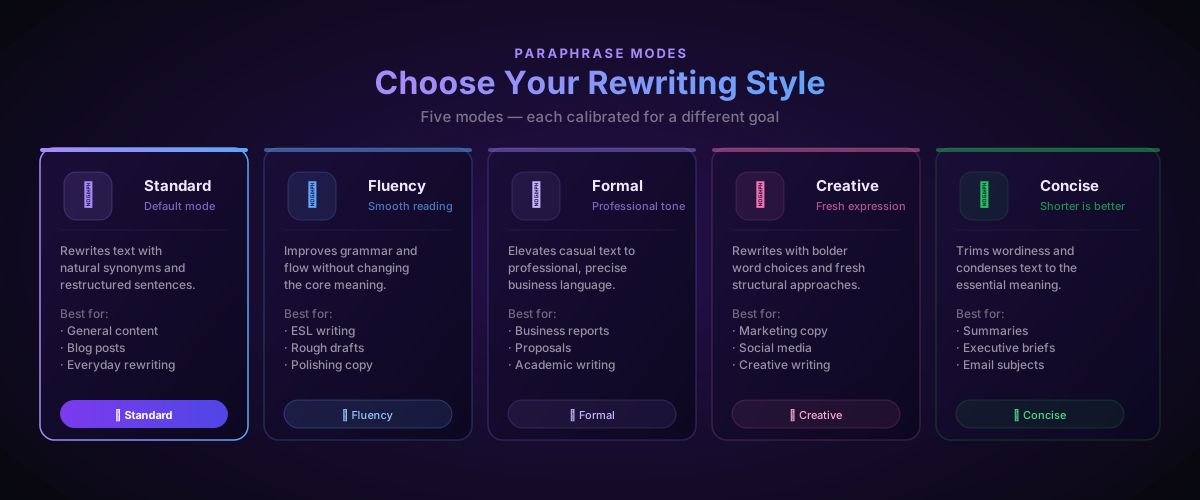
Choosing the right mode is the single biggest factor in output quality. Here is when to use each one.
Standard — The default mode. Natural synonym substitution combined with sentence restructuring. Works well for blog posts, general articles, and any situation where you want a clean, readable rewrite without a strong stylistic shift. Most users should start here.
Fluency — Focuses on improving readability and grammatical flow rather than maximising difference from the original. Ideal for text that is already close to what you want but reads awkwardly — translated content, rough drafts, or text written by a non-native speaker. The AI smooths the edges without changing the substance.
Formal — Elevates casual or conversational language to a professional register. Contractions are removed, vocabulary becomes more precise, and sentences are constructed with greater formality. Use this for business reports, academic writing, client proposals, and any context where a professional impression matters.
Creative — Produces the most departure from the original, using bolder vocabulary choices and more varied structural approaches. Best for marketing copy, social media content, and creative writing where you want a fresh angle rather than a clean rewrite. Expect the output to feel different from the input — that is intentional.
Concise — Trims the input to its core meaning, reducing word count while keeping the substance. Excellent for condensing verbose writing, producing executive summaries, or tightening any text that has become too long. If someone told you to cut your draft by thirty percent, this mode does it.
Who Uses an AI Paraphrasing Tool?
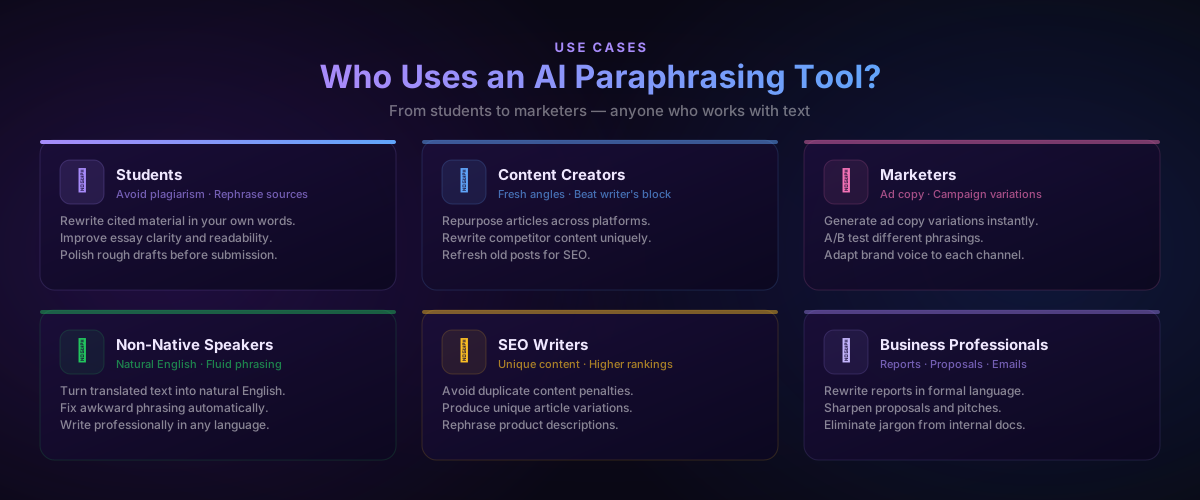
The range of people who benefit from AI paraphrasing is broader than most expect.
Students use it to rephrase cited material in their own words without changing the meaning — one of the core skills required in academic writing. It also helps polish essay drafts before submission, improving clarity and flow across the whole paper.
Content creators use it to repurpose articles across platforms. A long-form blog post can be condensed for LinkedIn, rewritten in a more conversational register for a newsletter, or restructured for a different keyword focus for SEO. What takes hours manually takes minutes with AI.
Marketers use it to generate ad copy variations quickly. Rather than writing five versions of the same headline from scratch, they write one and let the AI produce the rest. A/B testing becomes much less painful when variation is cheap.
Non-native English speakers use Fluency mode to convert translated text into natural English. Machine translation often produces technically correct but stilted output. The AI paraphraser smooths this into prose that reads as though it was written in English originally.
SEO writers use it to produce unique content variations that avoid duplicate content penalties. Product descriptions, location pages, and category text that needs to be distinct can be rewritten systematically without starting from scratch each time.
Business professionals use Formal mode to upgrade internal drafts — project proposals, board summaries, client-facing reports — from working language to polished, professional prose.
AI Paraphrasing vs. Manual Rewriting
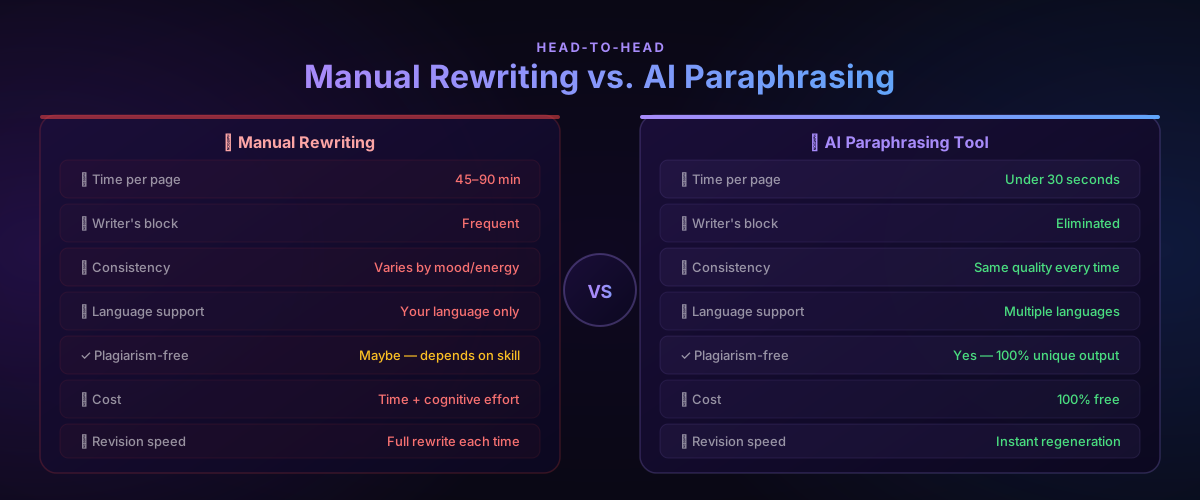
| Manual Rewriting | AI Paraphrasing Tool | |
|---|---|---|
| Time per page | 45–90 minutes | Under 30 seconds |
| Writer's block | Frequent | Eliminated |
| Consistency | Varies with energy and mood | Same quality every time |
| Language support | Your language only | Multiple languages |
| Plagiarism-free | Depends on skill | 100% unique output |
| Cost | Time and cognitive effort | 100% free |
| Revision speed | Full rewrite each time | Instant regeneration |
| Mode control | Requires explicit skill | Five modes, one click |
Manual rewriting has one advantage AI cannot replicate: you know the context, the audience, and the relationship in ways the AI cannot. A skilled human writer brings judgment that no paraphrasing tool can fully replace — especially for high-stakes content where every word matters.
The practical approach is to use them together. Let the AI handle the mechanical restructuring. Spend your attention on the judgment calls: which details to emphasise, which phrases will land with this specific audience, which words carry connotations the AI missed. You end up with both speed and quality.
Best Practices for Better Results
Give the AI complete sentences. The tool works on meaning, and meaning lives in complete grammatical units. Fragments and bullet points produce weaker paraphrases than full sentences do.
Process in sections for long documents. The 2,000-character limit per request is a feature, not a limitation. Processing section by section lets you review and adjust each part before moving on, producing tighter overall output than pasting everything at once and accepting the result wholesale.
Match the mode to the destination. Think about where the output will live before you select a mode. A blog comment section calls for Standard or Fluency. A board presentation calls for Formal. A product launch email calls for Creative. Mismatched modes produce technically correct but contextually wrong output.
Use the AI Grammar Checker on the output for high-stakes content. The paraphraser produces clean prose, but a grammar check before publishing anything client-facing or publicly visible is still worth thirty seconds.
Add specifics the AI cannot know. The AI rewrites what you give it. It cannot know that your target audience is enterprise procurement managers, that a particular phrase has internal significance, or that a competitor recently used similar language. After paraphrasing, read through with that contextual knowledge and make the additions that only you can make.
Regenerate freely. Each click of Regenerate produces a different rewrite. If the first output is not quite right, do not edit it into shape — regenerate and see if the next version is closer. It usually costs ten seconds and occasionally produces something significantly better.
The AI Humanizer is a useful companion tool when you need paraphrased output to feel warmer and more personal — it adds the natural rhythm of human writing to text that reads slightly formal or mechanical.
Common Paraphrasing Mistakes to Avoid
Swapping only synonyms. If the sentence structure stays identical and only individual words change, the output is not a genuine paraphrase — it is a cosmetic modification. Modern detectors and careful readers will notice. The AI restructures at the sentence level by default; do not use tools that do not.
Changing the meaning. The goal is to say the same thing differently, not to say a different thing. Review every paraphrase to confirm the core point survives intact. This matters most for technical content where precision is essential.
Accepting the output without reading it. The AI is accurate, but it cannot verify factual claims, know your internal terminology, or understand your audience's specific expectations. A brief read-through catches the small number of cases where the rewrite misses something.
Ignoring context that the AI cannot see. The AI paraphrases the text in front of it. If important context lives elsewhere — in a previous paragraph, in an image caption, in the audience's assumed knowledge — the AI does not have it. Factor that context into your review.
Using the wrong mode. Creative mode on a legal document and Formal mode on a casual newsletter both produce outputs that are technically paraphrased but wrong for the context. Match the mode to the destination before generating.
Over-relying on the tool. A paraphrasing tool produces restructured text. It does not produce better arguments, stronger evidence, or more insightful analysis. It handles the presentation layer. The substance is still yours to provide.
Frequently Asked Questions
Is the ToolNest AI Paraphrasing Tool completely free?
Yes. The tool is 100% free with no usage limits, no subscription tiers, and no sign-up required. Open the page, paste your text, and use it as many times as you need.
Is the paraphrased output plagiarism-free?
Yes. The AI generates new phrasing from scratch rather than modifying the original incrementally. The output is linguistically distinct from the input and will not match the source in any plagiarism checker. That said, the underlying ideas come from wherever your input came from — paraphrasing a source does not remove the need to cite it in academic contexts.
Can I use it for academic essays?
Yes, with the same caveat that applies to any rewriting: paraphrasing a cited source does not replace citation. Use the tool to help express the idea in your own words, then cite the original source as your institution requires. It works particularly well for improving the fluency of your own draft writing.
How much text can I paraphrase at once?
Up to 2,000 characters per request. For longer documents, paste and process in sections — this also gives you better control over the output, since you can review and adjust each section before moving on.
What is the difference between Standard and Fluency mode?
Standard mode maximises rewriting — it changes both vocabulary and structure to produce output that is clearly different from the input. Fluency mode is more conservative: it prioritises smooth, natural reading over maximum difference. Fluency is better when your text is already close to what you want but reads awkwardly; Standard is better when you need a distinctly new version.
Does it work for languages other than English?
The tool is optimised for English but can handle other languages. Results in English are consistently the strongest. For non-English content, specify the language in your request and review the output carefully, as quality may vary.
Can I use the output commercially?
Yes. The output is generated fresh by the AI and is not subject to the original source's copyright. You own the paraphrased output and can use it in any commercial context.
What should I do if I do not like the first result?
Click Regenerate. Each generation produces a different version of the paraphrase. You can also try a different mode — switching from Standard to Fluency or Creative often produces a noticeably different result that may suit your needs better.
Rewrite Text Better, Faster
The ToolNest AI Paraphrasing Tool is free, unlimited, and requires no account. It rewrites text in five modes — Standard, Fluency, Formal, Creative, and Concise — and delivers the result in under thirty seconds.
Use it to rephrase cited sources, repurpose content across platforms, polish rough drafts, or convert casual language into professional prose. Then run the output through the AI Grammar Checker for a final polish, or use the AI Humanizer to add warmth and natural rhythm.
Your text, better — in thirty seconds.
About the author
ToolNest AI
The ToolNest AI editorial team tests and reviews the best free online tools so you don't have to.
Related Articles
AI Email Writer: Write Professional Emails in Seconds (2026 Guide)
Learn how to use an AI email writer to write professional, polished emails in seconds — completely free. Step-by-step guide, tone tips, comparison table, common mistakes, and 8 expert FAQs.
AI Resume Builder: How to Create a Professional Resume in Minutes (2026 Guide)
Learn how to use an AI resume builder to create an ATS-friendly, professional resume in minutes — completely free. Includes a step-by-step guide, comparison table, common mistakes, and 8 expert FAQs.