URL Encoder & Decoder: Percent-Encode URLs Free Online
Learn how URL percent-encoding works, when to use encodeURIComponent vs encodeURI, the full %XX character reference, and how to encode or decode any URL instantly — free, no sign-up.
ToolNest AI Team
Author
Published
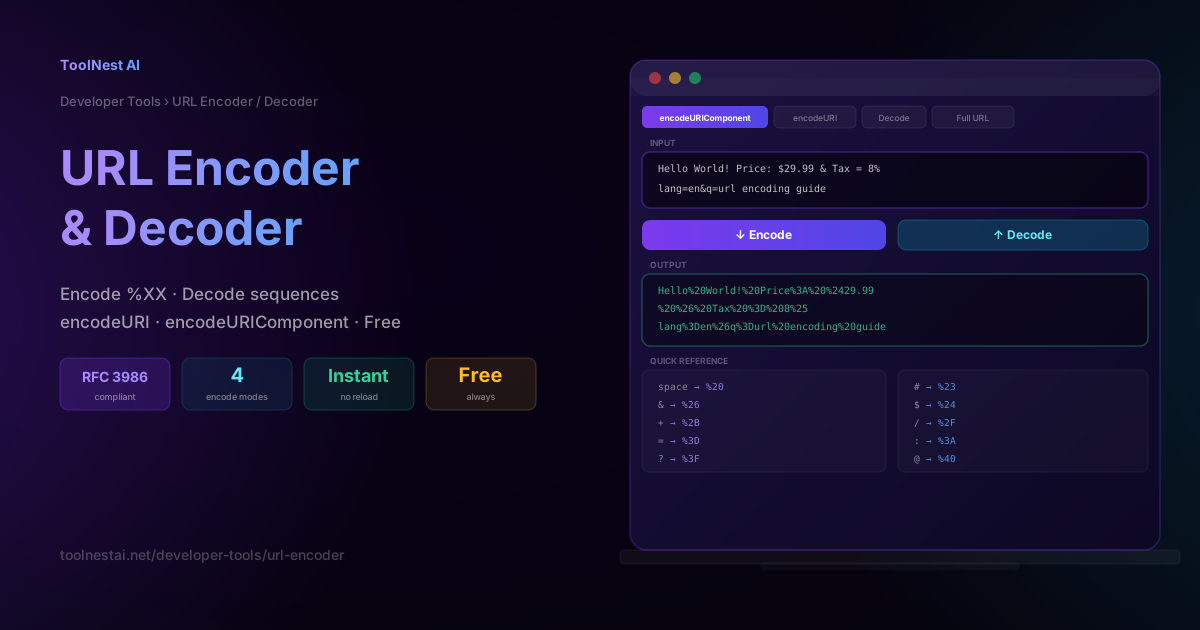
Every developer has encountered %20 in a URL and wondered why the space became two percent signs and a number. Or pasted a URL into a browser and watched it silently mangle special characters. Or spent time debugging an API call where the query parameter with an ampersand in the value was being parsed as two separate parameters.
These are all URL encoding problems — and they are surprisingly common. URL encoding, also called percent-encoding, is the mechanism that allows characters outside the safe ASCII set to be transmitted in a URL without breaking its structure. This guide explains how it works, which characters need encoding, when to use each JavaScript function, and how to use the ToolNest AI URL Encoder to encode or decode any string instantly.
Why URLs Need Encoding
A URL is composed of a fixed set of characters defined by RFC 3986. The only characters that can appear in a URL without encoding are:
- Unreserved characters:
A–Z,a–z,0–9,-,_,.,~ - Reserved characters (used as structural delimiters):
:,/,?,#,[,],@,!,$,&,',(,),*,+,,,;,=
Any other character — including spaces, accented letters, emoji, Chinese characters, and most punctuation — must be percent-encoded before being placed in a URL.
Percent-encoding works by replacing each character with % followed by two hexadecimal digits representing the character's UTF-8 byte value. A space (ASCII 32, hex 0x20) becomes %20. An ampersand (&, ASCII 38, hex 0x26) becomes %26.
The reason reserved characters also need encoding in certain contexts is that they serve structural roles. An & in a URL normally separates query parameters. If a query parameter value itself contains &, that character must be encoded as %26 — otherwise the URL parser will interpret it as a parameter separator.
The Anatomy of a URL
Understanding which part of a URL you are encoding is the key to choosing the right approach.
https://example.com/path/to/page?q=hello+world&lang=en#section
Scheme (https://): Never encoded. Must remain a literal colon and slashes.
Host (example.com): Domain names use a separate encoding scheme (Punycode) for international characters. Never percent-encode a hostname directly.
Path (/path/to/page): Path segments can be encoded, but the / separators must not be. If a path segment itself contains a /, encode that character before placing it in the path.
Query string (?q=hello+world&lang=en): The most common source of encoding bugs. The ?, &, and = are structural — they must not be encoded. But the values on the right side of each = must have any &, =, #, or other special characters encoded.
Fragment (#section): The fragment identifier is not sent to the server. It is processed entirely by the browser.
encodeURIComponent vs encodeURI — The Critical Difference
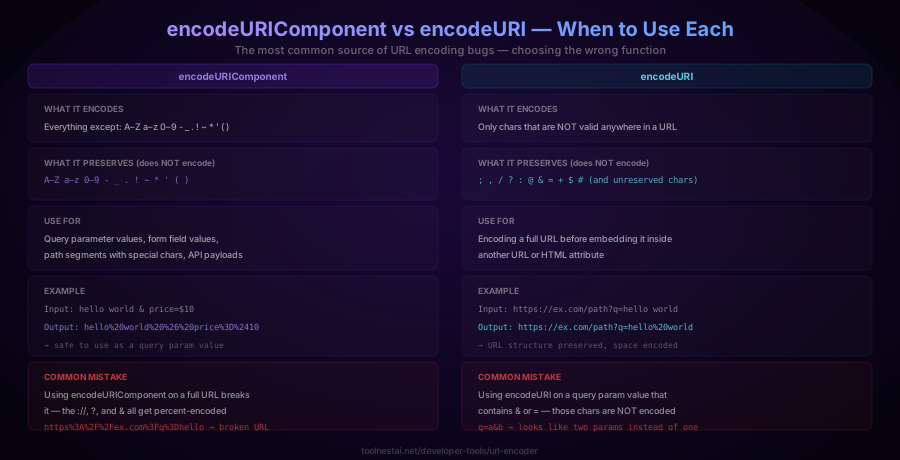
JavaScript provides two built-in encoding functions. Choosing the wrong one is the most common URL encoding mistake.
encodeURIComponent
Encodes: Everything except A–Z a–z 0–9 - _ . ! ~ * ' ( )
Does not encode: Only the unreserved characters plus the characters ! ~ * ' ( ) (which RFC 3986 deems safe in component values)
Use for: Query parameter values, form field values, path segment values, any string that will become part of a URL component.
// Correct: encoding a query parameter value
const query = "coffee & tea";
const url = `https://example.com/search?q=${encodeURIComponent(query)}`;
// → https://example.com/search?q=coffee%20%26%20tea
Do not use for full URLs. If you pass a complete URL to encodeURIComponent, the ://, ?, &, and = will all be encoded, producing a broken result:
// Wrong: passing a full URL to encodeURIComponent
encodeURIComponent("https://example.com?q=a&b=c")
// → "https%3A%2F%2Fexample.com%3Fq%3Da%26b%3Dc" — broken
encodeURI
Encodes: Everything that encodeURIComponent encodes, plus additional characters that cannot appear anywhere in a valid URL.
Does not encode: Everything encodeURIComponent preserves, plus the URL structural characters: ; , / ? : @ & = + $ #
Use for: Encoding a full URL before placing it inside an HTML attribute, another URL, or a context where the complete URL structure must be preserved.
// Correct: encoding a complete URL
const url = "https://example.com/search?q=hello world&lang=en";
encodeURI(url);
// → "https://example.com/search?q=hello%20world&lang=en"
// Note: & and = are NOT encoded — they are structural
Do not use for query parameter values. If a parameter value contains & or =, encodeURI will not encode them:
// Wrong: using encodeURI on a param value with &
const value = "a&b";
encodeURI(value); // → "a&b" — & NOT encoded → URL is misread
The rule
- Encoding a query parameter value → use
encodeURIComponent - Encoding a full URL to put inside an href or JSON field → use
encodeURI - Decoding
%XXsequences back to text → usedecodeURIComponentordecodeURIrespectively
The Complete Percent-Encoding Reference
These are the most commonly encountered percent-encoded characters. All values are based on UTF-8 encoding.
Safe characters — never need encoding:
A–Z, a–z, 0–9, -, _, ., ~
Characters that require encoding in query parameter values:
| Character | Encoded | Character | Encoded |
|---|---|---|---|
| space | %20 | ! | %21 |
" | %22 | # | %23 |
$ | %24 | % | %25 |
& | %26 | ' | %27 |
( | %28 | ) | %29 |
* | %2A | + | %2B |
, | %2C | / | %2F |
: | %3A | ; | %3B |
= | %3D | ? | %3F |
@ | %40 | [ | %5B |
\ | %5C | ] | %5D |
^ | %5E | ` | %60 |
{ | %7B | | | %7C |
} | %7D |
Space: %20 vs +
In query strings specifically, spaces are sometimes represented as + (a convention from HTML form encoding, defined in the application/x-www-form-urlencoded format). In URL path segments, spaces must always be %20. The + convention only applies to form data in query strings and is not universally supported — %20 is safer and more explicit.
How to Use the URL Encoder
The ToolNest AI URL Encoder handles encoding and decoding in four modes. All processing runs in your browser — nothing is sent to a server.
encodeURIComponent mode: Encodes all characters except the unreserved set. Use this for encoding query parameter values, form data, and path segment content.
encodeURI mode: Encodes characters that cannot appear anywhere in a URL, but preserves structural URL characters. Use this for encoding complete URLs.
Decode mode: Converts %XX sequences back to their original characters. Works on both encodeURI and encodeURIComponent encoded strings.
Full URL mode: Parses the URL into its components (scheme, host, path, query, fragment), encodes each component correctly, and reassembles a valid URL. This is the safest option when you have a complete URL with mixed encoding needs.
To encode a query parameter value:
- Select
encodeURIComponentmode - Paste the parameter value (not the full URL) into the input
- Click Encode
- Copy the result and use it as the parameter value in your URL
To decode a URL you received:
- Select Decode mode
- Paste the encoded URL or string
- Click Decode
- The original text appears in the output
Common URL Encoding Scenarios
Encoding a search query
When building a search URL programmatically, always encode the search term:
const term = "C++ programming & algorithms";
const url = `https://example.com/search?q=${encodeURIComponent(term)}`;
// → https://example.com/search?q=C%2B%2B%20programming%20%26%20algorithms
Encoding an email address in a URL
Email addresses contain @ and . which are safe in some URL positions but problematic in others:
const email = "user@example.com";
const url = `https://api.example.com/users/${encodeURIComponent(email)}`;
// → https://api.example.com/users/user%40example.com
Building a redirect URL parameter
When including a return URL as a query parameter value, the entire URL must be encoded:
const returnUrl = "https://app.example.com/dashboard?tab=settings";
const loginUrl = `https://auth.example.com/login?return=${encodeURIComponent(returnUrl)}`;
// The returnUrl's ://, ?, and = are all encoded — the outer URL is valid
Encoding a file path
If a file path contains spaces or special characters and needs to go into a URL:
const filename = "My Report (2026) — Final Draft.pdf";
const url = `https://cdn.example.com/files/${encodeURIComponent(filename)}`;
// → https://cdn.example.com/files/My%20Report%20(2026)%20%E2%80%94%20Final%20Draft.pdf
Note that encodeURIComponent encodes the em dash (—) as its UTF-8 byte sequence %E2%80%94.
Decoding a URL from a log file
Log files often contain percent-encoded URLs. Use the decoder to read them:
%2Fsearch%3Fq%3Dhello%20world%26lang%3Den
→ /search?q=hello world&lang=en
URL Encoding in Different Languages
The concepts are the same across languages, but the function names differ:
JavaScript (browser and Node.js):
encodeURIComponent("hello world"); // → "hello%20world"
decodeURIComponent("hello%20world"); // → "hello world"
Python:
from urllib.parse import quote, unquote
quote("hello world")       # → "hello%20world"
unquote("hello%20world")   # → "hello world"
quote("a&b", safe="")      # → "a%26b" (safe="" encodes everything)
PHP:
urlencode("hello world");   // → "hello+world" (uses + for spaces)
rawurlencode("hello world"); // → "hello%20world" (RFC 3986 compliant)
urldecode("hello+world");   // → "hello world"
rawurldecode("hello%20world"); // → "hello world"
Note that PHP's urlencode uses + for spaces (form encoding convention) while rawurlencode uses %20 (RFC 3986). Use rawurlencode for URL path segments and query parameters in modern applications.
Java:
URLEncoder.encode("hello world", "UTF-8"); // → "hello+world"
URLDecoder.decode("hello+world", "UTF-8"); // → "hello world"
Go:
url.QueryEscape("hello world")   // → "hello+world"
url.PathEscape("hello world")    // → "hello%20world"
URL Encoding vs Base64 Encoding
Both encode data for safe transmission, but they serve different purposes:
URL encoding (percent-encoding):
- Encodes characters that are unsafe in URLs
- Output is still a valid URL fragment — readable with minimal overhead
- Encoded output is typically slightly longer than input
- Used specifically for URLs and query strings
Base64 encoding:
- Encodes arbitrary binary data as ASCII text
- Output is not URL-safe by default (contains
+,/,=) — Base64URL variant is needed for URLs - Encoded output is always 4/3 the size of input
- Used for binary data, images, JWTs, and other contexts where arbitrary bytes need to be text
For URL query parameters, always use percent-encoding. For binary data that needs to go in a URL (like an image or JWT), encode with Base64URL first, then the result can go directly into a URL without further encoding.
Frequently Asked Questions
What is percent-encoding?
Percent-encoding (also called URL encoding) is the process of replacing characters that cannot appear safely in a URL with a % sign followed by two hexadecimal digits representing the character's UTF-8 byte value. For example, a space (byte value 32, hexadecimal 20) becomes %20. It is defined in RFC 3986.
What is the difference between encodeURIComponent and encodeURI?
encodeURIComponent encodes all characters except the unreserved set (A–Z a–z 0–9 - _ . ! ~ * ' ( )). It is used for encoding individual query parameter values. encodeURI also preserves URL structural characters (: / ? # [ ] @ ! $ & ' ( ) * + , ; =), so the URL's structure remains valid. Use encodeURIComponent for parameter values and encodeURI for complete URLs.
Why does a space sometimes appear as + instead of %20?
The + convention for spaces comes from the application/x-www-form-urlencoded format used in HTML forms. In this format, spaces are encoded as + in query strings. The %20 encoding is defined by RFC 3986 and is correct in all URL contexts. Both %20 and + are widely supported in query strings, but %20 is safer and more universally correct, especially in URL path segments where + should never be used for spaces.
Does URL encoding affect the security of a URL?
URL encoding is not a security mechanism — it is a data encoding mechanism. Encoding a URL does not make it safer or prevent attacks. For security, validate and sanitise all URL inputs on the server side. Never trust a URL just because it appears to be encoded.
Why does decoding a URL sometimes produce garbled characters?
Garbled characters usually indicate a mismatch between the encoding used to produce the percent-encoded sequence and the decoding being applied. Most modern URLs use UTF-8 encoding. If you see garbled characters when decoding a URL, the source URL may have been encoded using an older character set like ISO-8859-1 (Latin-1) or Windows-1252. Try decoding with the ToolNest decoder — it handles UTF-8 correctly for all standard URLs.
What are reserved characters in a URL?
Reserved characters are characters that have a specific structural meaning in URLs: : / ? # [ ] @ ! $ & ' ( ) * + , ; =. These characters must be percent-encoded when they appear in a context where they would otherwise be misread as structural delimiters. For example, & in a query parameter value must be encoded as %26 to prevent it from being interpreted as a parameter separator.
Can I encode a full URL with the URL Encoder?
Yes. Use the "Full URL" mode, which parses the URL into its components and encodes each part correctly — encoding path segments and query values while preserving structural characters like ://, ?, &, and =. Alternatively, use "encodeURI" mode for a simpler full-URL encode that preserves structural characters.
Why does my encoded URL not work in certain browsers or APIs?
The most common causes are: using encodeURIComponent on a full URL (which encodes structural characters); encoding a URL that was already encoded (double-encoding produces %2520 for a literal %25); or using the + space convention where %20 is expected. Use the ToolNest decoder to inspect what the encoded URL actually contains, then re-encode correctly.
About the author
ToolNest AI Team
The ToolNest AI team builds free tools that help developers, marketers, and creators do more online — faster.
Related Articles
JSON Formatter: Format, Validate & Minify JSON Free
Learn what JSON is, how to read and write it correctly, the 6 data types, common syntax errors, and how to instantly format or minify any JSON online with a free formatter tool.
Password Generator: Create Strong, Random Passwords Free
Learn what makes a password strong, how password entropy works, which character sets to use, and how to generate uncrackable passwords instantly with a free tool — no sign-up required.