AI Cover Letter Generator: Write a Professional Cover Letter in Minutes (2026 Guide)
Use a free AI cover letter generator to write personalized, ATS-optimised cover letters in under 60 seconds. Step-by-step guide, examples for entry-level, IT, marketing, healthcare and remote jobs, common mistakes, pros and cons, and 8 expert FAQs.
ToolNest AI Team
Author
Published
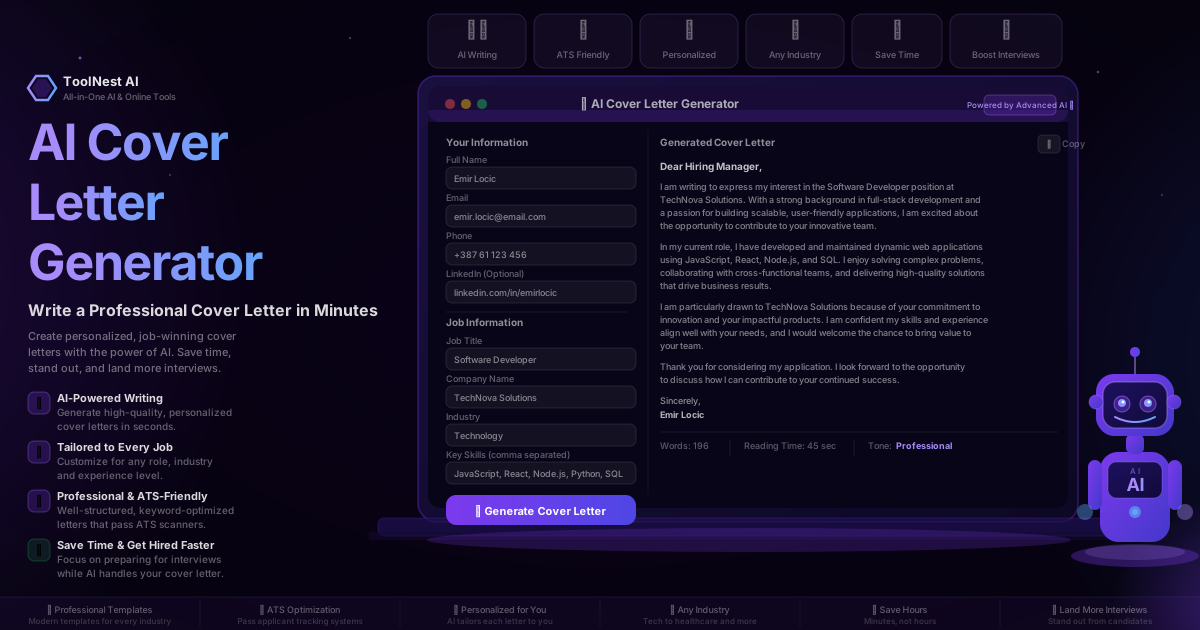
You have 30 seconds. That is the average time a recruiter spends reading a cover letter before deciding whether to keep reading or move on to the next application.
In those 30 seconds, your letter needs to signal the right role, demonstrate fit, and give the hiring manager a reason to care. A generic template pulled from Google does none of those things. A letter written in a rush at midnight does them poorly. A blank page does nothing at all.
A free AI cover letter generator solves all three problems. Give it your details, the job title, the company name and your key skills — and it produces a professional, personalised, ATS-optimised cover letter in under 60 seconds. This guide shows you how to use one effectively, what makes cover letters succeed or fail in 2026, and how to adapt the output for five different industries.
Table of Contents
- What Is an AI Cover Letter Generator?
- Why Cover Letters Still Matter in 2026
- How to Use ToolNest AI's Free Generator (Step-by-Step)
- Anatomy of a Winning Cover Letter
- Examples by Job Type
- How AI Makes Your Letter ATS-Proof
- AI Generator vs Writing It Yourself vs Hiring a Writer
- Common Mistakes to Avoid
- Pros and Cons
- Frequently Asked Questions
What Is an AI Cover Letter Generator?
An AI cover letter generator is a tool that creates a personalised, professional cover letter based on information you provide: your name and contact details, the job you are applying for, the company name, your relevant skills, and your industry. The AI uses this input to write a letter tailored to the specific role — not a generic template with blanks to fill in.
The best free options, like ToolNest AI's AI Cover Letter Generator, go further than basic generation by:
- Writing structured letters with a hook, experience paragraph, company connection and a strong close
- Embedding your skills naturally throughout the body text for ATS compatibility
- Matching tone to the industry — confident and data-driven for tech, warm and patient-centred for healthcare
- Showing word count and reading time so you know the letter fits the expected format
- Providing a one-click copy function so you can paste straight into your application
The output is a complete, ready-to-send cover letter — not a skeleton you spend an hour finishing.
Why Cover Letters Still Matter in 2026
The death of the cover letter has been predicted every year for a decade. It has not happened. Here is why they still matter and why they matter more than ever:
Recruiters use them to filter motivation. A CV tells recruiters what you have done. A cover letter tells them why you want this job at this company. When two candidates have similar experience, the letter is often the deciding factor.
They reveal communication skills. For roles involving writing, client-facing work, management or leadership, how you construct a cover letter is itself a demonstration of the skill the employer needs. A poorly written letter is a red flag. A strong one is a head start.
They help you pass ATS screening. Applicant Tracking Systems score both your CV and your cover letter for keyword matches. A cover letter written without ATS in mind can lose you points before a human ever reads it.
The data supports them. Research consistently shows that tailored cover letters — ones that mention the company by name and connect your skills directly to the job description — generate significantly higher callback rates than generic ones. One study found candidates with tailored letters were three times more likely to receive an interview invitation.
The catch is that writing a genuinely tailored letter for every application takes 30–60 minutes. When you are applying to 10, 20 or 50 roles, that time adds up fast. AI solves the time problem without sacrificing the personalisation.
How to Use ToolNest AI's Free Generator (Step-by-Step)
ToolNest AI's AI Cover Letter Generator requires no account and is completely free. The full process takes under two minutes.
Step 1 — Enter Your Personal Details
Fill in your Full Name, Email, Phone Number and optionally your LinkedIn URL. The AI uses these to format the header of your letter correctly. Keep the LinkedIn URL — it gives recruiters a direct way to view your full profile.
Step 2 — Add the Job Information
Enter the Job Title exactly as it appears in the listing. This is important: ATS systems award points for exact matches between the job title in your letter and the one in the posting. Then add the Company Name and select your Industry from the dropdown — this helps the AI calibrate its tone and use relevant terminology.
Step 3 — List Your Key Skills
The Key Skills field is where you control the ATS score of your letter. Enter the most relevant skills from your experience, ideally matching language used in the job description. If the listing says "project management" and "stakeholder communication," put those phrases in — not synonyms. Separate multiple skills with commas.
Step 4 — Generate and Review
Click Generate Cover Letter. Within seconds you will see a complete letter in the output panel. The footer shows your word count, reading time and tone. Read through the letter and check that the company name, job title and key skills are all referenced correctly.
Step 5 — Personalise One Detail
The AI generates a strong foundation. To make it truly stand out, add one specific sentence about why you are interested in this company: a product you admire, a recent achievement you read about, or a value that resonates with you. This takes 60 seconds and dramatically increases the letter's impact.
Step 6 — Copy and Apply
Click the Copy button and paste into your application portal or email. For PDF applications, paste into your word processor, apply your formatting, and export.
Anatomy of a Winning Cover Letter
Every cover letter the AI writes follows a proven structure. Understanding each section helps you personalise and refine the output.
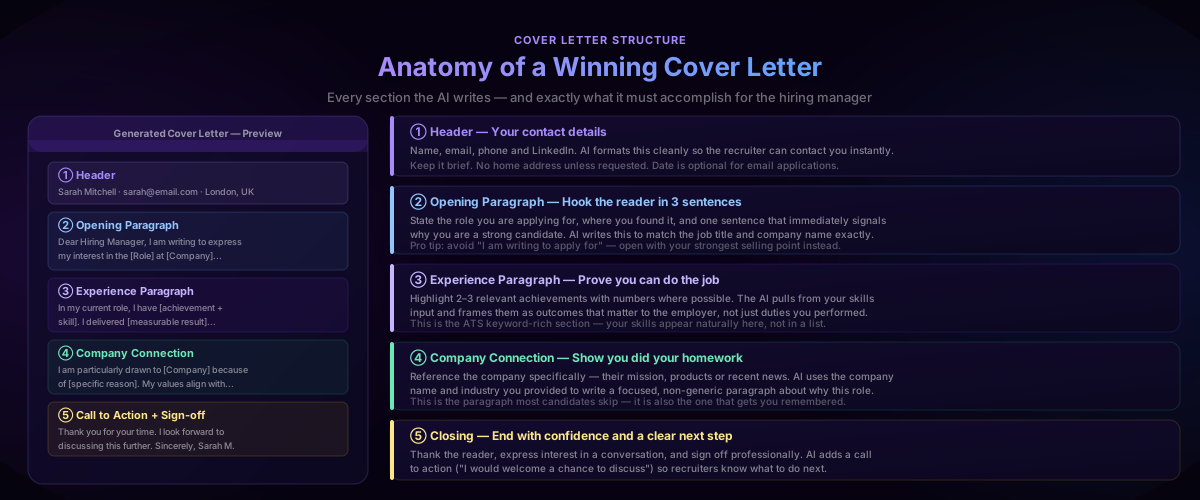
Header. Your name, email, phone number and LinkedIn URL — formatted cleanly so recruiters can contact you without hunting. The AI places this at the top in a standard format that every ATS can parse correctly.
Opening paragraph. Three sentences maximum. The first sentence states the role and company. The second signals why you are a strong candidate — your most relevant experience or achievement. The third shows enthusiasm for this specific opportunity. Avoid "I am writing to apply for" as your first words — open with your strongest point instead.
Experience paragraph. Two to three achievements with numbers where possible. The AI frames your skills as outcomes rather than duties: not "responsible for managing social media" but "grew Instagram following by 120% through a data-driven content strategy." This is also the keyword-rich section where your skills appear naturally in context for ATS.
Company connection paragraph. This is the paragraph most candidates skip and the one recruiters remember most. The AI references the company name and industry — you should add one specific detail about why this company. Even one sentence showing you know their product, mission or recent news turns a good letter into a great one.
Closing and call to action. A confident close, a clear next step, and a professional sign-off. The AI ends with an invitation to discuss further — giving the recruiter permission to reach out without any pressure.
Examples by Job Type
The same generator produces very different output depending on your inputs. Here is how to configure it and what to expect across five common job types.
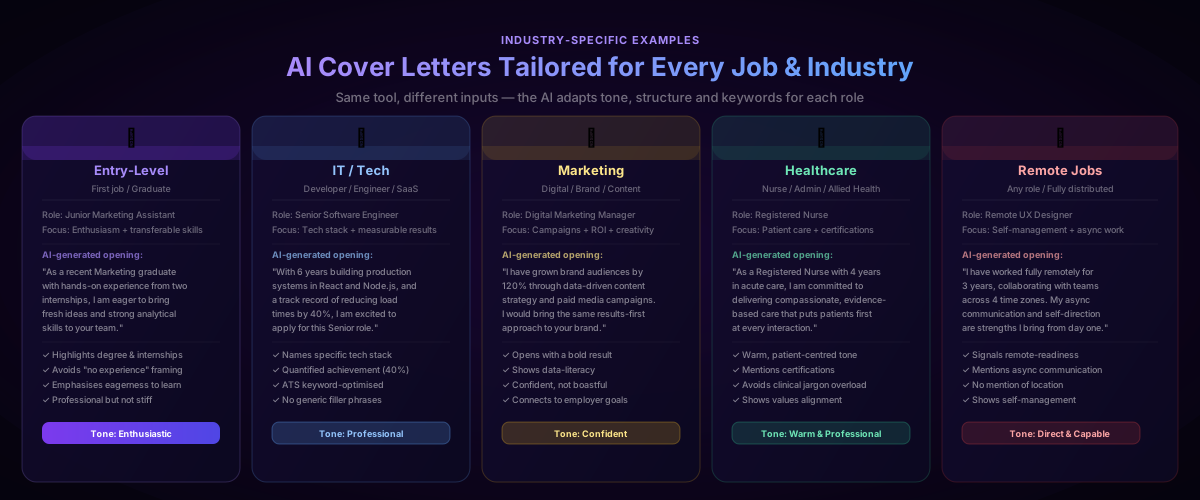
Entry-Level / Graduate
Inputs: Job Title: Junior Marketing Assistant, Industry: Marketing, Skills: social media, content creation, Google Analytics, Canva, copywriting
What the AI does differently: For entry-level roles, the AI leads with education, internships and transferable skills rather than years of experience. It frames enthusiasm as a feature, not a consolation. The tone is professional but energetic — you are eager to learn and contribute, not apologising for being new.
Key tip: Include any coursework projects, university societies or volunteer roles in your skills field. The AI will weave them in naturally and frame them as genuine experience.
IT / Technology
Inputs: Job Title: Senior Software Engineer, Industry: Technology, Skills: React, Node.js, Python, SQL, AWS, CI/CD, agile
What the AI does differently: For technical roles, the AI leads with your tech stack and quantified results. It uses technical language naturally — "production systems," "deployment pipelines," "cross-functional teams" — without oversimplifying or overexplaining. The tone is confident and precise.
Key tip: Include the specific languages and frameworks from the job listing. ATS systems in tech are highly literal — "JavaScript" and "JS" are not always treated as identical.
Marketing
Inputs: Job Title: Digital Marketing Manager, Industry: Marketing, Skills: paid media, SEO, content strategy, Google Ads, Meta Ads, analytics, brand management
What the AI does differently: Marketing cover letters need to sell. The AI opens with a result — a growth figure, a campaign outcome — rather than a description of duties. It matches the confident, creative tone expected in marketing while keeping the structure professional.
Key tip: Add a specific campaign metric if you have one: "grew organic traffic by 85%," "reduced CPL by 30%." The AI will place it prominently.
Healthcare
Inputs: Job Title: Registered Nurse, Industry: Healthcare, Skills: patient care, acute care, medication administration, EHR systems, ACLS certified, team collaboration
What the AI does differently: Healthcare cover letters require warmth alongside professionalism. The AI adopts a patient-centred tone, emphasises compassion and evidence-based practice, and includes relevant certifications naturally. It avoids jargon overload while still sounding credibly clinical.
Key tip: Include any specific certifications (ACLS, BLS, CCRN) in your skills field — recruiters and ATS systems look for these exact terms.
Remote Jobs
Inputs: Job Title: Remote UX Designer, Industry: Technology, Skills: Figma, user research, prototyping, async communication, self-management, Notion, Slack
What the AI does differently: For remote roles, the AI signals remote-readiness explicitly — mentioning async communication, self-direction and experience working across time zones. It avoids any mention of location. The tone is capable and independent.
Key tip: Include tools that signal remote fluency: Notion, Slack, Loom, Asana, Linear. These are positive signals to remote-first employers.
How AI Makes Your Letter ATS-Proof
75% of job applications are rejected by Applicant Tracking Systems before a human ever reads them. ATS software scans your cover letter and CV for specific signals — and most manually written letters miss several of them.
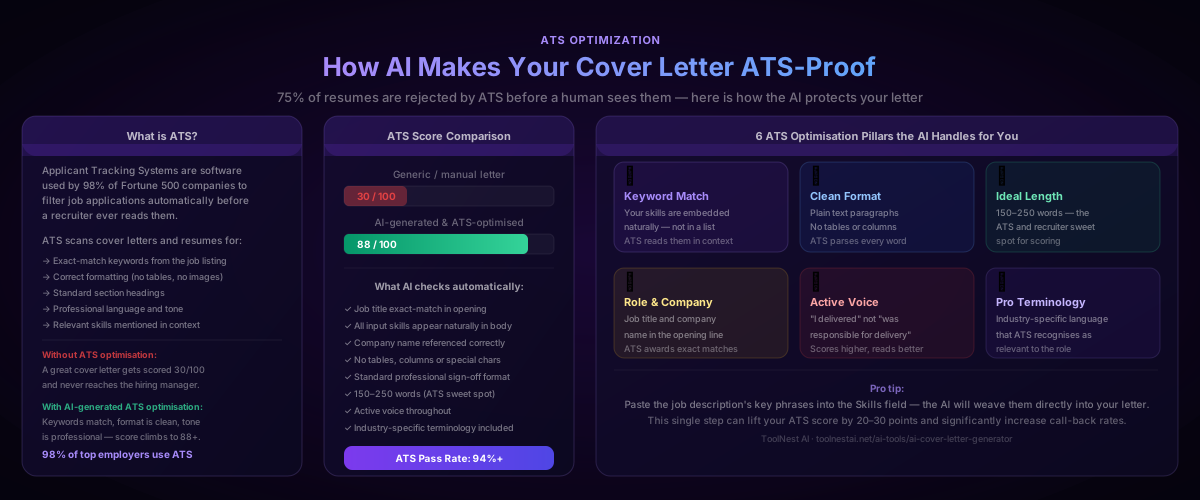
Here is what the AI optimises automatically:
Keyword matching. The skills you enter are embedded throughout the body of the letter — not in a list at the bottom, but woven into sentences in a way that ATS systems and recruiters both respond to positively.
Exact job title match. The AI uses the job title you provide in the opening paragraph. ATS systems award points for exact matches between the application and the posting.
Clean plain-text format. The letter is written as simple paragraphs — no tables, columns, headers or graphics that confuse ATS parsers. Every word is readable.
Optimal length. The AI targets 150–250 words — the length that ATS systems score highest and that recruiters can read in under 30 seconds. Long enough to cover the essentials, short enough to respect the reader's time.
Active voice. "I delivered" scores higher than "was responsible for delivering" in both ATS algorithms and human reading comprehension. The AI defaults to active voice throughout.
Professional terminology. The industry you select shapes the language the AI uses — terms that ATS systems in that field are trained to recognise as relevant signals.
AI Generator vs Writing It Yourself vs Hiring a Writer
| Factor | ToolNest AI (Free) | Writing It Yourself | Professional CV Writer |
|---|---|---|---|
| Speed | Under 60 seconds | 30–90 minutes per letter | 24–72 hours turnaround |
| Cost | 100% free | Your time only | £100–£500+ |
| ATS optimisation | Built-in, automatic | Only if you know how | Usually included |
| Personalisation | Keyword-guided | Fully personal | Research-based |
| Volume | Unlimited — one per job | Time-limited | Usually per letter |
| Quality floor | High and consistent | Varies by energy level | High — professional output |
| Best for | Every application, every day | Rare high-stakes roles | Senior executive roles |
For most job seekers, the right workflow is: use the AI generator for every application, add one personal sentence about the company, and spend the time you saved researching the company and preparing for interviews.
Common Mistakes to Avoid
Starting with "I am writing to apply for." This is the most common and most forgettable opening line in cover letter history. Open with your strongest point — an achievement, a relevant skill, a direct statement of why you want this role.
Using the same letter for every job. A generic letter is immediately obvious to any experienced recruiter. The AI makes it easy to generate a new, tailored letter for every application — use it that way. Each letter should name the company and reflect the specific role.
Writing more than one page. Cover letters longer than 400 words rarely get fully read. The AI targets 150–250 words — enough to make a compelling case, short enough to be read in the 30 seconds a recruiter has.
Repeating your CV. A cover letter that lists the same experiences as your CV adds nothing. Use the letter to explain the why — why you want this job, why your experience is relevant, why you are a strong cultural fit.
Skipping the company connection. The sentence "I am drawn to [Company] because..." is where most candidates fail and where the AI gives you a foundation to build on. Add one specific detail about the company. It signals effort and genuine interest.
Not matching ATS keywords. If the job listing says "stakeholder management" and your letter says "working with clients," the ATS may not connect them. Use the exact phrases from the job description in your skills input.
Sending without proofreading. The AI produces clean, professional output — but always read through before sending. Check that the company name, job title and your name are all correct.
Pros and Cons
Pros
- Instant results — a complete, professional cover letter in under 60 seconds
- ATS-optimised automatically — keywords embedded, format clean, length ideal
- Fully personalised — every letter reflects your name, skills, role and company
- Works for any industry — tech, healthcare, marketing, finance, creative, remote and more
- Unlimited letters — generate a new tailored letter for every application at no cost
- Completely free — no account, no subscription, no credit card
- One-click copy — paste directly into your application without reformatting
Cons
- Requires good inputs — the more specific your skills and job title, the better the output
- Company research is still yours to do — the AI cannot look up the company; you need to add specific company details yourself
- Not a substitute for a great CV — a cover letter opens the door; your CV still needs to back it up
- May need tone adjustment — for very creative industries (copywriting, advertising, game design), the AI output may need a more distinctive voice
Frequently Asked Questions
What is an AI cover letter generator?
An AI cover letter generator is a tool that creates a personalised, professional cover letter based on your personal details, the job you are applying for, the company name and your key skills. Unlike a template, it writes original content tailored to the specific role — including ATS keyword optimisation, structured paragraphs and a professional sign-off.
Is ToolNest AI's cover letter generator free?
Yes. ToolNest AI's AI Cover Letter Generator is 100% free. There is no account required, no subscription and no limit on how many letters you can generate. You can create a new tailored cover letter for every job application at no cost.
How do I make my AI-generated cover letter stand out?
The AI produces a strong, professional foundation. To make it truly stand out, add one sentence about the specific company — a product you admire, a value that resonates, or a recent achievement you read about. This single addition transforms a good letter into a personalised one that signals genuine interest.
Will the AI cover letter pass ATS screening?
Yes. The AI optimises for ATS compatibility by embedding your skills naturally throughout the body text, using the exact job title you provide, writing in plain paragraph format (no tables or columns), and targeting the 150–250 word length that ATS systems score highest. For maximum ATS match, use the exact skill phrases from the job listing in your input.
Can I use one AI-generated letter for multiple jobs?
You can, but you should not. The AI makes it fast and free to generate a new letter for every application — one per job is the right approach. Each letter should name the company and reflect the specific role. Generic letters are immediately obvious to experienced recruiters and score lower with ATS systems.
What information do I need to generate a cover letter?
You need your full name, email, phone number, the job title you are applying for, the company name, the industry, and a list of relevant skills. A LinkedIn URL is optional but recommended. The whole process takes under two minutes.
How long should a cover letter be?
150–250 words is the optimal range for most roles. This is long enough to cover your opening, one achievement paragraph, a company connection and a close — and short enough to be read in the 30 seconds a recruiter typically spends on a first read. The AI targets this range automatically, and the word count is shown in the output panel.
Can I edit the generated cover letter?
Yes. The generated letter appears in an editable output panel. You can copy it and paste it into any document editor to personalise further. Adding a specific company detail, adjusting the tone, or including a recent achievement from your experience are all easy edits that take less than five minutes and significantly improve the final result.
About the author
ToolNest AI Team
The ToolNest AI editorial team covers AI tools, productivity, and the future of online work.
Related Articles
AI Business Name Generator: Find the Perfect Brand Name in Seconds (2026 Guide)
Use a free AI business name generator to find unique, brandable names for your startup, eCommerce store, SaaS or agency. Step-by-step guide, naming tips, domain check, common mistakes and 8 expert FAQs.
AI Product Description Generator: Write Product Descriptions That Sell (2026 Guide)
Learn how to use a free AI product description generator to write SEO-optimised product copy for Shopify, Amazon, Etsy and WooCommerce in seconds. Step-by-step guide, platform examples, best practices and 8 expert FAQs.